Dension Ice Link & the Ipod!

sharp4runr said:

Yes the Dension does display text, but apparently there is a bug that it only shows the first song's title.

I have the 2005 JBL single disc CD, and it displays and changes the song title 75% of the time. It sometimes doesn't change, but I can force it to update by toggling the random/shuffle button.

It's the artist name (shown as the disc name) that doesn't change for me. That is what remains set to the first song played. Toggling random/shuffle doesn't get it to update, but switching to FM/AM/CD and back to CD1 seems to.
 
Thanks j0mama for the Dension .... installed it in 1 hours and it works .... it just sometimes the Disc Title / Artist display is mess up ... other than that it great...

now i need to get rid the iTrip LCD (for sale for $30 shipped) and my cheap FM Transmitter (FREE, just pay s/h)
 
1
 

Attachments

  • 100_0002.jpg
    100_0002.jpg
    52 KB · Views: 442
100_0004.jpg

100_0005.jpg

100_0013.jpg

100_0014.jpg

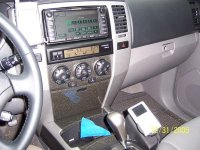
^^^^^ Dension Dock with KUDA Mounting ^^^^^
100_0006.jpg

^^^^^ how can i make the repeat mode OFF for default setting ^^^^^
100_0008.jpg

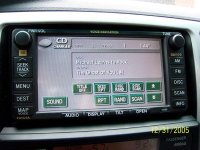
^^^^^ Title messed up after i turn the car off and on again, it works again after i change the "Disc". Also, i can't change the track too fast otherwise the title messed up ^^^^^

today, the headunit FREEZE for some reason. i have to turn the car off.

So, for now i just use the iPod UI ... instead the NAV Control
 
Last edited:
YSutarko said:

how can i make the repeat mode OFF for default setting

...i can't change the track too fast otherwise the title messed up


The way I did it for mine was to manually set the Ipod to repeat all. You could turn your to "off" from the ipod before you connect it next.

Mine has the 2 second delay from the +/- setting. A pain in the a**, but I tried the 1-6 setting from the denison settings and it went all goofy.
 
Is it possible to directly connect another device like a SIRIUS to my stereo if I have an Ice Link installed? Thanks!
 
YSutarko said:
the Songs Info are BIG ... but the Dension menu are very small

Weird -- i need to poke around in the dension menu or something... my song info is as big as the font on the 'ok to disconnect'.

thanks
 
ToyotaDan said:
Weird -- i need to poke around in the dension menu or something... my song info is as big as the font on the 'ok to disconnect'.

thanks

let me know if you find something .... i don't like the big font

my iPod is 20GB iPod Photo
 
Just installed this thing in my 04 4Runner with the 10 speaker single disc JBL. First thing is that it was simple to install per the instructions previously posted. It sounds great.

My problem is that it is buggy as hell. I can only access the Dension menu some of the time. The stereo won't always "change disk" when I push the 3 or 4 button that supposedly does this function. When I do see the Dension menu and try to use the controls to access the ipod ui or whatever it will mostly just change the song I'm listening to then when I try to go back to disk 6 aka dension menu the playlist restarts. It's really frustrating because it sounds so good.

Hopefully they will have a nice firmware upgrade soon because it was a lot of money to pay for something this buggy.

Anyone else experiencing any of these problems?
 
NoleRx said:

The stereo won't always "change disk" when I push the 3 or 4 button that supposedly does this function.

I had the same problems at first but I've decided to just work with it instead of making it work the way I wanted it to.
I know you have the single disk so yours may function a little differently than mine but try this:

*Check your Denison settings and set it to +/- ; it acts really buggy for me in the 1-6 direct setting.

*Change "disks" from the steering wheel controls or the far right button on the radio.

*Take your instruction card with you when you're accessing the Denison menu for the first time. Navigating the menu the first few times is hard because of the goofy, backwards setup of the inputs.

*Most importantly--give the Denison menu up to 10 seconds to "load" after you go to disk 6 and go slow when changing playlists or tracks.. There's already a 2 second delay to get to the Denison menu with the +/- menu, and add up to 5 more seconds to access it. It might seem like it takes forever to load, but it will get there.


molocono: I don't know which radio you have, and I'm probably wrong, but I don't think it's possible to hook everything in if you've got a 6 disk changer, an Ipod and you're planning on adding a satelite radio.
 
Last edited:
Thanks for your help earlier. :)

I'm not really happy with the kuda, though.

I got it about where I want it but the Ipod seems too low and out of reach for me. I might mount something else on the kuda, but in the meantime I'm going to put a proclip on the vent.

I didn't really want to block the vent or have it so high but playing with it changed my mind. I kind of like the Ipod close to line of sight when I'm directly accessing it. I'd hate to sit through a red light 'cuz I'm goofing around looking at the passenger footwell.
 
Can anyone start the runner, then plug in the ipod?

Mine seems to prefer plug in nano, start truck.

Also, I can't access the disc 6 menu...arg!


Stats:
4gb nano w/ i120 toyota ice link plus; 03 ltd v6 w/6disc in dash changer, no nav.


J
 
jacal said:
Can anyone start the runner, then plug in the ipod?

I usually have the ipod plugged in first, but yes, I have done it the other way a number of times.

It gets kinda flakey sometimes, but I can have the runner runnin' with the radio off, plug in the ipod and wait for the startup before turning the radio on. About half the time, I can get it to work directly from the ipod main interface, the other half it works from the radio controls.
 
I have had success now both ways (ipod in, then start; vs. start, then ipod in).

I have hidden the mount, so I can't see the ipod screen...I did not realize that the disc 6 is only viewable on the ipod!!! I wish that was made clear.

New discovery: I have had the ipod fail to recognize more then 50% of the time. This morning, when it failed, I decided to "Crank" the already running engine. That seemed to work, so it will require further testing.

Given #1) flaky to recognize and #2) can't see disc 6 menu on HU I really need to decide if I want to keep this unit. Too bad I mounted it with 4 screws and 1 large hole for the cable already. I got the cradle, eventhough the nano should get the cable.


J
 
iPod2Car Adapter for SALE!!!

bearly used iPod2car unit for a Toyota 4Runner, i bought the unit brand new and installed it in my 2006 Toyota 4Runner with Navigation. Turns out that the unit is not compatibale with my vehicle so now i am trying to get rid of it, my loss is your gain. it comes with the appropriate harness (PXHTY3) for toyotas and all instruction manuals. the dip switches have been set to the correct settings. i heard good things about this unit for the 2005 and lower 4Runners. im asking $125 obo plus shipping. send me an email [email protected] with questions
 

Members online

Forum statistics

Threads
278,312
Messages
3,554,089
Members
248,016
Latest member
Advally Service

Trending content

Back
Top