
You are using an out of date browser. It may not display this or other websites correctly.
You should upgrade or use an alternative browser.
You should upgrade or use an alternative browser.
Double din head unit Android
- Thread starter Mr.X.
- Start date
Register to hide this ad

JWaldz
Moderator
I am looking to install an android unit in my 02 limited. Curious what options do we have for these cars in terms of size, fitment etc..
Anyone installed a double din android unit recently please share!
:thanks:
If you go to crutchfield.com and input your car it will show you everything that fits in the space. Then you can narrow down your search to what your wanting to see what's available. It will fit most double din radios, but not all.
There are plenty of people here with double-din radios.
Good luck!

gamefreakgc
Elite Member
Anything measured for a double din slot will fit just fine. However, if you still have the stock radio in there, be ready to do some wiring or at the very least, buy a harness adapter.

Coward
New member
My advice on double DIN touch screen units. Touch screen for preset buttons SUCK. Look for one with actual buttons around the screen. Glancing at the screen is a bit distracting. And on my Sony unit, if you hit somewhere other than a preset "button" area the screen maximizes the station you are on so the buttons are gone. very frustrating. Oh you will always wish you have a volume knob. I have had it both ways and buttons for volume are stupid.
On that note for all you CAD and 3D printer experts. Please design a new center stack that moves the radio to the top, the vents in the middle, and the HVAC controls to the bottom! I have only seen one attempt at it and it looked terrible.
On that note for all you CAD and 3D printer experts. Please design a new center stack that moves the radio to the top, the vents in the middle, and the HVAC controls to the bottom! I have only seen one attempt at it and it looked terrible.
mysunroofworks
Member
http://www.toyota-4runner.org/3rd-g...ur-3rd-gen-today-post2703632.html#post2703632
http://www.toyota-4runner.org/3rd-g...din-input-sought-post2851529.html#post2851529
Both links are posts from my stereo. Love my Carjoying unit. Still have to trim the surround a bit, but it fit without much of a problem.
http://www.toyota-4runner.org/3rd-g...din-input-sought-post2851529.html#post2851529
Both links are posts from my stereo. Love my Carjoying unit. Still have to trim the surround a bit, but it fit without much of a problem.

Denis_Ruso
New member
On that note for all you CAD and 3D printer experts. Please design a new center stack that moves the radio to the top, the vents in the middle, and the HVAC controls to the bottom! I have only seen one attempt at it and it looked terrible.
Uhm, I would love to see this conversion! I hate having my GPS directions that low!

infantry503
New member
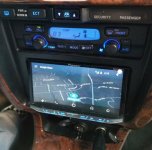
I'm going to directly go against what [MENTION=84796]Coward[/MENTION] said. I have a double din pioneer avh 4100 and it is amazing. I don't need to worry about fumbling with buttons or knobs because it come with a handy remote that operates whatever I need it to operate. Don't get hung up on small details when selecting a head unit. The cheap ones are crap and the more expensive ones are amazing.
Attachments

SilverRidgeRunner1
Member
Ummm u have my attention .... So how do u get google maps on the unit and is it tough to doI'm going to directly go against what [MENTION=84796]Coward[/MENTION] said. I have a double din pioneer avh 4100 and it is amazing. I don't need to worry about fumbling with buttons or knobs because it come with a handy remote that operates whatever I need it to operate. Don't get hung up on small details when selecting a head unit. The cheap ones are crap and the more expensive ones are amazing.
infantry503
New member
Ummm u have my attention .... So how do u get google maps on the unit and is it tough to do
It is literally the easiest thing to do. When purchasing your android auto compatible head unit make sure you have the "interface" adaptor..... I literally used a cor I bought off amazon that is USB and HDMI to one port so I can have the option to hook up HDMI compatible devices to my head unit. Then you download android auto on your phone, plug your phone into it, and voila. there is an on screen little button on the upper right hand of the screen that you can press, say navigate to or call/text whoever and it will happen. Complete hands free and I have had zero issues with anything on it.

theesotericone
New member
OP
Are you asking about an Android head unit or a unit that uses Android Auto. They are two very different units.
Android Auto's come a long way but it won't completely mirror your phone unless you already have, or want, root. An Android head unit will act just like a phone. You can DL all the apps you want and it operates separately from your phone.
As far as buttons go, I prefer to have a manual volume knob. They are going the way of the dodo though. It won't be long before all double dins are touch only.
Are you asking about an Android head unit or a unit that uses Android Auto. They are two very different units.
Android Auto's come a long way but it won't completely mirror your phone unless you already have, or want, root. An Android head unit will act just like a phone. You can DL all the apps you want and it operates separately from your phone.
As far as buttons go, I prefer to have a manual volume knob. They are going the way of the dodo though. It won't be long before all double dins are touch only.

marcus clarkus
New member
I'm running Android Auto on the Pioneer AVH-4200NEX and it's awesome. The voice controls are great:
e.g.
"Ok google, navigate home" (my home and work addresses are presaved in Google maps)
"Ok google, search for chick-fil-a"
"Ok google, text Monica 'I'm going to be late I'm working on my car'"
"Ok google, translate 'The boy eats tomato sauce' to Italian" (no joke, it can do this)
All my Spotify music is available through it (unfortunately, the voice controls don't work for that). I wired up a back up camera too which is nice since I parallel park on the street every night, and the faceplate is removable so I remove it so it's less tempting for thieves. There's an SD card slot too, so once I get a dashcam if I ever need to view the video I can just stick the SD card in the head unit and watch the videos on the 7" screen.
I definitely recommend getting a head unit that tilts (like in the picture infantry503 posted) -- if it doesn't tilt, it will be very hard to see anything on the screen.
There's some guy out there that did this and made a custom fiberglass cover. It looked kinda strange though -- our center stacks are shallow at the top and deeper at the bottom where the stereo goes, so he had to design it so the stereo stuck out farther.
EDIT: found the picture, it's actually looks better than I remember. still way too much work though

e.g.
"Ok google, navigate home" (my home and work addresses are presaved in Google maps)
"Ok google, search for chick-fil-a"
"Ok google, text Monica 'I'm going to be late I'm working on my car'"
"Ok google, translate 'The boy eats tomato sauce' to Italian" (no joke, it can do this)
All my Spotify music is available through it (unfortunately, the voice controls don't work for that). I wired up a back up camera too which is nice since I parallel park on the street every night, and the faceplate is removable so I remove it so it's less tempting for thieves. There's an SD card slot too, so once I get a dashcam if I ever need to view the video I can just stick the SD card in the head unit and watch the videos on the 7" screen.
I definitely recommend getting a head unit that tilts (like in the picture infantry503 posted) -- if it doesn't tilt, it will be very hard to see anything on the screen.
On that note for all you CAD and 3D printer experts. Please design a new center stack that moves the radio to the top, the vents in the middle, and the HVAC controls to the bottom! I have only seen one attempt at it and it looked terrible.
There's some guy out there that did this and made a custom fiberglass cover. It looked kinda strange though -- our center stacks are shallow at the top and deeper at the bottom where the stereo goes, so he had to design it so the stereo stuck out farther.
EDIT: found the picture, it's actually looks better than I remember. still way too much work though
Last edited:

jkeith.w
Official Vendor
There's some guy out there that did this and made a custom fiberglass cover. It looked kinda strange though -- our center stacks are shallow at the top and deeper at the bottom where the stereo goes, so he had to design it so the stereo stuck out farther.
EDIT: found the picture, it's actually looks better than I remember. still way too much work though
I just threw up a little.
SilverRidgeRunner1
Member
It is literally the easiest thing to do. When purchasing your android auto compatible head unit make sure you have the "interface" adaptor..... I literally used a cor I bought off amazon that is USB and HDMI to one port so I can have the option to hook up HDMI compatible devices to my head unit. Then you download android auto on your phone, plug your phone into it, and voila. there is an on screen little button on the upper right hand of the screen that you can press, say navigate to or call/text whoever and it will happen. Complete hands free and I have had zero issues with anything on it.
I guess Its time to go shopping now
 any brands u stick with
infantry503
New member
I guess Its time to go shopping now
I'm strictly Alpine or Pioneer. I chose the Pioneer this time and got it so the buttons are on the bottom so it didn't take away screen size.
gamefreakgc
Elite Member
I'm strictly Alpine or Pioneer. I chose the Pioneer this time and got it so the buttons are on the bottom so it didn't take away screen size.
I second that. When it comes to head units, those companies are solid and usually have good interfaces & good button placement.

ltsr
New member
My advice on double DIN touch screen units. Touch screen for preset buttons SUCK. Look for one with actual buttons around the screen. Glancing at the screen is a bit distracting. And on my Sony unit, if you hit somewhere other than a preset "button" area the screen maximizes the station you are on so the buttons are gone. very frustrating. Oh you will always wish you have a volume knob. I have had it both ways and buttons for volume are stupid.
On that note for all you CAD and 3D printer experts. Please design a new center stack that moves the radio to the top, the vents in the middle, and the HVAC controls to the bottom! I have only seen one attempt at it and it looked terrible.
You hit all of the same points I don't like on double din touch screens. I actually spent a lot of time last week looking for a better replacement to my AVIC 5100nex. I don't want to spend another few hundred to replace this equally expensive headunit. I have backup camera integration that I don't want to lose, so a single dins are most likely out of the running.
I've seen people relocate the 3rd gen center stack but all solutions i've found i'm not fond of.
AntleredRuin
New member
Guys, be glad the head unit is lower.
It means you can watch videos while driving and the unit is out of sight of passing cops :behindsofa:
In all seriousness, I'd love a real Android (not auto) single DIN with a motorized flip out screen
It means you can watch videos while driving and the unit is out of sight of passing cops :behindsofa:
In all seriousness, I'd love a real Android (not auto) single DIN with a motorized flip out screen
Last edited:
http://www.toyota-4runner.org/3rd-g...ur-3rd-gen-today-post2703632.html#post2703632
http://www.toyota-4runner.org/3rd-g...din-input-sought-post2851529.html#post2851529
Both links are posts from my stereo. Love my Carjoying unit. Still have to trim the surround a bit, but it fit without much of a problem.
I'm going to directly go against what [MENTION=84796]Coward[/MENTION] said. I have a double din pioneer avh 4100 and it is amazing. I don't need to worry about fumbling with buttons or knobs because it come with a handy remote that operates whatever I need it to operate. Don't get hung up on small details when selecting a head unit. The cheap ones are crap and the more expensive ones are amazing.
Thanks for the replies. This really helping me out with my fitment worries.
Infantry53, did you have to do any trimming to have it poke through the opening or it was fine?
I looked into Android Auto units and was dissapointed in the fact that the phone becomes useless when connected, also current apps and features are not very liberal. I intend on having no hassle no wires kinda setup and I have ordered a magnetic mount with wireless charging for my phone, with android auto you have to have a wired connection to the phone, which is a drawback for me, as I hate having wires lying around
I like Android because of customizability, which android auto kinda takes away. So I am opting for a full on Android unit that can support SIM card, which is a must with these units IMO. Not much options with this criteria but I have zero'd in on this one:
https://www.gearbest.com/car-dvd-player/pp_652184.html
there's also an older version with the volume and knobs if anyone is interested, it's slower though, and has the screen recessed which I assume would block the top portion due to viewing angle in our cars:
https://www.gearbest.com/car-dvd-player/pp_606353.html
I would love a unit similar to the Pioneer AVH posted above that supports full android and SIM with the tilted screen, but so far I haven't been able to find one..
The size for these units is shown 178mm X 100mm which I think is similar to infantry53's and mysunroofworks', I think, not quite sure though. Either way seems like a little bit of trimming would do the trick.. I looked on Crutchfield and they do show a universal double DIN mounting bracket for our cars but I am not sure if this is needed for installation
Last edited:
It is literally the easiest thing to do. When purchasing your android auto compatible head unit make sure you have the "interface" adaptor..... I literally used a cor I bought off amazon that is USB and HDMI to one port so I can have the option to hook up HDMI compatible devices to my head unit. Then you download android auto on your phone, plug your phone into it, and voila. there is an on screen little button on the upper right hand of the screen that you can press, say navigate to or call/text whoever and it will happen. Complete hands free and I have had zero issues with anything on it.
Isn't Google Maps a Native app on Android Auto? What is the reason for the additional interface (I am not even sure what that is or does)
Ps, what kind of LED's are you using for the instrument panel? That's an awesome color!
Last edited:
Similar threads
- Replies
- 4
- Views
- 3K

