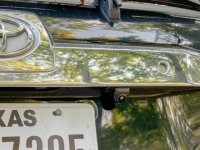
Front camera on a 4th gen?

importman

New member
Hey Guys, I did a fairly exhaustive search on this but only came up with options for a 5th gen. Can anybody point me in the direction of a kit, or a writeup on adding a front camera to a 4th gen. I have a backup camera and if I recall correctly my Sony head unit only had one input for a camera. I'd really like to add the front camera but I'm a little nervous about trying in on my own. Don't want to damage the head unit or anything. Thank in advance for any ideas.
 
Register to hide this ad
Hey Guys, I did a fairly exhaustive search on this but only came up with options for a 5th gen. Can anybody point me in the direction of a kit, or a writeup on adding a front camera to a 4th gen. I have a backup camera and if I recall correctly my Sony head unit only had one input for a camera. I'd really like to add the front camera but I'm a little nervous about trying in on my own. Don't want to damage the head unit or anything. Thank in advance for any ideas.

First thing is to confirm that your head unit only has one input. If so, that's probably a nonstarter unless some kind of splitter type deal can be bought or made. If it has two inputs, it should be pretty simple to do following any of the backup cam writeups on the forum (mine is linked in my sig). You're just going to the other end of the truck. ;-)

I haven't look into these that much but one thing that comes to mind is what turns the front camera on? Is it only through the head unit, or can you have an on-demand switch? Questions better minds than mine will need to answer.
 
First question I have is what are your expectations for this application? What's the intended use?

Just from previous experience.. any aftermarket camera setup is kind of worthless compared to a factory setup.. it's cool to be able to see stuff, but depending on the viewing angle and position of the camera it's hard to rely on to, for instance, back up or pull up right up against something.

If you only have 1 camera input, that means you won't be able to set independent guide-lines on the screen overlay, which means you'd be relying on the look and feel for distance vs where you bumper actually is.


With that out of the way, nothing is impossible.. I'm not electric engineer, but even with a single camera input it's possible to feed in more than 1 camera. You can either wire all this stuff yourself, or just buy a dedicated chinese camera splitter from amazon (something like this Amazon.com: Anytime Backup Camera, Video Switcher, Intelligent Multi-Function 4-Way Video Switcher (4 in, 1 Out) for Cars, Trucks, RVs : Electronics)

That may be overkill for what you need... ultimately the way the headunit/backup camera works is when you throw your car in reverse, a voltage signal is sent to power on the camera, once it's powered on, the signal from the camera triggers the headunit to overlay the camera feed.

This means that really all you have to do in order to have any of the cameras show up on your screen is power them on to have the signal sent. The complication with a single input is that you need to make sure you're only powering 1 camera at a time. More than likely what you'll want is an on-demand switch to kick on the front camera, which also simultaneously cuts off the power (or signal) circuit from the rear camera (meaning that even if you're in reverse and your rear camera is automatically on, hitting the button will kill that power and switch it over to the front camera).

I'm pretty sure all of this can be done via a simple toggle switch and relay setup, but a diagram is not something I can readily provide.. now that I got to the bottom of typing all this out I'm thinking maybe that controller/splitter I linked maybe the best option if your wiring knowledge is limited..

 
I have a front camera using a kenwood excelon head unit and its absolutely useless. Don't waste your time. The lighting is horrible, the sunsets don't work, and night wheeling is a no go.

I can't see any reason to ever put one on again. I'm using a kenwood camera front and rear and kenwood dash cam. The dash cam and rear camera are great. Front useless after having it on the truck for 2 years.
 
^ Great feedback from someone actually using one. Kind of confirms the reason I never decided to run a front camera (especially a non-factory one)
 
My aftermarket backup cam setup has two inputs. I added a camera to the front for plow attaching, it goes on with a toggle switch. Only issue on my setup is that the front camera is a mirror image of what it should be. Some units can flip the image but I don't see the option on mine. Left is right and right is left confusing. :D
 
Mikein,
I have the same issue with my front camera. It is mirrored and both Kenwood and crutchfield could not help me. The irony is the kenwood head unit recommended the kenwood cam!

I am thinking of putting the front cam under the truck facing back at my front diff so I can tell if I get hanged up on something.

Find some way to actually use it...
 
Mikein,
I have the same issue with my front camera. It is mirrored and both Kenwood and crutchfield could not help me. The irony is the kenwood head unit recommended the kenwood cam!

I am thinking of putting the front cam under the truck facing back at my front diff so I can tell if I get hanged up on something.

Find some way to actually use it...

Cool idea. I do see Amazon now has some cameras that you can cut a wire to make it mirror. Price is cheap enough to try for just the camera.
 
interesting thread. we are about to install a new h/u in my son's '06 and have a backup camera for it, but the unit has the capability of running a front camera. was wondering what peopl were doing to activate it.

my wife's caddy has a front camera that is activated by proximity, but obviously the '06 does not have that.
 
interesting thread. we are about to install a new h/u in my son's '06 and have a backup camera for it, but the unit has the capability of running a front camera. was wondering what peopl were doing to activate it.

my wife's caddy has a front camera that is activated by proximity, but obviously the '06 does not have that.

What head unit does he have? Any update on adding a front cam?
 
What head unit does he have? Any update on adding a front cam?
We installed the Alpine iLX-W650. It is a great headunit. Does everything we needed it to....Car Play, bluetooth for phone calls, etc.

So far, we have only installed the back up camera. I'm not sure we will mess with a front camera unless I can figure a way for it to automatically turn on.
It won't be wheeled, so no need for it otherwise.
 

Attachments

  • 26.jpg
    26.jpg
    91.5 KB · Views: 810
I have a kenwood unit with multiple inputs. I ended up installing a front camera that faces down on my grill emblem. It looks like it has a little nose sticking out of it. I will definitely say it's not perfect, but I find it helpful for parking in tight spaces.

I ran wires through the hood insulation and down the strut. I was able to feed them through the existing gasket where the OEM wires enter the car. I think I put some silicone on it though to seal it.
 
Mikein,
I have the same issue with my front camera. It is mirrored and both Kenwood and crutchfield could not help me. The irony is the kenwood head unit recommended the kenwood cam!

I am thinking of putting the front cam under the truck facing back at my front diff so I can tell if I get hanged up on something.

Find some way to actually use it...

I recently saw a YouTube video of someone just cutting one of the wires that go to their camera to get it to reverse because the software didn't have the feature built in to do it. Might be worth looking into.
 

Members online

Forum statistics

Threads
278,307
Messages
3,554,048
Members
248,016
Latest member
Advally Service

Trending content

Back
Top