FYI...compass calibration

nashman69g

Member
I've been noticing in posted pics that people need to perform compass calibrations. Not sure if others care, but just felt like I would point it out. Next to the compass heading, there will be a dot in the lower left of the heading. This dot means that a calibration needs to be done. See section 3-7 pg 451 "Calibrating the compass" of the owners manual. Just FYI.

Marshall
 
Register to hide this ad
I've been noticing in posted pics that people need to perform compass calibrations. Not sure if others care, but just felt like I would point it out. Next to the compass heading, there will be a dot in the lower left of the heading. This dot means that a calibration needs to be done. See section 3-7 pg 451 "Calibrating the compass" of the owners manual. Just FYI.

Marshall

Yeah well I tried it when I first got the truck and I drove in circles for over an hour and it never changed. It also says the dot will blink and it didnt do that either so I gave up. Seeing all these pictures of eveyones dash and they all have the dot.
 
Yeah well I tried it when I first got the truck and I drove in circles for over an hour and it never changed. It also says the dot will blink and it didnt do that either so I gave up. Seeing all these pictures of eveyones dash and they all have the dot.

It took a few tries but I was able to calibrate mine.
 
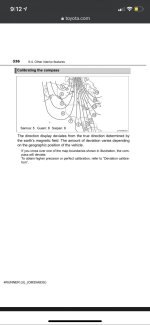
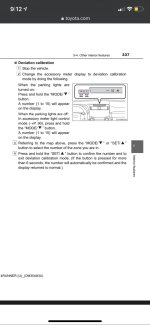
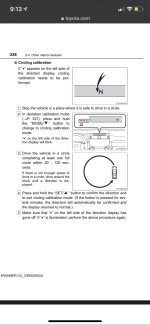
I have been meaning to calibrate my compass, but kept forgetting until this thread reminded me. My compass was set for zone 6, but looking at the zone map in the owners manual I thought it should be 7. Once the zone is changed, you have to perform a circle calibration. Hold the mode down arrow again until the dot flashes and then drive slowly around in a circle (5mph, 8kph). Mine calibrated right away (2 slow circles) and now it's finally showing proper directions. Previously it seemed to be about 45 degrees off and reporting (for exmpale) NE when I was facing E.

Rob
 
...My compass was set for zone 6, but looking at the zone map in the owners manual I thought it should be 7. Once the zone is changed, you have to perform a circle calibration. Hold the mode down arrow again until the dot flashes and then drive slowly around in a circle (5mph, 8kph). Mine calibrated right away (2 slow circles) and now it's finally showing proper directions. Previously it seemed to be about 45 degrees off and reporting (for exmpale) NE when I was facing E.

Rob

I had the same experience. I changed my zone first and then did the circle calibration (about 2 slow circles). The whole thing took about 5-10 minutes. Mine seemed to be about 45 deg off as well before I did it.
 
Calibrated mine tonight, it was a snap. Now the little dot is gone. Also had to change my compass zone, it was wrong by 4 zones.
 
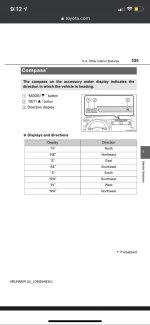
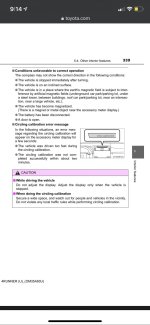
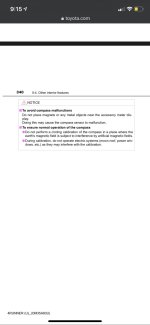
Compass Calibration - Owners Manual Instructions

Reviving/adding to a long dead thread. Here are pictures of the instructions from the owners manual for those of us that have 2015+ 4Runners but have installed 2010-2014 accessory meter displays above the radio. Since us 2015+ owners don't have these directions in our owners manuals. I have printed these out and added them to my owners manual in my glove box.
 

Attachments

  • IMG_8915.jpg
    IMG_8915.jpg
    87 KB · Views: 4,254
  • IMG_8916.jpg
    IMG_8916.jpg
    87.3 KB · Views: 4,442
  • IMG_8917.jpg
    IMG_8917.jpg
    101.5 KB · Views: 4,152
  • IMG_8918.jpg
    IMG_8918.jpg
    119.5 KB · Views: 4,266
  • IMG_8919.jpg
    IMG_8919.jpg
    127.8 KB · Views: 4,098
  • IMG_8920.jpg
    IMG_8920.jpg
    73.5 KB · Views: 4,036
Last edited:

Members online

Forum statistics

Threads
278,307
Messages
3,554,049
Members
248,016
Latest member
Advally Service

Trending content

Back
Top