GPS Signal Problems after install

4runnin

New member
I finally installed the NAV today. Thanks to everybodies posts on this forum the install went pretty smoothly.

My problem now is that I am not getting a GPS signal. I placed the antenna as far forward as I could. I mounted it right past the center speaker and a bit to the right using double sided tape.

Also, I took the antenna off the metal plate it came on since there was no room to stick it on with that plate. Has anybody had any problems with their gps signal from this location. Also, if the antenna is not flat, will there be no signal or just be inaccurate.

Any help is appreciated.
 
Register to hide this ad
4runnin said:
I finally installed the NAV today. Thanks to everybodies posts on this forum the install went pretty smoothly.

My problem now is that I am not getting a GPS signal. I placed the antenna as far forward as I could. I mounted it right past the center speaker and a bit to the right using double sided tape.

Also, I took the antenna off the metal plate it came on since there was no room to stick it on with that plate. Has anybody had any problems with their gps signal from this location. Also, if the antenna is not flat, will there be no signal or just be inaccurate.

Any help is appreciated.

Make sure that

1) You put the correct side facing up, since you took it off the metal plate, and make sure it is level

2) Also, make sure it is plugged into the HU (duh, but hey, this is troubleshooting)

3) Good chance the tape unstuck while you installed the HU and the antenna is dangling far down in the dash. I actually kept my antenna on the mounting plate and bent it so that I can use the little screw mount that is located on the ceiling of the dash, just to the left of where the HU sits...

4) Make sure you are in an open area while the NAV does it's first search. It may take a while for it to "locate" itself. Right under the little compass on the screen, you will see the letters "GPS" if you are receiving signal....

Good luck!
 
Last edited:
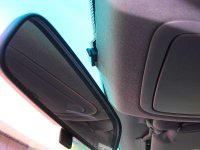
I could never get a signal when I mounted the antena under the dash, it also was always falling off the mounting point. In the directions for installation, they say to mount it behind the rear view mirror facing the silver part up towards the sky. I did this by running the wire up the passenger a-plillar and along the headliner then stuffed the antena in, halfway sticking out of the headliner where the rear view mirror is, there is a cutout in the headliner that allows the wires for the auto-dimming mirror to enter the headliner. This works out to hold the antena in place by friction. Works perfectly for me, and I hardly ever have GPS signal drop-off, and you can't see the antena either.
 
Re: Re: GPS Signal Problems after install

spyderdoc said:
Make sure that

1) You put the correct side facing up, since you took it off the metal plate, and make sure it is level.

.........The side with the silver should be facing up right?


2) Also, make sure it is plugged into the HU (duh, but hey, this is troubleshooting)

................lol...that was what I thought at first and had to rip out the dash to check, but it was plugged in .

Could there be some interference from the center speaker? The dash seems to be pretty packed in there from the speaker and insulation around that speaker.


ZOSO could you tell me how you ran the wires up the a-pillar. Is there a hole for going through to the underside of the dash on that side? Also, would you happen to have a copy of the instructions. I have emailed Troy a couple weeks ago asking for the directions, but have had no response.
 
If you take the lower and upper glove boxes out and look up into the dash, there is a dash reinforcement pipe that runs along the back of the dash. I zip tied the wire along that, keeping it out of the way of the airbag. The a-pillar snaps off after removing the assist handle that has two screws. Fish the wire up through, there are some existing plastic wire holders you can secure the wire to. Then its just a matter of stuffing the wire along the headliner to where the rear view mirror is. I started from the rear view mirror and worked my way to the NAV. It's easier to fish the plug end vs. the antena end. I'll see if I can find the directions.
 
Last edited:
Any chance you can take a picture of the installed antenna behind the mirror? I'd love to see how that looks.
 
Here you go rando....
 

Attachments

  • dscn1889_resize.jpg
    dscn1889_resize.jpg
    49.3 KB · Views: 623
I would leave the metal mounting piece on the antenna. It serves two purposes: (1) as a ground plane for the antenna (2) mounting bracket for the car the system was designed for (in my case a Solara).

I wrapped it in bubble packing (the small bubbles) and stuffed the whole assembly (antenna facing up and ground plane on the bottom) and pushed it as far as I could reach just to the left of the center speaker. Its held place by friction is nice and snug and has not moved since I put it there a year ago.

I have always gotten excellent signal with 4 to 6 sats 99 percent of the time.

GL -TM-
 
ZOSO Runner said:
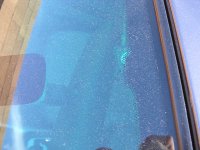
from the exterior, exuse the dirty windshield....

Thanks for posting the pics. That spot probably wouldn't work for anyone with compass mirror because the little wire cover inserts into that slot in the head liner.
 
Toy-Man said:

I have always gotten excellent signal with 4 to 6 sats 99 percent of the time.

GL -TM-

How are we supposed to tell exactly how many sats and percentage of signal.

I mounted mine as close to the natural location that the GPS antenna is installed at the factory. The OEM location is a bit more to the left of the left air vent, I just don't have access to it without pulling the instrument cluster. My install was simple, plain, and a no brainer. I attached a strip of velcro to the top of the left vent airway and then I attached a strip of velcro to the antenna (after removing from the metal plate) and then stuck the antenna onto that.

It works, didn't require all this plumbing, removal of the a pillar cover, AND is near the OEM location of the GPS antenna.

BTW, I had the original GPS antenna in my hand and there isn't a metal cover over the gold portion of the antenna.
 
ZOSO Runner, glad that you are very pleased with your (and oemvalue.com's recommended) placement of the GPS antenna, however, its not the original location and although you can't see it from inside the cabin... it wouldn't work for me as I would know it is out of place.
 
To each his own, Prozac. I'm glad your antena position is working for you, I just couldn't get mine to stay there under the dash, don't know what I was doing wrong. I am curious though, did you put the velcro over the mirror side, so that the antena is facing up to the sky? If so, does it matter if something is touching that circular mirror? I guess not, if yours if working...
 
ZOSO Runner said:
To each his own, Prozac. I'm glad your antena position is working for you, I just couldn't get mine to stay there under the dash, don't know what I was doing wrong. I am curious though, did you put the velcro over the mirror side, so that the antena is facing up to the sky? If so, does it matter if something is touching that circular mirror? I guess not, if yours if working...

Well, the way I look at it is this. The GPS antenna can receive signals through the dash and all that material.

When I removed the two screws from the square sheet of metal, the side that was facing the metal had a square foam suround with a circular cut out. Beyond the cut out, I could see this goldish mirror. I determined (via the instructions from oemvalue.com) that I wasn't to touch this portion as this was the receiving side. All I did was put the velcro on the opposite side of the receiving side (which I adhered then used a razor to cut the velcor). I put a large velcro piece on the very top of the left vent and then stuck the GPS antenna towards the the rear. It fits snug and will not move whatsoever. So the goldish mirror receiving side faces upward and I don't think it matters if dust collects there as the GPS unit can receive signals through the dash material etc. That is thick as heck! In a couple years I can easily remove the GPS antenna and blast some air on the goldish side... but even then... I wouldn't think it would be necessary.
 
Thanks for the help guys...i will be pulling the dash again tomorrow and try to move the antenna around.

Prozac - Did you pull the instrument cluster to get to the area above the vent? Is so , would this be difficult? Also, is this the left vent on the center dash (above the rear window switch). Mine is sitting to the upper right of the center speaker (right before the defroster vents) and is being held up with double sided tape. I stretched the tape across that cushion so it's not touching the recieving area. Still not getting any signal.

I'm thinking about going with ZOSO's solution since it seems like if it won't work from that position then there's something wrong with the antenna or receiver.
 
4runnin, I didn't pull the instrument cluster. FWIW, pulling the instrument cluster is not a difficult or time consumptive task. Yes, I put a large strip of velcro (the non felt side) on the vent that is above the rear window switch. Easy Easy Easy! No fishing wires through anything and it is as close to the stock location as you need be. As long as the receiving side (which is the gold plated side) is facing up... you should get a signal. BTW, I drove around for about 5 or 6 minutes before the unit pick up the signal. It also says NOT to attempt correcting your position before the GPS signal is achieved.

Note that OEMvalue.com says to drive around...
 
Thanks for the help PROZAC. I placed the antenna above the vent like you did and finally got GPS signal :D .

Now the problem I'm having is that the cursor is going backwards (as if I was driving in reverse). So when I drive it will go the opposite way and only be updated once in a while, only to go off track again. The screen always has GPS on it. Could this be a bad connection to the Speed/reverse wires? I thought if there was a GPS signal the speed/reverse wires aren't really used. Also, is there a way of checking if the speed/reverse wires are giving it's signal correctly? I can go into the maintenence menus and all.

Thanks again for all the help.
 
I would check the connection to the reverse sensor. If you used a wire tapping connection, sometimes the metal "slot" does not make contact with the wire. I had this happen with mine, and ended up carefully cutting away some of the insulation on the wire to make sure there was contact.

You can check to see if the vehicle sensors are working by accessing the diagnostic menu. The easiest way to access this is to hold the info button while turning your parking lights on and off three times. You will then get a screen with three choices, I don't remember all of them offhand, but look for one about navigation, then there is a screen with a few more choices, pick the vehicle sensor one. At this screen if you put your car in reverese (brake applied for safety) the reverse line should say "on". You can also check if the speed sensor is working at the same screen. I just went up and down my driveway, the speed should register if all is hooked up correctly.


Good Luck, I hope this helps.
 
The best connectors to use for splicing come from radio shack. They are really small, are half clear and half green and are specifically used to splice into telephone wires. You will get a snug fit and the connector is really small. It was clearly the best way to go.
 
Prozac, those are exactly the ones I used. I think they recommended them on the sienna forum. They work perfectly.

Thanks Zoso for getting me into the diagnosis mode. Looks like my reverse sensor is hooked up onto the wrong wire, since the reverse signal is always on (which explains why the cursor was always going backwards). For the time being i disconnected the reverse sensor wire. And everything is working fine. Just don't have voice navigation, but I prob won't be doing the speaker mod since I don't really use the voice all that much. I always mute it when I use the nav in my sis TL.

Weird thing is that during the day I was getting almost 100% GPS signal, but at night I got more of a 50% signal. But the speed sensor did it's job and kept at the correct spot all the time. Does anybody else have worst reception at nite? Also, which wire did you guys tap into for the reverse sensor. I tried following petegaz (sp?) direction and tapped into the red and yellow wire next to the pollen filter. I think there were two bundles of wires and both had red and yellow wires. I used the one to the left (with a little less wires). Does this sound like the correct bundle? Should I try another red and yellow wire? Also, would it matter if the battery is disconnected while I tap into the wire?
 

Members online

Forum statistics

Threads
278,308
Messages
3,554,059
Members
248,016
Latest member
Advally Service

Trending content

Back
Top