Ham radio repeater load

Register to hide this ad
I have the little brother of the d710, the TM-V71a, but I am a bit of a loss when you mentioned repeater load?

Are you referring to the electrical load (amp draw) during operation?

The repeater loads would be no different than regular operation... standby is generally very low <1 amp, and transmit amperage would be dependent on the power level.
 
Last edited:
I have the little brother of the d710, the TM-V71a, but I am a bit of a loss when you mentioned repeater load?

Are you referring to the electrical load (amp draw) during operation?

The repeater loads would be no different than regular operation... standby is generally very low <1 amp, and transmit amperage would be dependent on the power level.

What I'm referring to is that i would like to load repeaters into the memory banks and Im wondering if someone has a "load" ready. does that make sense?
 
I get it… I tried that once but it ends up becoming a mess.

There are about 1900+ records for 2meter and 70cm repeaters in CA alone on RepeaterBook… you can't fit them all even if you want to, and that's just CA.

You have 1000 memory slots available, you could probably fill that up and not have everything you actually need/want. On top of that, it’s going to be based off someone else’s needs/preferences that may not work out for you.

I don’t have a “standard load” per say, because I am actively programming my radio before trips and things like that. On top of that Kenwood does memory management different than Yaesu or other brands. Every 100 channels can be considered a set, and you can have 10 sets for a radio. 1000 channels in total.

I think understanding how they do it helps you setup the radio in a way that makes a lot more sense for your region.

For example, channels 1-100 could be Northern CA, and 101-200 could be Southern CA. You could scan a set without having to roll though an extra 900 stations that are not useful for where you are at the time.

When I am in town, I have a “set” that I use 99% of the time, but off-road in my normal stomping grounds, there is another set of repeaters and stations I use. I even have some overlap/duplicates between the two sets because that’s how I wanted to organize my useful channels.

If I take a road trip to a new area, I use online and iPhone resources like RepeaterBook and program a large coverage area for where I know I will be. The iPhone version is great because you can use it based on GPS of your current location. I’ll throw all that into a new “set” and use that for that state. For example I have a set for Utah, Idaho, Wyoming when I did a Yellowstone road trip.

I know it’s not the answer you are looking for, but every time I try to take a shortcut with these types of things I ended up finding out there is no replacement for just doing it yourself since the results don’t always yield something as useful your individual needs.
 
Last edited:
Actually that's really helpful.. thank you for the info. I just ned to spend time fiddling with it i guess. I thought I would set it and forget it.. I mainly use it when off road... Was gong to restructure them to my needs.
 
Your thread was in the General Discussion section.

The General Discussion section description is "General category concerning all generations of the 4Runner"

The Off Topic section description is "Discuss things of interest, not necessarily related to the T4R."

Neither description is "vague" to the point a ham radio could be considered a 4Runner.
 
I get it… I tried that once but it ends up becoming a mess.

There are about 1900+ records for 2meter and 70cm repeaters in CA alone on RepeaterBook… you can't fit them all even if you want to, and that's just CA.

You have 1000 memory slots available, you could probably fill that up and not have everything you actually need/want. On top of that, it’s going to be based off someone else’s needs/preferences that may not work out for you.

I don’t have a “standard load” per say, because I am actively programming my radio before trips and things like that. On top of that Kenwood does memory management different than Yaesu or other brands. Every 100 channels can be considered a set, and you can have 10 sets for a radio. 1000 channels in total.

I think understanding how they do it helps you setup the radio in a way that makes a lot more sense for your region.

For example, channels 1-100 could be Northern CA, and 101-200 could be Southern CA. You could scan a set without having to roll though an extra 900 stations that are not useful for where you are at the time.

When I am in town, I have a “set” that I use 99% of the time, but off-road in my normal stomping grounds, there is another set of repeaters and stations I use. I even have some overlap/duplicates between the two sets because that’s how I wanted to organize my useful channels.

If I take a road trip to a new area, I use online and iPhone resources like RepeaterBook and program a large coverage area for where I know I will be. The iPhone version is great because you can use it based on GPS of your current location. I’ll throw all that into a new “set” and use that for that state. For example I have a set for Utah, Idaho, Wyoming when I did a Yellowstone road trip.

I know it’s not the answer you are looking for, but every time I try to take a shortcut with these types of things I ended up finding out there is no replacement for just doing it yourself since the results don’t always yield something as useful your individual needs.
Thanks for this post! It was helpful to read how you approach programming the repeaters. I have the same transceiver and, admittedly, have been reluctant to attack programming it. I figure I can step it up a bit from just printing out a page of repeaters and stuffing the page in my map pocket before a trip! Do you prefer to use CHIRP?
 
Thanks for this post! It was helpful to read how you approach programming the repeaters. I have the same transceiver and, admittedly, have been reluctant to attack programming it. I figure I can step it up a bit from just printing out a page of repeaters and stuffing the page in my map pocket before a trip! Do you prefer to use CHIRP?

CHIRP is OK since its free, but the s/w from RT Systems I use on my VX8-DR is
better.
 
Thanks for this post! It was helpful to read how you approach programming the repeaters. I have the same transceiver and, admittedly, have been reluctant to attack programming it. I figure I can step it up a bit from just printing out a page of repeaters and stuffing the page in my map pocket before a trip! Do you prefer to use CHIRP?

No problem, glad I was able to help.

Ill be honest, sometimes it feels like a chore or homework, especially before a big trip, but it's importation to do it, and stay relevant with your own equipment. I consider it a tool, and knowing how to use the tool is important without external aids.

Speaking from experience, I am a HUGE fan of actually knowing how to program my radio in the field, without a computer, using the front panel. I make a habit of knowing how to use my primary radios without manual, and without software. (VM-V71a, Yaesu VX-7R, and all my 2m Yaesu mobiles)

The Kenwood is amazingly intuitive to program using the front panel, and once you do it a few times its easy to throw in a couple extra repeaters while sitting in the drivers seat. Most of the time I just open iPhone repeater book while I still have cellular data, screen shot all the repeaters within 50-100 miles, then go off-road. When I have time, like when at camp, I try various stations and input/save them to memory if they pan out. That's how I build MY list and inventory of repeaters. Most everything in my radios memory I have used, or know works...

That said, for my "master list / bulk memory management" I do use a piece of software. It allows you to quickly important, organize, and move things around. Very useful when needing to update multiple radios...

I have Chirp, I also have other software I use for Yaesu and other brand radios...

BUT for my Kenwood radio, I don't use anything other than the included / free software that is available for download from Kenwood.

AMATEUR RADIO PRODUCTS SOFTWARE DOWNLOADS / KENWOOD

image02.jpg


The Kenwood software has radio specific controls and its the best option... so use that.

Just for convenience, I do keep a long programming cable plugged into the radio and available from the passenger seat... I could at any time just sit inside the truck with a laptop and do more advanced tasks, but as mentioned above, I most of the time use the front panel when in the field.

I've found them for a lot less, but this is the programming cable... pretty generic item.

https://www.amazon.com/Hosa-DBK-110...8&qid=1515266348&sr=8-1&keywords=Hosa+DBK-110

Hope that helps.

 
Last edited:
No problem, glad I was able to help.

Ill be honest, sometimes it feels like a chore or homework, especially before a big trip, but it's importation to do it, and stay relevant with your own equipment. I consider it a tool, and knowing how to use the tool is important without external aids.

Speaking from experience, I am a HUGE fan of actually knowing how to program my radio in the field, without a computer, using the front panel. I make a habit of knowing how to use my primary radios without manual, and without software. (VM-V71a, Yaesu VX-7R, and all my 2m Yaesu mobiles)

The Kenwood is amazingly intuitive to program using the front panel, and once you do it a few times its easy to throw in a couple extra repeaters while sitting in the drivers seat. Most of the time I just open iPhone repeater book while I still have cellular data, screen shot all the repeaters within 50-100 miles, then go off-road. When I have time, like when at camp, I try various stations and input/save them to memory if they pan out. That's how I build MY list and inventory of repeaters. Most everything in my radios memory I have used, or know works...

That said, for my "master list / bulk memory management" I do use a piece of software. It allows you to quickly important, organize, and move things around. Very useful when needing to update multiple radios...

I have Chirp, I also have other software I use for Yaesu and other brand radios...

BUT for my Kenwood radio, I don't use anything other than the included / free software that is available for download from Kenwood.

AMATEUR RADIO PRODUCTS SOFTWARE DOWNLOADS / KENWOOD

image02.jpg


The Kenwood software has radio specific controls and its the best option... so use that.

Just for convenience, I do keep a long programming cable plugged into the radio and available from the passenger seat... I could at any time just sit inside the truck with a laptop and do more advanced tasks, but as mentioned above, I most of the time use the front panel when in the field.

I've found them for a lot less, but this is the programming cable... pretty generic item.

https://www.amazon.com/Hosa-DBK-110...8&qid=1515266348&sr=8-1&keywords=Hosa+DBK-110

Hope that helps.

It does help and it's a good reminder to make better use of what I have. I previously downloaded the Kenwood software and I have the programming cable plugged in, but I never even bothered to take the twist-tie off the cable. Honestly, I've been intending to look for a file like [MENTION=75328]DannyLlama[/MENTION] asked about after seeing people offer them in the past. Your previous post provided a good rationale for why that might not be the best option, at least not for our radios. I'll get to work!

Sorry for the hijack [MENTION=75328]DannyLlama[/MENTION]!
 
It does help and it's a good reminder to make better use of what I have. I previously downloaded the Kenwood software and I have the programming cable plugged in, but I never even bothered to take the twist-tie off the cable. Honestly, I've been intending to look for a file like [MENTION=75328]DannyLlama[/MENTION] asked about after seeing people offer them in the past. Your previous post provided a good rationale for why that might not be the best option, at least not for our radios. I'll get to work!

Sorry for the hijack [MENTION=75328]DannyLlama[/MENTION]!

Not at all. Good information regarding the Kenwoods
Not sure which model you have but I would like to figure out how to email from my D710 using APRS as well. Always room to learn
 
[MENTION=140870]Offcamber[/MENTION]

If you give me some time, I will put together a Kenwood file or an excel list of repeaters I use in the SoCal area.

I have many off-road destinations in SoCal, including San Diego, so i'll see what I can do about getting you and [MENTION=75328]DannyLlama[/MENTION] a jump start with some repeaters.

I did mention above that I use repeater book, and as I find repeaters I notice they generally belong to some clubs or organizations, so I look them up to learn more...

ECRA repeaters are top of my list for ones I use off-road in places like Anza Borego or deserts off the 8 freeway. There are others, but these have great coverage too. (Monument Peak)

Perhaps if you get some of these programmed in, we can make contact.

http://ecra-sd.com/our-repeaters/

SANDRA is also great for San Diego
San Diego Repeater Association | Ham Radio

I use many of their repeaters around town. If fact I think one of the guys that works at Ham Radio Outlet owns one of them...
 
I'm glad this thread got bumped. It's a good reminder that I was going to try to do some programming. But...


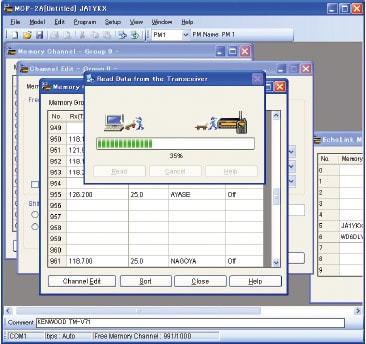
See those green bars? Yeah, I don't get those at all. For some reason, I can't get the MCP and my transceiver to talk to each other. CHIRP sees it, but not the MCP. It's getting frustrating. The instructions say to not enter anything until it can first read the necessary data from the transceiver, so I can't even start building the list.
 
I'm glad this thread got bumped. It's a good reminder that I was going to try to do some programming. But...


See those green bars? Yeah, I don't get those at all. For some reason, I can't get the MCP and my transceiver to talk to each other. CHIRP sees it, but not the MCP. It's getting frustrating. The instructions say to not enter anything until it can first read the necessary data from the transceiver, so I can't even start building the list.

That is weird... Ya, instructions basically say to pick the right transceiver, download the existing data first (even if its blank), and then use that as the main list you will modify and upload...

Make sure your serial to USB dongle isn't bad... clones have a lot of problems vs legit FTDI dongles.

Make sure your your COM port is correct (COM1, COM2, COM3) you can check device manager to see if the USB to serial dongle is working, and to confirm COM port.

Perhaps reset the transceiver to factory fresh configuration and try again.

Make sure you are using the correct version/download of MCP from Kenwood.

Let me know how it goes...
 
That is weird... Ya, instructions basically say to pick the right transceiver, download the existing data first (even if its blank), and then use that as the main list you will modify and upload...

Make sure your serial to USB dongle isn't bad... clones have a lot of problems vs legit FTDI dongles.

Make sure your your COM port is correct (COM1, COM2, COM3) you can check device manager to see if the USB to serial dongle is working, and to confirm COM port.

Perhaps reset the transceiver to factory fresh configuration and try again.

Make sure you are using the correct version/download of MCP from Kenwood.

Let me know how it goes...

I'm using MCP-2A Version 3.21 with an RTS cable (K5G) and the latest driver. The cable shows up in device manager and CHIRP can see it so I'm assuming the cable and drivers are fine. I also tried it on three different laptops. My assumption at this point is that the COM port settings aren't matching up. One thing that seems strange is that the COM set up window in MCP is grayed out and I can't select a COM port. I'll spend some more time on this evening. I'd really like to sort it out.
 

Members online

Forum statistics

Threads
278,310
Messages
3,554,079
Members
248,016
Latest member
Advally Service

Trending content

Back
Top