Headrests with the screens in them?

4Runners

New member
Ok so i got the pioneer 3300 bt and love it! now i was wondering what kind of headrests with the screens in them to buy. I'm hoping these dont cost too much. I was looking around on ebay and came across several of these kinds of headrests for under $200: (hopefully not bad quality) Example:
L0220 Eonon Car Black 9" Digital LCD Headrest Monitor | eBay

I just put that as a quick example. I dont even know if it's compatible with my headunit. I dont even know how to wire this stuff up yet (still gotta look into that, but heard it isn't that difficult) I have a grey leather interior though so i gotta look for something to match that.

So bottom line: which direction do i go with the headrests? Ideas on a good purchase?
 
Register to hide this ad
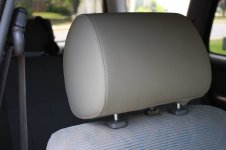
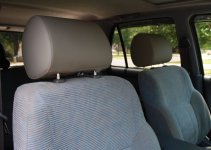
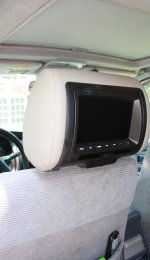
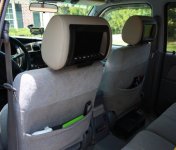
Oh, and they come with 3 different color covers (grey, beige & black). Easy to switch..mine are grey. The wiring is not too hard...gotta take the seats out to really do it right. I put mine on a switch so I can turn them off when they're not in use. I went all-out and put in an inverter and an XBox 360, too.
 
As long as your hu has an av out which most do you should ne able to go with any screens. Notamy people make headrest screens so you won't find many mane brands but if you've got a good audio guy you can just buy some name brand screens and have them put into your headrest for a perfect match
 
I got the version of these with the DVD players (both of my kids can watch different movies). The eBay ones always made me nervous. These are cheap and have a warranty from an actual store!

Chameleon - 7" Widescreen LED-LCD Headrest Monitor - CLS-700X - Best Buy

Chameleon - 7" Widescreen LED-LCD Headrest Monitor with DVD Player - CLD-700X - Best Buy

Yes something like this is exactly what i was looking for (although my head unit already has the dvd player) But i would trust something from a real store much more too! Now you said you put an xbox 360 with a power invertor too? wow! :wow2: that is awesome! you got any pictures you can post up because i would really love to see your set up!
 
Yes something like this is exactly what i was looking for (although my head unit already has the dvd player) But i would trust something from a real store much more too! Now you said you put an xbox 360 with a power invertor too? wow! :wow2: that is awesome! you got any pictures you can post up because i would really love to see your set up!

I can take some today and put them up. I should've taken some of my actual install...I always forget to do that. I've been really happy with the monitors so far, though.
 
The first link from bestbuy you posted is backordered :( but i did find this guy on ebay with the same screens selling both new for $160 Chameleonx CLS-700x 7" car headrest LCD Monitor | eBay
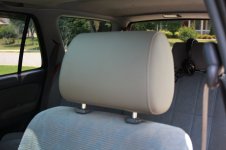
He doesn't know if it is compatible with my pioneer 3300bt head unit, and i believe it has a gray cover to make it match my gray leather interior, but i'm not sure how that works either. I just need it to be compatible with my head unit and possibly a xbox 360.

EDIT: Cant wait to see those pics!
 
Just FYI, mine were back-ordered, too, when I ordered them, but they shipped in less than a week. As far as "compatible", it should just be RCA cables (red, wht, yellow), so all should work together. I would ask the eBay seller if the full warranty (2 yrs, I think!) is valid when sold thru him. Will get pics shortly!
 
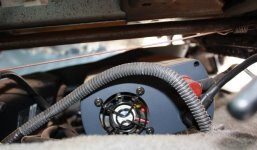
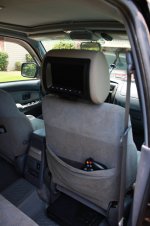
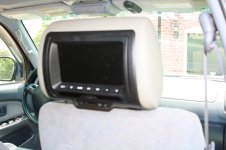
OK, here you go! Yes, everything in my truck has a coat of dust or dirt on it...

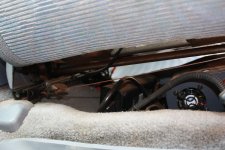
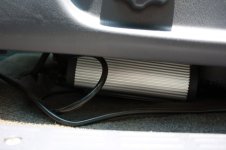
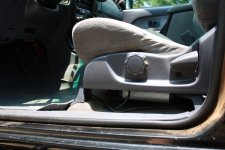
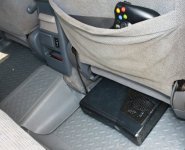
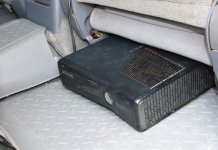
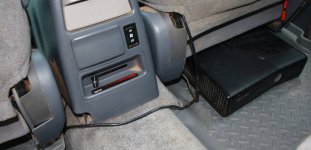
The inverter and 360 power brick are under the driver's seat...not bolted down...just "there". The fan-side is towards the front, which can get some air, at least. I've started turning my inverter off when I'm not in it for a day or two, as when it's hot, the fan runs, which it's hot a lot here in GA these days. It's a pretty hefty cable (4 AWG) running from the battery to the inverter, so you want that as short as possible, but not under the hood. So, the driver's seat seemed a good place. I took both my seats out, as I needed to get the center console out to run the power wires for the headrests properly. They come with cigarette lighter power, too, but I wanted something more permanent. As I said before, I put them on a switch, so I can turn them off when not in use.

The 360 is just under the passenger seat, in the back. I want to build a footrest to go over it, as my son has to be sorta careful with where he puts his feet. Although, you can see it's dirty, too! The signal wires (audio/video) are all hidden under/in the seats or mats.

One of the little doors that cover the headphone jack (and other misc stuff) got broken off, but, that's kids for ya! Sorry about the few blurry pics...it was bright outside and I couldn't see the screen very well after I took them. Let me know of any questions!
1/2, as they only allow 8 pics.
 

Attachments

  • Img_0707.jpg
    Img_0707.jpg
    112.4 KB · Views: 2,231
  • Img_0708.jpg
    Img_0708.jpg
    122.2 KB · Views: 2,152
  • Img_0709.jpg
    Img_0709.jpg
    133 KB · Views: 2,149
  • Img_0712.jpg
    Img_0712.jpg
    102.8 KB · Views: 2,139
  • Img_0713.jpg
    Img_0713.jpg
    127.4 KB · Views: 2,156
  • Img_0715.jpg
    Img_0715.jpg
    117.8 KB · Views: 2,178
  • Img_0716.jpg
    Img_0716.jpg
    119.5 KB · Views: 2,206
  • Img_0717.jpg
    Img_0717.jpg
    132 KB · Views: 2,247
Here are the rest of the pics..

Oh yeah...obviously I have cloth seats and you said you had the leather, so the monitor covers should match your seats better, I would think. Color is always hard to tell on pix, though.

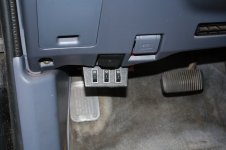
Include a pic of my switch...the other two switches are for my lights on my roof rack, front & back.

Happy shopping!
 

Attachments

  • Img_0719.jpg
    Img_0719.jpg
    114 KB · Views: 2,164
  • Img_0720.jpg
    Img_0720.jpg
    124.5 KB · Views: 2,116
  • Img_0721.jpg
    Img_0721.jpg
    122.3 KB · Views: 2,110
  • Img_0722.jpg
    Img_0722.jpg
    122.1 KB · Views: 2,182
  • Img_0725.jpg
    Img_0725.jpg
    74 KB · Views: 2,182
  • Img_0726.jpg
    Img_0726.jpg
    110.4 KB · Views: 2,123
  • Img_0705_sm.jpg
    Img_0705_sm.jpg
    124.9 KB · Views: 2,100
Thanks for the pics RedDragon. That is a very nice setup. I didn't know you had a 3rd gen though. My 4th gen definitely has more room and i'll tuck away all the wires and what not. What head unit do you have? I just gotta figure out how to wire all this up. I'll most likely end up ordering the same headrest screens as you. Oh and yeah my 4runner has gray leather seats so these should match. Did you put the gray cover on them? Because i think they are black by default. Also what power invertor is that? Now i gotta learn how to hook that up i guess. Although i do have the 116v outlet in the center cubby. Will that work for the xbox? I just wanted to put the xbox in there for the 4,000 mile road trip i was taking, then put it back in my media room when i'm back home. Sorry for all the questions but you've been so helpful :)

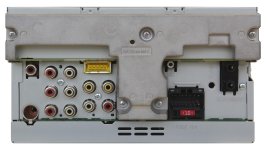
Here's a pic of the back of my pioneer 3300bt just to show you the connections, but i think it is made for 2 screens to be attached, not sure though:
 

Attachments

  • avh-3300bt-back_zoom.jpg
    avh-3300bt-back_zoom.jpg
    135.9 KB · Views: 2,100
ok i'm pretty sure those screens connect to the back of the head unit just fine, but where are you hooking up the 360 to? is it hooked up to both screens or just one? How did you wire that? (I swear if i can successfully do these interior mods i will post pics! :) )
 
ok i'm pretty sure those screens connect to the back of the head unit just fine, but where are you hooking up the 360 to? is it hooked up to both screens or just one? How did you wire that? (I swear if i can successfully do these interior mods i will post pics! :) )

I have it just hooked to one...that one is my "main" unit, which I then wired it's output (not sure if the screens without the DVD player have an output, but probably so) to the input of the 2nd screen. That way, they can watch the same movie (put it in the main DVD player and then turn the other's input to the Line-in), or they can watch different movies.

I think you asked about my head unit...I don't have a DVD-player head unit...I got both of the screens with DVD players in them.

You should just be able to run the 360 to 1 screen, though, and run it's output to the other. Do you have a schematic to tell you about your rear panel? One of the audio/video sets may be input. But, you really just need one output. Although, now that I just typed that...you have two things you want to use as an input, your head unit and the 360, so you would probably need a switch in there to decide which input to use, unless you used the front A/V input, but that's kinda messy...hmmm...do-able, just a little more complicated than mine, b/c of the head unit in play.

Here's the inverter that I bought

Amazon.com: Cobra CPI 880 800 Watt 12 Volt DC to 120 Volt AC Power Inverter with 5 Volt USB output: Electronics

But, if you have an A/C plug, it wouldn't hurt to try it first. I think the 360 needs less than 200W of power.

Glad to be of help...that's what this place is for!
 
Oh, and you asked about the covers, too...yes, the black was on when I got them. After a little futzing, I was able to figure out how to take them off and put a new one on. Once you get it, it's no problem.

I just checked and the "screen-only" headrests have outputs, too, so you should be OK. Just realize the 2nd input they refer to is a front input, not a nice and hidden-away one.

In case I wasn't clear about the 360 setup...whatever is showing on the "main" screen will show on the "other" one when it's (2nd screen) input is set to line-in. So, I have the 360 going to the input of the "main" one, and then both screens can see it.
 
Oh, and you asked about the covers, too...yes, the black was on when I got them. After a little futzing, I was able to figure out how to take them off and put a new one on. Once you get it, it's no problem.

I just checked and the "screen-only" headrests have outputs, too, so you should be OK. Just realize the 2nd input they refer to is a front input, not a nice and hidden-away one.

In case I wasn't clear about the 360 setup...whatever is showing on the "main" screen will show on the "other" one when it's (2nd screen) input is set to line-in. So, I have the 360 going to the input of the "main" one, and then both screens can see it.

ok this sounds good. I'm gonna order the screens probably tomorrow and it has free economy shipping so i'll probably get it the week after next. Until then i'll read up on the installs. Thanks again!
 
Well i went ahead and ordered both headrest CLS-700 screens for $160 with free shipping. It says it should arrive sometime between Friday of this week and next week. When i get them i'll probably post pics on the install and ask for help/advice here if i need it (i got a friend who knows this stuff better than i do) So now we just wait :)
 
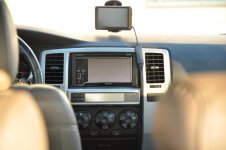
Just a teaser picture here i took of the pioneer head unit 3300bt. All my stuff will hook up to this. Performs way better than the stock radio! By the way, Red Dragon, how did you directly hook up the power for the head rests. I dont want to use the cig lighters. I already ordered the headrests and they are supposed to arrive this coming friday!
 

Attachments

  • aaaaa.jpg
    aaaaa.jpg
    120.4 KB · Views: 585
Well, i did some measuring and fitting today for the xbox 360 (i have the bigger one not the slim) Turns out that i dont need a power inverter because the xbox powers on and works with the 115v outlet in the center compartment between the front seats. The xbox also fits nicely under either front seat with room to spare so no one will ever accidentally kick it while sitting in the back. The best part about this setup is that i can easily remove the 360 and put it back in the house whenever i want.

The headrest screens were shipped out monday and i'm hoping they will be here by the end of the week (friday), if not it will be here early next week. Hey Red Dragon, I was wondering how you permanently wired the headrest screens to the power (instead of using the cig lighter for power) and how do these screens link to each other to show the same thing playing on the xbox? Also what are the ports on the screens you have so i know which xbox cords to use in advance. Thanks!
 
Well, i did some measuring and fitting today for the xbox 360 (i have the bigger one not the slim) Turns out that i dont need a power inverter because the xbox powers on and works with the 115v outlet in the center compartment between the front seats. The xbox also fits nicely under either front seat with room to spare so no one will ever accidentally kick it while sitting in the back. The best part about this setup is that i can easily remove the 360 and put it back in the house whenever i want.

The headrest screens were shipped out monday and i'm hoping they will be here by the end of the week (friday), if not it will be here early next week. Hey Red Dragon, I was wondering how you permanently wired the headrest screens to the power (instead of using the cig lighter for power) and how do these screens link to each other to show the same thing playing on the xbox? Also what are the ports on the screens you have so i know which xbox cords to use in advance. Thanks!

Very cool that you don't have to worry about the inverter...one less thing to wire!

As for the power for the headrests, I tapped an extra ACC fuse, then to a switch (so I can turn the monitors off), then I ran the wires under my center console to the back seat area, where I spliced in the power for the headrests. As for both monitors showing the same thing...make one your "main" unit, which you run the inputs into (H/U, XBox), then run the output from the main unit to the input of the secondary unit. That way, when the 2nd unit is on "line-in", it shows whatever is on the main unit.

Oh, and the headrests just accept RCA (red,wht,ylw) cables for input. Your xbox should've come with one of those.

Good luck! Post up pix when you're done.
 
Very cool that you don't have to worry about the inverter...one less thing to wire!

As for the power for the headrests, I tapped an extra ACC fuse, then to a switch (so I can turn the monitors off), then I ran the wires under my center console to the back seat area, where I spliced in the power for the headrests. As for both monitors showing the same thing...make one your "main" unit, which you run the inputs into (H/U, XBox), then run the output from the main unit to the input of the secondary unit. That way, when the 2nd unit is on "line-in", it shows whatever is on the main unit.

Oh, and the headrests just accept RCA (red,wht,ylw) cables for input. Your xbox should've come with one of those.

Good luck! Post up pix when you're done.

ok sounds good. I'll post pics for sure!
 

Members online

Forum statistics

Threads
278,310
Messages
3,554,079
Members
248,016
Latest member
Advally Service

Trending content

Back
Top