

Ph03n1x24
Member
Why did I feel compelled to put myself through this horror show? Because I am stupid and can't stop upgrading my 4Runner. And I won't let this !@#$ get the best of me!
Maybe someone knows what I did wrong. Or maybe my HU is defective?
Scenario: Black screen with only guidelines showing when in Reverse or enabling the camera from the menu directly.
― Head unit: Alpine iLX-x650
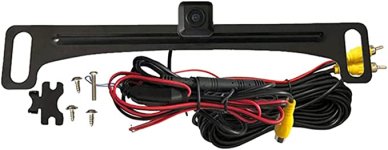
― Camera: Voxx ACAM4 HD
I've been through 3 cameras troubleshooting.
All connections have been checked, rechecked, then rechecked again. Each section swapped out as I went along.
I even swapped out their RCA cable for one that was double-insulated.
Wired up:
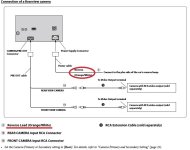
Yellow RCA Video cable connected to Rear Camera RCA of HU.
― red tail connected to an independent piggyback fuse connector to ACC at the fusebox.
― Orange/White trigger wire from HU connected to positive reverse light wire located in the wiring harness next to the fuse box.
Regulator w/ red and black wire that powers the camera connected at hatch.
― red wire connected to red tail (opposite end of RCA) to power camera.
― black wire connected to solid chassis ground.
I have also tried wiring the Orange/White trigger wire to the red tail of the RCA cable at the HU, while on the other end, I connected the red tail of the RCA cable to the positive reverse light wire directly at the taillight.
Putting the car in reverse: Engages camera mode with guidelines but with no video feed.
Manually pressing the camera option: Does the same.
Every video I've watched...
Every diagram I've looked at...
They all say to wire it up either way and it will work fine.
This isn't trigonometry! Does anyone have a blues clue what I am doing wrong?
iLX-x650 has the latest firmware
I am getting 12v at the red tail at the hatch connected to power the camera.
Thanks in advance!
Maybe someone knows what I did wrong. Or maybe my HU is defective?
Scenario: Black screen with only guidelines showing when in Reverse or enabling the camera from the menu directly.
― Head unit: Alpine iLX-x650
― Camera: Voxx ACAM4 HD
I've been through 3 cameras troubleshooting.
All connections have been checked, rechecked, then rechecked again. Each section swapped out as I went along.
I even swapped out their RCA cable for one that was double-insulated.
Wired up:
Yellow RCA Video cable connected to Rear Camera RCA of HU.
― red tail connected to an independent piggyback fuse connector to ACC at the fusebox.
― Orange/White trigger wire from HU connected to positive reverse light wire located in the wiring harness next to the fuse box.
Regulator w/ red and black wire that powers the camera connected at hatch.
― red wire connected to red tail (opposite end of RCA) to power camera.
― black wire connected to solid chassis ground.
I have also tried wiring the Orange/White trigger wire to the red tail of the RCA cable at the HU, while on the other end, I connected the red tail of the RCA cable to the positive reverse light wire directly at the taillight.
Putting the car in reverse: Engages camera mode with guidelines but with no video feed.
Manually pressing the camera option: Does the same.
Every video I've watched...
Every diagram I've looked at...
They all say to wire it up either way and it will work fine.
This isn't trigonometry! Does anyone have a blues clue what I am doing wrong?
iLX-x650 has the latest firmware
I am getting 12v at the red tail at the hatch connected to power the camera.
Thanks in advance!
Attachments
Last edited:


