I will expand this thread (maybe with pictures!) but wanted to contribute my findings. I hope that anyone having questions about a nav install will find some answers here!
Ok lets start at the back and work our way forward.
Back up camera:
My experience has only been with the BOYO VLT400. Others should be similar. The camera basically has 3 wires, a 12v, a ground and the video feed. If you buy a license plate mount (like i did), it makes things a little easier. There are guides here on how to take apart the rear gate, so i wont go into that.
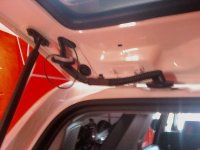
Hints: Make sure you wrap the wire to the camera around the existing wire loom. Inside the gate you will see a black wire loom, i zip tied my camera wire to this. Why? if you dont, its highly likely that the rear window will snap your wire on its way down.
Im attaching a picture of where i fished the wire through. Do not mess with the headliner to get the wire down into the cabin, you can run it through the piller that the back up mirror/pillar speaker is on all the way at the back.
Tap the power to the camera to any +12v at the headunit. I used the wire for my PAC SWI-PS.
Navigation system:
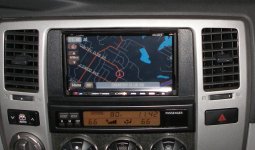
Hint 1: For the Pioneer (im assuming others will be the same) AVIC nav, the GPS antenna can be INSIDE the dash. There is a little tray right behind the stereo where i mounted my gps antenna. I am getting between 8-10 satellites (80-100%) with zero problems.
Hint 2: If you have JBL, be wary of many many connections. For the Avic systems for example, you will need the TYTO-01 (which is HUGE), the nd-BT1 for bluetooth, the SWI-PS to retain steering controls, AND a large bundle of RCA attachments. All of this happens within 5" of the nav unit, so space (for jbl people) is VERY limited. I fiddled for an HOUR trying to make it fit. Eventually i took the TYTO out of its gigangic housing and just wrapped it in some foam to get everything to fit.
Hint 3: YES you can have AUX input into your Avic, just not through the factory aux port. Simply get a RCA to Stereo jack adapter (radio shack) and hook up to the Aux IN RCA on the avic.
Hint 4: The Metra 95-8210 will NOT FIT the Avic z2 without heavy modification. I have seen it fit the Kenwood 7100 but the Avic is just too large and the face will not open if you jam it in there (i learned this the hard way). I had to cut my 8210 to just the sides to get it to fit.
Hint 5: JBL people cannot use the Metra 8202...no where close to fitting in my car. Left .5" gaps on the sides.
Hint 6: The ILL (illumination) Wire can be tapped at ANY of the 3 connectors going to the piece you pull to access the head unit. Its the green wire.
Hint 7: Do not run the reverse sensor switch (to activate the back up camera) to the trunk. Tap into the drivers kick panel, far left of the fuses. Its a red wire with a yellow stripe.
Hint 8: You dont need to pull any panels to get the mic to the roof . The wire tucks into this rubber thing that is between the door and the A pillar
Hint 9: Make sure you dont forget to connect power to the radio antenna. This is the single plug on the same connection as the 2 radio antenna plugs. Only 1 fits into the new nav, and the little plug wrapped in foam needs +12v.
Hint 10: Been discussed before, but VSS wire is purple with red stripe, found in the large bundle of wires right behind the 3 HVAC controls. Any one will do.
Hint 11: Dont forget to take your CD's out of the factory radio. i forget this EVERYTIME.
Thats all i can think of for now, i hope this helps somebody!!
Abe
Ok lets start at the back and work our way forward.
Back up camera:
My experience has only been with the BOYO VLT400. Others should be similar. The camera basically has 3 wires, a 12v, a ground and the video feed. If you buy a license plate mount (like i did), it makes things a little easier. There are guides here on how to take apart the rear gate, so i wont go into that.
Hints: Make sure you wrap the wire to the camera around the existing wire loom. Inside the gate you will see a black wire loom, i zip tied my camera wire to this. Why? if you dont, its highly likely that the rear window will snap your wire on its way down.
Im attaching a picture of where i fished the wire through. Do not mess with the headliner to get the wire down into the cabin, you can run it through the piller that the back up mirror/pillar speaker is on all the way at the back.
Tap the power to the camera to any +12v at the headunit. I used the wire for my PAC SWI-PS.
Navigation system:
Hint 1: For the Pioneer (im assuming others will be the same) AVIC nav, the GPS antenna can be INSIDE the dash. There is a little tray right behind the stereo where i mounted my gps antenna. I am getting between 8-10 satellites (80-100%) with zero problems.
Hint 2: If you have JBL, be wary of many many connections. For the Avic systems for example, you will need the TYTO-01 (which is HUGE), the nd-BT1 for bluetooth, the SWI-PS to retain steering controls, AND a large bundle of RCA attachments. All of this happens within 5" of the nav unit, so space (for jbl people) is VERY limited. I fiddled for an HOUR trying to make it fit. Eventually i took the TYTO out of its gigangic housing and just wrapped it in some foam to get everything to fit.
Hint 3: YES you can have AUX input into your Avic, just not through the factory aux port. Simply get a RCA to Stereo jack adapter (radio shack) and hook up to the Aux IN RCA on the avic.
Hint 4: The Metra 95-8210 will NOT FIT the Avic z2 without heavy modification. I have seen it fit the Kenwood 7100 but the Avic is just too large and the face will not open if you jam it in there (i learned this the hard way). I had to cut my 8210 to just the sides to get it to fit.
Hint 5: JBL people cannot use the Metra 8202...no where close to fitting in my car. Left .5" gaps on the sides.
Hint 6: The ILL (illumination) Wire can be tapped at ANY of the 3 connectors going to the piece you pull to access the head unit. Its the green wire.
Hint 7: Do not run the reverse sensor switch (to activate the back up camera) to the trunk. Tap into the drivers kick panel, far left of the fuses. Its a red wire with a yellow stripe.
Hint 8: You dont need to pull any panels to get the mic to the roof . The wire tucks into this rubber thing that is between the door and the A pillar
Hint 9: Make sure you dont forget to connect power to the radio antenna. This is the single plug on the same connection as the 2 radio antenna plugs. Only 1 fits into the new nav, and the little plug wrapped in foam needs +12v.
Hint 10: Been discussed before, but VSS wire is purple with red stripe, found in the large bundle of wires right behind the 3 HVAC controls. Any one will do.
Hint 11: Dont forget to take your CD's out of the factory radio. i forget this EVERYTIME.
Thats all i can think of for now, i hope this helps somebody!!
Abe