How to watch videos on 2014 Entunes while not parked

outlaws

New member
I am wondering since we have AV for the entunes how do you use the screen as a video display while driving for watching TV shows for the passengers? Currently the system will force you to be in P and parking brakes on. Also how do you go about loading videos to display? Does it use the AV cables (red/white)?

I have seen threads about the nav override mod but don't know if it applies for the AV input as well.
 
Register to hide this ad
Does it just play a DVD? I haven't tried mine yet, but I thought that was the option.

I just called Entune support and they say it's for vehicles equipped with DVD and you can't load videos onto it. My question is then has anyone hacked it to use as a external display for a phone or some other device? It seems to me this should be plausible with some kind of mod/hack.
 
Yes I have done this on a 13 Entune, but I don't know if 14+ is exactly the same. I have a Xbox 360 pre-loaded with movies and games under the passenger seat and can view them on the Entune head unit (also displays on a tv in the rear) I can also mirror my phone or Ipad.

I did this awhile ago and remember it was quite complicated to make everything work right, and you will also have to bypass the motion lock out as well. I will dig into my bookmarks/research on my home computer to see if I can find everything that helped me. I posted this at the time, and nobody even seemed interested.

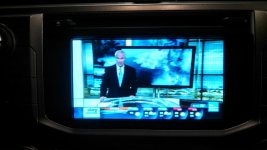
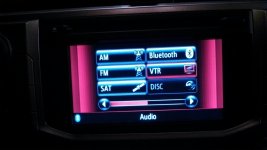
Here is the only two pics I have to show you the new option on the menu and it working.
 

Attachments

  • V1.jpg
    V1.jpg
    135.1 KB · Views: 13,759
  • V2.jpg
    V2.jpg
    112.2 KB · Views: 14,877
In my FJ Cruiser, I actually had this capability on the Kenwood/Garmin unit. Never used it once in the 6 years I owned the vehicle. Installer thought he was doing me a favor by removing the safety feature, but I can't imagine watching a movie while moving. In this day and age when every phone or tablet can watch movies (for the passengers)....what's the point of having this bypassed on the HU? Seems like a major safety concern to me. Not picking an argument, but I just don't see the need, nor would I like to try and explain the accident while I was watching a movie while driving. YMMV.
 
Installer thought he was doing me a favor by removing the safety feature, but I can't imagine watching a movie while moving. In this day and age when every phone or tablet can watch movies (for the passengers)....what's the point of having this bypassed on the HU?
Front facing camera for going off road. That's a very nice feature and these days you can get external cameras for something like $15 shipped from Hong Kong. I actually came to this thread because I bought a new very small dashboard video camera (small enough to hide behind the mirror) without a built in display and want to periodically check to see if it's working.
 
In my FJ Cruiser, I actually had this capability on the Kenwood/Garmin unit. Never used it once in the 6 years I owned the vehicle. Installer thought he was doing me a favor by removing the safety feature, but I can't imagine watching a movie while moving. In this day and age when every phone or tablet can watch movies (for the passengers)....what's the point of having this bypassed on the HU? Seems like a major safety concern to me. Not picking an argument, but I just don't see the need, nor would I like to try and explain the accident while I was watching a movie while driving. YMMV.
Yup. Get in an accident and the other guys insurance (and maybe yours) will point to that as proof you were at fault.
 
Yes I have done this on a 13 Entune, but I don't know if 14+ is exactly the same. I have a Xbox 360 pre-loaded with movies and games under the passenger seat and can view them on the Entune head unit (also displays on a tv in the rear) I can also mirror my phone or Ipad.

I did this awhile ago and remember it was quite complicated to make everything work right, and you will also have to bypass the motion lock out as well. I will dig into my bookmarks/research on my home computer to see if I can find everything that helped me. I posted this at the time, and nobody even seemed interested.

Here is the only two pics I have to show you the new option on the menu and it working.

How was your Xbox connected to the stock Entune? Via the AUX port?
What cable?
 
I am wondering since we have AV for the entunes how do you use the screen as a video display while driving for watching TV shows for the passengers? Currently the system will force you to be in P and parking brakes on. Also how do you go about loading videos to display? Does it use the AV cables (red/white)?

I have seen threads about the nav override mod but don't know if it applies for the AV input as well.

Curious if this works. I know in the past, applying slight brake pedal while in drive would allow for the device to work. Definitely not going to want to actually drive like that though.
 
In this day and age when every phone or tablet can watch movies (for the passengers)....what's the point of having this bypassed on the HU?.

Particularly when every phone and tablet will do so in much higher resolution, and most tablets will do so on a larger screen.
 
Front facing camera for going off road. That's a very nice feature and these days you can get external cameras for something like $15 shipped from Hong Kong. I actually came to this thread because I bought a new very small dashboard video camera (small enough to hide behind the mirror) without a built in display and want to periodically check to see if it's working.

i'm curious to know for this reason. I would like to add a front camera and have it hooked up to the entune.
 
You can do the briguydiy dot com harness addition. It allows you to put in a button to show reverse camera at any time. I added a 4 way av switch to have 4 inputs. Front camera, rear camera, widi adapter, and trailer camera. So, when driving you can push override button and the reverse camera shows (can check on hitch), or you can switch the 4 way available switch to change head screen to front camera, widi of smartphone, etc. The widi shows what ever is on phone, and audio goes in via the auxiliary port. You thus can use Google maps, movies, Internet, etc. I really don't use this setup when driving except for navigation once in a while since I hate the navigation interface of the 4runner. Lots of 4runner owners are doing similar extra camera mods although I didn't see any others using the widi extender.

Sent from my SM-G935T using Tapatalk
 
I think some entune head units don't have Navi, this would be a way to get navigation in your car/truck.

Sent from my SM-G935T using Tapatalk
 
What kind of video selector did you use? I'm looking at using one of these and mounting the rotary selector where the SOS button would be (to the right of the diff lock button on the overhead panel.)
 

Attachments

  • 1pcs-Four-audio-font-b-source-b-font-font-b-selector-b-font-font-b-switch.jpg
    1pcs-Four-audio-font-b-source-b-font-font-b-selector-b-font-font-b-switch.jpg
    115.9 KB · Views: 392

Members online

Forum statistics

Threads
278,317
Messages
3,554,129
Members
248,016
Latest member
Advally Service

Trending content

Back
Top