Interior Lights Problem

choover567

New member
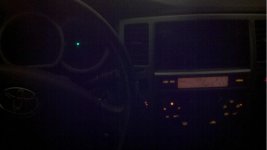
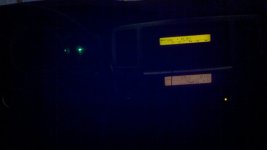
I can't seem to get my interior lights to come back up after a few stereo installs. Here's the story: I replaced my factory radio (non-jbl) with an alpine double dinn radio. Previously with my 91 and 97 4runner, I didn't have to connect the dimmer wires, so I didn't with this one. Apparently I was wrong and it was required. With headlights off, the dash lights were on. When I turned on my headlights, my dash lights (mph/rpm gauges) failed to light up. I knew it'd be a quick fix so I left it for the time being. Eventually I sold the alpine unit and upon reinstalling the factory radio, I figured things would just come back on. Well they didn't. Now my dash lights do not come on at all, and the middle temperature selector does the same. While lights are on, the radio light goes out, but the left and right temperature selectors come on. So weird. I attached two pictures, one is lights on, one is lights out. I have checked fuses, being "pretty sure" I checked the right ones. It seems like half the system works, and the other half doesn't. Any Ideas? Thanks

Chris
 

Attachments

  • lights on 2.jpg
    lights on 2.jpg
    113.3 KB · Views: 3,075
  • lights off 2.jpg
    lights off 2.jpg
    64.8 KB · Views: 2,884
Last edited:
Register to hide this ad
Those came out huge, sorry. The first one is with the lights on, the second pic is with the lights off.
 
Last edited:
bump for help? I don't think bulbs are out because some lights are coming on backwards from when they are supposed to. And notice the mph/rpm dash lights dont come on at all.. any ideas?
 
Not sure what advice I can offer based on the information. If all the fuses look good (under dash and engine compartment), then you may have fried the interior light relay/parking light circuit. The center HVAC temp selector issue might be that your bulb is out. All selectors on the HVAC should be on the same circuit so I would swap bulbs with one of the outside ones to see if this is true.

  1. When you installed the alpine deck, did you use a metra connector to plug into the stock harness or did you cut wires?
  2. When you installed the alpine deck, did you disconnect your battery?
 
I had this happen to me when I installedy Sony deck to. If I remember rite, I had conenected the two dimmers together and then was left over with another orange wire that I ran to the ground wires. The funny thing is that I also tried putting my old deck in and nothing worked. I was over it at that point haha As for the ac unit, mine did the same thing and I just replaced the bulb and it works now.
Hope this helps..
 
I am pretty sure the fuses are good, I pretty much looked at everything that "could be" incorporated with the dash lights. I used a wiring harness that plugged into the dash, I did not cut into factory harnesses. I also did not disconnect my battery. I hope something did not fry. I suppose the AC unit middle light very much could be out, but the dash/radio light has got to be a different problem. Ill give the AC unit a look tonight.
 
Believe it or not, I am still having this problem. I took my factory stereo back out, and just wired in the aftermarket harnesses. Now, my lights are backwards. With car on/headlightswitchoff = dash lights are on, with car on/headlightswitchON = dash lights are off. This seems like the dimmer issue that most of the previous generations are dealing with. Possibly damaging the dimmer rheostat by connecting the orange dimmer wire to an aftermarket radio.... Any thoughts?
 
Believe it or not, I am still having this problem. I took my factory stereo back out, and just wired in the aftermarket harnesses. Now, my lights are backwards. With car on/headlightswitchoff = dash lights are on, with car on/headlightswitchON = dash lights are off. This seems like the dimmer issue that most of the previous generations are dealing with. Possibly damaging the dimmer rheostat by connecting the orange dimmer wire to an aftermarket radio.... Any thoughts?

Yep, seems like the same problem. (Yes I've been driving this whole time without interior lights.) It looks like hooking up that dimmer wire previously fried my dimmer switch. I removed my dimmer switch completely, and all lights are on like their supposed to. Well, their on even when their not supposed to. This way is at least safer while driving at night. Going to order a new rheostat/dimmer switch tomorrow, I'll post if its the absolute fix. Now to find a part number.....
 
Yup, dimmer rheostat fixed it. If anyone plugs the two orange wires together in your aftermarket radio harness, it will short your dimmer. Replaced it, and everythings working 100%.

PN: 84119-35030
 
I am having this same problem, thank you for the info I am going to get a new rheostat switch and see if that works! Thanks again.
 
Not sure if this is the same problem. I'm a new owner of a 2007 4Runner and tonight while driving I noticed what I think are several lights are out:

- Left-half of the climate-control status screen lights are out
- I'm guessing there should be lights for the left and center "dial" controls below the status screen (left = fan speed, center = A/C, temp, auto). Only the selected arrows are lit up, shouldn't the control (fan speed, a/c, temp up, temp down, auto) also be lit up too?

Where do I get the replacement lights? How do I replace them?


See the photos

2015-09-06%2000.01.01_rs.jpg


2015-09-06%2000.00.24_rs.jpg
 
Not sure if this is the same problem. I'm a new owner of a 2007 4Runner and tonight while driving I noticed what I think are several lights are out:

- Left-half of the climate-control status screen lights are out
- I'm guessing there should be lights for the left and center "dial" controls below the status screen (left = fan speed, center = A/C, temp, auto). Only the selected arrows are lit up, shouldn't the control (fan speed, a/c, temp up, temp down, auto) also be lit up too?

Where do I get the replacement lights? How do I replace them?


See the photos

2015-09-06%2000.01.01_rs.jpg


2015-09-06%2000.00.24_rs.jpg

Search the forum for "HVAC Lights Dim/Out" it's been a known issue to occur with the 4th gens.

Part number for the bulb is 90010-09017

There's a philips head screw that holds the HVAC Panel on located under the buttons (open the storage compartment and you'll see it) Remove the screw and then gently pry the HVAC control panel from the vehicle (it's clipped in.) Then replace the bulb and you're good to go.
 

Members online

Forum statistics

Threads
278,305
Messages
3,554,044
Members
248,016
Latest member
Advally Service

Trending content

Back
Top