
You are using an out of date browser. It may not display this or other websites correctly.
You should upgrade or use an alternative browser.
You should upgrade or use an alternative browser.
iPad Mini In Dash?
- Thread starter jangoforhire
- Start date

Coastiepilot200
New member
First off I'd like to thank Stifler for his wisdom, courage, and tact. He's been a driving force throughout this entire project...:deadhorse:
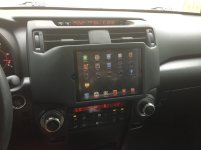
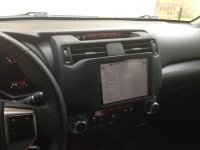
Second, it's done! I had the iPad mini dash mount installed this morning, and so far I absolutely love it. It's easy to control, the anti-glare coating from invisible shield actually works, and the sound from the iStreamer is awesome. That being said, I know none of you are reading this and are only looking for pics, so here ya go...
Second, it's done! I had the iPad mini dash mount installed this morning, and so far I absolutely love it. It's easy to control, the anti-glare coating from invisible shield actually works, and the sound from the iStreamer is awesome. That being said, I know none of you are reading this and are only looking for pics, so here ya go...
Attachments

Sundog7121
Member
Wow. The early pix were worrisome. The final looks great!!! :tea:
Hawaiian4runner
New member
anytime..... the finished product looks better but way out of place/proportion. Looks like a tumor on your dash..... as long as you like it though who gives a shit what I think! lol
I like the look but do think it's a little tall and would like it to fill the sides more. What do you suggest could be done with the proportion besides maybe going with an Android tablet?
To the OP, how do you have the iStreamer connected to your stock stereo? Through the auxillary input or wired in?
Coastiepilot200
New member
I knew from the start it wasn't going to be perfect, due especially to the fact that as far as I can tell I'm the first person to do this in a 5th gen. There isn't a whole lot you can do with the size if you want an iPad, other than to relocate the A/C controls somewhere so that you could move it a bit lower. If you still want to be able to read the LCD panel for the A/C and still see over the dash, you have to move the iPad up. The other option was to move the upper A/C vents to the sides, but I didn't want to dive that deeply into this project, especially with the crack team I had working on it (BOOOO) and Stifler's hatred for life following me around on this forum.
If anyone is interested in doing this, ever, I strongly encourage you to throw me a PM first so that I can give you some tips to make it even better. There are a few things I would like to change, but that would require starting over completely...
As for the iStreamer, it isn't connected to the stock stereo, as the iPad is my stock stereo now. I had an aftermarket stereo in there before, which included the adapter that turned the 16 pin (?) stock connector into 4 RCA ports (front L/R, back L/R). The iStreamer connects directly to those RCA ports, is hardwired into a switched 12V wire from the previous stereo, and then goes into the iPad via a lightning cable. The iStreamer is a digital to analog converter as well, so the sound is incredible. It puts the previous Pioneeering stereo to shame.
If anyone is interested in doing this, ever, I strongly encourage you to throw me a PM first so that I can give you some tips to make it even better. There are a few things I would like to change, but that would require starting over completely...
As for the iStreamer, it isn't connected to the stock stereo, as the iPad is my stock stereo now. I had an aftermarket stereo in there before, which included the adapter that turned the 16 pin (?) stock connector into 4 RCA ports (front L/R, back L/R). The iStreamer connects directly to those RCA ports, is hardwired into a switched 12V wire from the previous stereo, and then goes into the iPad via a lightning cable. The iStreamer is a digital to analog converter as well, so the sound is incredible. It puts the previous Pioneeering stereo to shame.

Coastiepilot200
New member
The hazard button has been moved down to where "Party Mode" used to be. The switch doesn't work anyway with an aftermarket stereo and it kept the top of the iPad mount from looking COMPLETELY ridiculous, instead of just pretty ridiculous. It requires a bit of dremel work to get the button to fit (which I haven't started yet). I was going to do some looking around and see if I can't find another Toyota model that has a smaller hazard button that would fit.
The hazard button has been moved down to where "Party Mode" used to be. The switch doesn't work anyway with an aftermarket stereo and it kept the top of the iPad mount from looking COMPLETELY ridiculous, instead of just pretty ridiculous. It requires a bit of dremel work to get the button to fit (which I haven't started yet). I was going to do some looking around and see if I can't find another Toyota model that has a smaller hazard button that would fit.
I'm pretty sure wiring up the "Party Mode" button to turn on the flashing (hazard) lights is appropriate. :reddance:

grey_ghost
New member
Hey I have to say; pretty ambitious project and I'm also a big fan of Apple products as I have an iPad mini myself.
Can I ask; did you lose the steering wheel control for hands-free blue tooth phone and/or radio control?
Can I ask; did you lose the steering wheel control for hands-free blue tooth phone and/or radio control?
Coastiepilot200
New member
Steering wheel control is indeed gone. Don't get me wrong, there are some stiff drawbacks to doing the system the way I did, and right now I'm still happy with it. Give it a month and let's see how I feel then...

Awesome job man, always thought of doing this then I thought of the drawbacks.. No steering wheel controls, back up camera, cd player, ect. But major props taking on a project when had nothing to go off of and no idea of the final outcome. :cheers:
How hard is it to take out of the holder? Are you thinking of doing anymore adjustments or leaving it?
How hard is it to take out of the holder? Are you thinking of doing anymore adjustments or leaving it?
Hawaiian4runner
New member
I knew from the start it wasn't going to be perfect, due especially to the fact that as far as I can tell I'm the first person to do this in a 5th gen. There isn't a whole lot you can do with the size if you want an iPad, other than to relocate the A/C controls somewhere so that you could move it a bit lower. If you still want to be able to read the LCD panel for the A/C and still see over the dash, you have to move the iPad up. The other option was to move the upper A/C vents to the sides, but I didn't want to dive that deeply into this project, especially with the crack team I had working on it (BOOOO) and Stifler's hatred for life following me around on this forum.
If anyone is interested in doing this, ever, I strongly encourage you to throw me a PM first so that I can give you some tips to make it even better. There are a few things I would like to change, but that would require starting over completely...
As for the iStreamer, it isn't connected to the stock stereo, as the iPad is my stock stereo now. I had an aftermarket stereo in there before, which included the adapter that turned the 16 pin (?) stock connector into 4 RCA ports (front L/R, back L/R). The iStreamer connects directly to those RCA ports, is hardwired into a switched 12V wire from the previous stereo, and then goes into the iPad via a lightning cable. The iStreamer is a digital to analog converter as well, so the sound is incredible. It puts the previous Pioneeering stereo to shame.
Thanks! Might be a dumb question but do you have external amp(s) in your system? How do you adjust volume? What was the stock system you started with?

Coastiepilot200
New member
I'm still happy with it, but the one adjustment I am going to look at is some sort of external volume control. Theoretically I'm going to have to find the wires that go to the amp and see if I can wire up an external volume control. I started with the upgraded JBL system in the 4Runner, then moved to an aftermarket Pioneer double din head unit.
Thankfully I didn't lose the backup cam as it's in the rearview mirror of the '10 Limited without nav, so that still works. If I would have lost that as well I don't think I would have done it.
Anyone a wiring guru that could offer some suggestions as to how to wire in an external volume knob?
Thankfully I didn't lose the backup cam as it's in the rearview mirror of the '10 Limited without nav, so that still works. If I would have lost that as well I don't think I would have done it.
Anyone a wiring guru that could offer some suggestions as to how to wire in an external volume knob?
Hawaiian4runner
New member
I'm still happy with it, but the one adjustment I am going to look at is some sort of external volume control. Theoretically I'm going to have to find the wires that go to the amp and see if I can wire up an external volume control. I started with the upgraded JBL system in the 4Runner, then moved to an aftermarket Pioneer double din head unit.
Thankfully I didn't lose the backup cam as it's in the rearview mirror of the '10 Limited without nav, so that still works. If I would have lost that as well I don't think I would have done it.
Anyone a wiring guru that could offer some suggestions as to how to wire in an external volume knob?
You can use subwoofer type volume controls connected to the RCAs between the iStreamer and the wiring harness. The issue with this is the controls will attenuate (reduce) volume only, not increase it, so this will only work if your default volume now is loud. Otherwise you need to get to the gain control on the amp and set it higher and I don't know if that's possible on your system. I have the Premium with Nav and I cannot make any adjustments on the amp. I called Harman/JBL and they told me that the amp settings are locked down and only Toyota has the code to unlock it and they will not give it out.
Please update us on your progress. I want to integrate an iPad also but don't want to lose my factory stuff. My goal is much like what you did with the iStreamer. I want to bypass the IPad/Ipod DAC and amp for better sound quality. Both iStreamer and Nuforce said that I should be able to use their Apple licensed DACs and use an RCA to mini cable from the DAC into the auxillary input and get high quality sound. I guess I'll just order an iStreamer and give it a try.
Hawaiian4runner
New member
I'm still happy with it, but the one adjustment I am going to look at is some sort of external volume control. Theoretically I'm going to have to find the wires that go to the amp and see if I can wire up an external volume control. I started with the upgraded JBL system in the 4Runner, then moved to an aftermarket Pioneer double din head unit.
Thankfully I didn't lose the backup cam as it's in the rearview mirror of the '10 Limited without nav, so that still works. If I would have lost that as well I don't think I would have done it.
Anyone a wiring guru that could offer some suggestions as to how to wire in an external volume knob?
You can use subwoofer type volume controls connected to the RCAs between the iStreamer and the wiring harness. The issue with this is the controls will attenuate (reduce) volume only, not increase it, so this will only work if your default volume now is loud. Otherwise you need to get to the gain control on the amp and set it higher and I don't know if that's possible on your system. I have the Premium with Nav and I cannot make any adjustments on the amp. I called Harman/JBL and they told me that the amp settings are locked down and only Toyota has the code to unlock it and they will not give it out.
Please update us on your progress. I want to integrate an iPad also but don't want to lose my factory stuff. My goal is much like what you did with the iStreamer. I want to bypass the IPad/Ipod DAC and amp for better sound quality. Both iStreamer and Nuforce said that I should be able to use their Apple licensed DACs and use an RCA to mini cable from the DAC into the auxillary input and get high quality sound. I guess I'll just order an iStreamer and give it a try.


