K&N 63 Series Aircharger and Borla Cat-back

Update 2/9/11

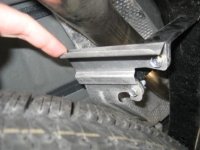
Turns out the rattle was coming from what appears to be some kind of bolt-on heat shield in place to protect the spare tire, not the foil-like heat shield running the length of the pipe. It's pliable enough that I simply pulled it away from the pipe and no more clanging noise (see pic). So, I am now 100% satisfied with the Borla. They were very great to work with, by the way - They stayed with me the whole way while I tried to figure out what was going on. Can't wait to add the TRD intake...

Oh, I have the video clip of the exhaust - It turned out pretty good for taking it with my wife's camera. However, the file (I think it's an AVI type) is too large to load (or the format is wrong). If anyone can help troubleshoot the problem I will be happy to get it posted...
 

Attachments

  • IMG_9156.jpg
    IMG_9156.jpg
    31.4 KB · Views: 630
I'm hardly a Luddite; in fact I'm an online teacher. I'm just not interested in spending time setting up an account and "joining" their world just yet (I don't tweet or have a Facebook profile either - can't see the point).

Still, since folks seemed to be clamoring for the clip I wanted to point out that it's available if somebody can coach me through the file size/type issue...

DP
 
I'm hardly a Luddite; in fact I'm an online teacher. I'm just not interested in spending time setting up an account and "joining" their world just yet (I don't tweet or have a Facebook profile either - can't see the point).

Still, since folks seemed to be clamoring for the clip I wanted to point out that it's available if somebody can coach me through the file size/type issue...

DP

If you have uploaded it on to your computer, you could send it to me and I would be happy to put it up on youtube for you.

Just have it in .MPG, .MOV, or .AVI format, once i you upload it from your camera, your computer should be able to save it in one of those no problema
 
Last edited:
As of now, my email won't accept it due, I think, to its size (I tried to email it to my office computer and it didn't work). So, compressing it or resizing it seems to be the necessary first step, which might also alleviate the need to post it elsewhere. I found it simple to resize a pic, but videos seem to open in players without the editing function that pics have. I tried resizing in the Properties area, but it didn't seem to take (or work...).
 
Resizing a video is not like resizing a photo, and requires more specialized software. I think it would just be easier for you to reshoot the video clip.

Before recording, go into your cameras menus and reduce the resolution of the clip. Most all cameras have this option. Check the manual. Then, hopefully you can upload it to a place like photobucket. I don't think you can upload large files like that to this forum.

BTW, email probably won't work if the file size is over 10mb.

 
Resizing a video is not like resizing a photo, and requires more specialized software. I think it would just be easier for you to reshoot the video clip.

Before recording, go into your cameras menus and reduce the resolution of the clip. Most all cameras have this option. Check the manual. Then, hopefully you can upload it to a place like photobucket. I don't think you can upload large files like that to this forum.

BTW, email probably won't work if the file size is over 10mb.

That makes sense, although it may be a while before I can put that time together - I guess folks can visit me in Reno if they want to hear it roar...

;)
 
Where in Reno? I'll bring a thumb drive. I too was not interested in posting on youtube until recently. It's actually very easy and a good learing experience. Impressive software. Still no FaceBook for me.
 
I'm in the South Meadows area (Classics Village in Double Diamond). Maybe we could do this...

It's not so much that I can't as I won't - I'm a supporter of technology integration in education (that's what I do as a teacher and consultant), but I think too much of what our so-called digital natives do is actually just the virtual version of picking their nose. Too many of my online students overstate the admittedly useful aspects of YouTube in order to justify endless hours of "invisible rope" and Jackass-style nonsense. Just because it's viral doesn't mean it has value (just my soapbox proclamations...).

DP
 
Well, I guess I could videotape you ghostriding your 4runner around the Walmart parking lot:lookout:
BTW: My Avatar was taken at the end of South Meadows pkwy.
I'm sure we're both busy folks...PM me if you really want to do this...
stu
 
Windows 7 on my laptop and XP on my desktop, if that helps...
On your laptop, hit "start" then select "all programs" and see if you have Windows Live Movie Maker.

If you do, open it, select "add videos and photos" from the menu bar, then select the video you want to use. Play it to make sure it runs, then click the small arrow below "Save Movie" on the far right of the menu bar. Choose email and then a location and it will resize the video for you as a .wmv file.

Then you can either email it to someone or add it to a zip file, then post it here and one of us will add it to youtube for you.
 
I hate to beat a dead horse but if you spend 2 minutes setting up an anonymous Youtube account you can upload anything you want. Youtube automatically re-sizes and converts almost any format to be web/download friendly. It's also friendly with all the forums these days.

I really am trying to be helpful, I was kidding around with my other comment.

Oh yeah, you can get the latest version of Windows Live Movie Maker by downloading Windows Live Messenger. I've used it a couple of times before.
 
Last edited:

Members online

No members online now.

Forum statistics

Threads
278,317
Messages
3,554,129
Members
248,016
Latest member
Advally Service

Trending content

Back
Top