
Kenwood and Illumination wire

vtferret

New member
So I picked up a Kenwood single DIN KDC-BT555U for my t4r, and a Metra Harness to throw it in. Soldiering it all up and shrink rapping went well until I noticed the orange cables on the Metra harness that don't have partners on the Kenwood harness. The Metra packaging told me that these were the Illumination and Dimmer wires. There is no mention of illumination in the kenwood wiring manual for the product I got. Does this mean that I should just tape them off and forget about them, or am I missing something?

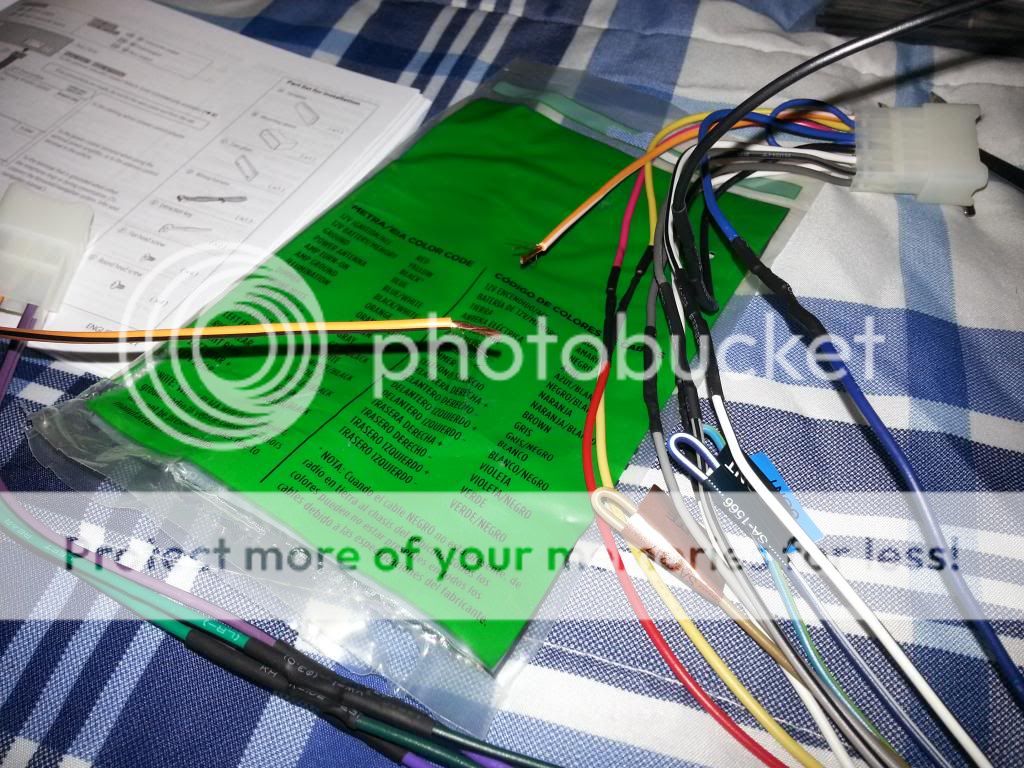
20131211_191219.jpg~original


20131211_190025.jpg


Thank you!
 
Register to hide this ad
It's been a while since I put my Kenwood head unit in, but if I recall correctly, I didn't hook up the orange ones on the Metra harness either. I'd tape them up, connect everything and turn it on to make sure it all works before you put it all back together. It's not a bad idea to do that anyway just to make sure all your connections are good.

And if you listen to the radio, double check that your antenna goes up and down before you put the head unit into the dash and screw everything on as well. I could have sworn that I hooked everything up correctly, but my antenna won't go up anymore. Not a big deal for me since I never listen to it, but you might want it working.
 
Last edited:
Thanks! Figure if two of us come to the same conclusion that it's less likely that I'm just blind.

As for the antenna going up thing, this kenwood harness had a specific "Antenna" power cable, the blue one. I saw on a youtube video to wire the antenna to the remote, but his harness didn't have the antenna cable. Hopefully this will work. I'll keep everyone posted.

I don't know if I'm going to bother putting together a build thread... No point in doing much to a t4r here in Florida. Just going to install a new stereo system, CB radio, and maybe do the deck plate and ISR mods.
 
I thought about taking it back out and wiring up the antenna to the remote after I noticed it wasn't working. That should definitely work, but I decided I'd rather have the antenna down all the time rather than up all the time. But if you don't mind the antenna being up whenever the head unit is on, then I'd say go for it!

And even if you don't do an official build thread, feel free to still post pictures of your 4runner and mods that you did in either the "what did you do to your 3rd gen today" thread or the picture thread stickied at the top. Everyone loves pictures haha.
 
I know for sure that with alpine (& I assume other brands) when you leave the orange illumination wire disconnected and taped off the head unit defaults to normal brightness.
 
^^This. My Pioneer just has illumination hooked up, no dimmer. I prefer it that way and wired it as such.

My antenna wire is also blue and I added a switch inline to be able to retract the antenna. As long as my headunit it on the antenna is up. Ipod, CD, radio, aux it doesn't matter. I put the switch in to be able to lower the antenna when it's not needed as well as for offroad and in the trees.
 
^^This. My Pioneer just has illumination hooked up, no dimmer. I prefer it that way and wired it as such.

My antenna wire is also blue and I added a switch inline to be able to retract the antenna. As long as my headunit it on the antenna is up. Ipod, CD, radio, aux it doesn't matter. I put the switch in to be able to lower the antenna when it's not needed as well as for offroad and in the trees.

I did the same using the ect switch in the new dash since mines a 5 speed.
 
I too have a 5 speed. Did you just drill a hole and put in a switch or did you buy an ect switch and wire it to that?

I've been wanting to find a cheap ect switch to wire into something. My antenna switch is just hidden near the console as it's not used much.
 
I too have a 5 speed. Did you just drill a hole and put in a switch or did you buy an ect switch and wire it to that?

I've been wanting to find a cheap ect switch to wire into something. My antenna switch is just hidden near the console as it's not used much.

I swapped out to a 99 style dash and center console and it was from an auto.

I just put power to one wire at a time with the switch pressed in and tested all of the others to see if they had power, once I found out the right wires it was simple to wire it up.

If you have a 96-98 center console I have a factory ect switch from one laying around I could mail to you if you wanted.
 
Not to completely derail the OP's thread but... I've got a '99 so there is a blank non pressable button in place of the ECT button. I may take you up on your offer, I just don't have anything to use a button for at the moment.
 
I installed my Kenwood KDC-X897 and still cannot get the antenna to go up and down.

Taped up the oranage dimmer wire - did not use.

Can one of you please give us a DIY on installing a switch to run the antenna up and down?
 
Look up your model unit and wire harness. There will be an antenna wire. It seems most are blue in color. I cut my wire, extended the ends to a switch that was hidden but accessible while driving. I wired it so up on the switch is up on the antenna and vise versa.

If you can't find a wiring diagram your wires might be labeled so check. Pull the wire or pin to verify function.
 
yes, it has a ble wire but when connected to Metra connector - no action.

Then wired to blue and white remote wire - nothing.
 
I installed my Kenwood KDC-X897 and still cannot get the antenna to go up and down.

Taped up the oranage dimmer wire - did not use.

Can one of you please give us a DIY on installing a switch to run the antenna up and down?

There is a blue wire that controls the power antenna, you'll need to hook that up to the wire which comes off of the antenna on the 4runner or the blue wire on the harness if you are using one. I don't know the colors on the Car side because I'm working with a hacked up radio harness.

On some headunits, the antenna will only come up when you are in the FM/AM radio mode, not sure about the kenwood.

If you want to wire a switch in to manually go up or down with it, you just need the blue wire to come into the switch and go into the harness like it normally would, all you need is a 2 way, on/off switch, nothing fancy.

If your headunit makes the antenna go up/down when you switch in or out of tuner mode, but you want it to have constant power, you can use the blue/white remote wire the same way, it will have power whenever the headunit is on.
 
I just got this HU for Xmas through Crutchfield. The first problem I noticed was that the wiring harness they gave me that attaches to the Kenwood harness was the wrong one. Now, I am a helicopter electrician, and obviously have no problems soldering said harnesses after cutting the stock harness out. But, since I want to do it right the first time and not have to worry about doing it all over again on the chance I throw in a different HU, I'm going to call em up and order the correct one.

The second problem I noticed was that the stock brackets off of the stock HU don't match up to the metra piece OR the actual head unit. Did anyone else have is problem?
 
I just got this HU for Xmas through Crutchfield. The first problem I noticed was that the wiring harness they gave me that attaches to the Kenwood harness was the wrong one. Now, I am a helicopter electrician, and obviously have no problems soldering said harnesses after cutting the stock harness out. But, since I want to do it right the first time and not have to worry about doing it all over again on the chance I throw in a different HU, I'm going to call em up and order the correct one.

The second problem I noticed was that the stock brackets off of the stock HU don't match up to the metra piece OR the actual head unit. Did anyone else have is problem?

Can't really say much about the first problem, but it looks like you already have a fix for it. As for the 2nd one, I think I can help a bit. If you follow the cables that used to plug into the back of the HU down a bit, there is a metal box. That metal box is a small amp. If you un-screw that, and look on the back there are more cables plugged into that. Unplug the cables, and you will see that those cables match with the metra harness.

Enjoy!
 
Can't really say much about the first problem, but it looks like you already have a fix for it. As for the 2nd one, I think I can help a bit. If you follow the cables that used to plug into the back of the HU down a bit, there is a metal box. That metal box is a small amp. If you un-screw that, and look on the back there are more cables plugged into that. Unplug the cables, and you will see that those cables match with the metra harness.

Enjoy!

That makes a lot of sense... Thanks
 

Members online

Forum statistics

Threads
278,315
Messages
3,554,104
Members
248,016
Latest member
Advally Service

Trending content

Back
Top