Kenwood DNX7100 Installation

airbur

New member
Hi All,

Like other projects, after reading all your posts and researching quite a bit, I bought the Kenwood DNX7100 system. Some of the reasons I chose this system over others: USB 2.0 interface, SD card interface, Garmin navigation internals, ability to download free firmware and purchase database updates directly from Garmin, 6.95
 
Last edited:
Register to hide this ad
Nice job! Man...is that thing hot or what?! *drool* I want one now! You get to xm radio through garmin nav right? Looks like same exact interface as portable garmin navs. Least you know nav kicks ass. Man I can't wait!
 
the garmin gps feature in that is sweet. Does it have all the points of interest and phone numbers of the "POI"?
 
The Garmin NAV is very cool. I believe it comes in at around 6 million POIs with all the contact info etc. You can also load your own POIs or download POI databases from the Internet.

Yes, XM Radio control is through the Nav screens which is fine. It actually makes sense to have both Nav and XM in the same area since they are both using satellites.

So far I love it. Haven't found one thing I don't like yet.
 
Last edited:
that white usb stick on the center console is an accident waiting to happen. too much happens in that area, you know? the shift of the arm, a reach there and next thing you know, it breaks off or that starbucks spills all in it. should've placed it in an area with less traffic.
 
I had trouble hooking up the SWI-JACK. I couldn't get it to program. I don't know if I hooked the resistor up right or not?? Did you just hook it up to the blue/white wire? How did you connect the 2 wires that were supposed to be connected with the resistor? I'm still a little confused on how to do it.
 
skoobz said:
that white usb stick on the center console is an accident waiting to happen. too much happens in that area, you know? the shift of the arm, a reach there and next thing you know, it breaks off or that starbucks spills all in it. should've placed it in an area with less traffic.

I like having easy access to the port. Also, the thumb drive I normally use is much smaller and isn't in the way of anything. What's nice is that the plastic place holder I used can be swapped out for one next to the steering column so I can put it there with not too much hassle if needed.
 
BigRed05 said:
I had trouble hooking up the SWI-JACK. I couldn't get it to program. I don't know if I hooked the resistor up right or not?? Did you just hook it up to the blue/white wire? How did you connect the 2 wires that were supposed to be connected with the resistor? I'm still a little confused on how to do it.

I just used the instructions from the web site for the 4Runner (see link above). They are very descriptive. You need to make sure to ground one of the wires.
 
Airbur, did you use the factory stereo brackets to put the stereo back into the car, or did you use the parts that came with the radio. I used the factory brackets and my stereo does not sit in the middle of the dash like yours does. I guess I'm going to have to go back in and bend the brackets a little to get the radio to be positioned right. Also how did you the plastic around the radio to stay in place? Did you glue it on or something?
 
BigRed05 said:
Airbur, did you use the factory stereo brackets to put the stereo back into the car, or did you use the parts that came with the radio. I used the factory brackets and my stereo does not sit in the middle of the dash like yours does. I guess I'm going to have to go back in and bend the brackets a little to get the radio to be positioned right. Also how did you the plastic around the radio to stay in place? Did you glue it on or something?

I used the factory brackets off the toyota stereo. They mounted perfectly to 3 screw holes on the DNX7100. I had the JBL 6-disc in-dash changer unit so if you have one of the other toyota stereos you may not have the same brackets.

The only thing I had to customize was the black-plastic trim that goes around the unit....that was a pain. I measured and cut it out. There were 2 trim pieces that came with the unit and I used the larger one. It attaches to the unit with 2 clips on each side...you just push it on.

Fyi....when I put the dash back together and pushed the silver trim around the stereo back in, I cracked the top right corner of the DNX7100's plastic trim piece that I customized above. It is much closer to the silver trim than any of the other corners. I'll have to go back in a fix that at some point....it's really hard to see though.
 
Last edited:
about mounting kits:

Why doesn't the 95-8202 work? because of the gap at the top?

What kit did you end up using? Thanks.

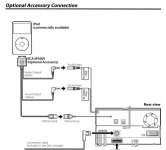
Can you hook up ipod and usb at the same time. Thanks.

Jeff
 
How's the sound quality?
Does it sound like the stock HU with "Surround mode" On or Off?
I noticed the HUGE difference in sound quality between the two and I always keep the mode turned on.

btw, I'll be receiving my unit next week! :happy bda
 
supraman215 said:
about mounting kits:

Why doesn't the 95-8202 work? because of the gap at the top?
What kit did you end up using? Thanks.
Can you hook up ipod and usb at the same time. Thanks. Jeff

Hi Jeff.....The kit didn't work because I had the JBL 6 Disc In-Dash changer originally. When you remove this unit, the dash opening is much larger due to the plastic trim piece. If you don't have this unit (or if you have the SR5 I think) you should be ok.

I ended up using the plastic trim that came with the DNX7100. It took some modification and cutting but ended up working out in the end. There's more info in the writeup at the beginning of this thread.
 
4Runner1371 said:
How's the sound quality?
Does it sound like the stock HU with "Surround mode" On or Off?
I noticed the HUGE difference in sound quality between the two and I always keep the mode turned on.

btw, I'll be receiving my unit next week! :happy bda

Truthfully, the sound quality if fine except for higher volumes. The front speakers start to cut out much sooner than with the stock system. I believe this is my fault though as I forgot to adjust the TYTO-01's potentiometer. I should be able to fix it but I'll have top open the dash again...gonna wait until I'm ready to install XM.
 
Last edited:
thanks man.

Yeah I read the thing at the begining but I am still a little confused. I also have the 6disc JBL indash unit. but I still don't understand how you filled the big gaps to the left and right of the unit. The trim ring that it comes with then 7100 is enough to fill the gaps? Thanks again man!

Jeff
 
FYI....
 

Attachments

  • ipod1.jpg
    ipod1.jpg
    37.6 KB · Views: 6,817
supraman215 said:
thanks man. Yeah I read the thing at the begining but I am still a little confused. I also have the 6disc JBL indash unit. but I still don't understand how you filled the big gaps to the left and right of the unit. The trim ring that it comes with then 7100 is enough to fill the gaps? Thanks again man! Jeff

Yep, it's more than big enough....that's why I had to use a razor blade and cut it down. This took care of the top, left, and right sides...but left a big gap at the bottom. For this I used some of the leftover trim that I cut off and placed it flat in the gap....as you can see from the pics...looks descent enough.
 
airbur i remember that you were trying to get the diversity antenna to work i think i have an idea you said the niasan adapter was 2 f plugs correct? the second Toyota antenna is a gm antenna size so all you need is a gm/mini to F adapter and then a nisana diversity antenna adapter.
 

Members online

Forum statistics

Threads
278,309
Messages
3,554,075
Members
248,016
Latest member
Advally Service

Trending content

Back
Top