
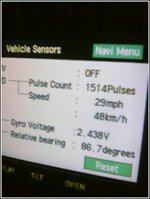
Let the NAV tell you how fast you are really going or use it while driving

LukeSKY

New member
IT WORKS ON THE 4RUNNER!!! MY 2005, FREAK'N AWESOME MOD.

Just go into the service mode, you can do this while driving even, and turn the over-ride button on. Hold it for 5 sec, see it highlight, and hit the back key.....

Now you can enter driving directions while driving!!

ENJOY!

Luke

http://www.clublexus.com/forums/showthread.php?t=171662
 

Attachments

  • 3.jpg
    3.jpg
    26.1 KB · Views: 1,036
Register to hide this ad
This is great, now tell us how to make it stay in this mode permenantly, and elimiminate that stupid disclaimer every time you use the nav system.
 
LukeSKY said:
IT WORKS ON THE 4RUNNER!!! MY 2005, FREAK'N AWESOME MOD.

Just go into the service mode, you can do this while driving even, and turn the over-ride button on. Hold it for 5 sec, see it highlight, and hit the back key.....

Now you can enter driving directions while driving!!

ENJOY!

Luke

http://www.clublexus.com/forums/showthread.php?t=171662

I know how overide the system but how did you get the screen that show the speed. Also is there any other info that can be displayed.

Koz
 
Re: Re: Let the NAV tell you how fast you are really going or use it while driving

Koz said:
I know how overide the system but how did you get the screen that show the speed. Also is there any other info that can be displayed.

Koz
which sateliteS it connects to, and ......error log:bash:
 
Last edited:
Hitman said:
Yeah, I've been using the override for a few months now, but I only wish that it would stay in override mode after I turn off the ignition and restart it.

For some reason I cannot make the override work (so that I can use the nav while driving). I do not ahve a speaker picture when I go to the Volume Menue, it just says Volume centered across the top of the screen. When I do the top/bottom/top/bottom toucing of the left corners per the isntructions nothing happpens? What am I missing?

I can get the NAV into diagnostic mode by pushing and holding the INFO button (bottom right) and then then turn on/off your park lights 3x-5x times. This lets me see the speed and sensor info etc. But even in here there is no Override Button?
 
Duc Hunter said:
For some reason I cannot make the override work (so that I can use the nav while driving).

My navi is an all-in-one unit originally intended for a Toyota Camry--you know, the one from OEMvalue.com.

I think the '04 and earlier 4Runner navigations systems were the older units (not the all-in-one) and do not have the override function.

I know that the '05 4Runner models with factory navi have it, but you might be out of luck with yours.
 
i belive i have read that for 2004 model you need to :

hit menu, volume (like 05's)

Then hit the screen


top left

bottom left

top left

bottom left

bottom right
 
LukeSKY said:
i belive i have read that for 2004 model you need to :
hit menu, volume (like 05's)
Then hit the screen
top left
bottom left
top left
bottom left
bottom right

That is what I did and it does not work. :(

So, think I can plug in an 05-newer NAV unit into my 04 truck? What other reasons would there be to do that? Hmmmm...........no my brain is going. :bash:
 
Duc Hunter said:
That is what I did and it does not work. :(

So, think I can plug in an 05-newer NAV unit into my 04 truck? What other reasons would there be to do that? Hmmmm...........no my brain is going. :bash:

Here's an idea:

Try to sell your factory navi on ebay. If it sells, just buy a new all-in-one unit from OEMvalue and pop it in. You might even sell your navi for more than the OEMvalue navi costs.....you never know.
 
Hitman said:
Here's an idea:

Try to sell your factory navi on ebay. If it sells, just buy a new all-in-one unit from OEMvalue and pop it in. You might even sell your navi for more than the OEMvalue navi costs.....you never know.

Great idea, if it plugs in and works. So, either I wait to see if someone here says it will or I have to save my money, buy one, see if it works and If it does, then sell mine. Why go through all the work if there is not a big reason to do it as well. It is not like the 04 unit sucks, it is a very nice unit!
 
Duc Hunter said:
Great idea, if it plugs in and works. So, either I wait to see if someone here says it will or I have to save my money, buy one, see if it works and If it does, then sell mine. Why go through all the work if there is not a big reason to do it as well. It is not like the 04 unit sucks, it is a very nice unit!

It will definitely work.... just just have to buy the Camry unit if you have the non-JBL radio or the Solara unit if you do have the JBL radio.

Either way, it's a pretty simple installation if you don't mind going through the hassle of ripping your system out and installing a new one.

The only thing you may not like is the buttons are backlit in green on the all-in-one units. It doesn't bother me at all, but some people don't like it unless it matches the rest of the dash lighting.
 
I can confirm the service menu trick & destination override works like a champ on the 2006 OEM Nav system.
 
Great find!! I just tried it out on my 2005 factory unit and it worked. I held the 'info' button down while turning the parking lights on/off 3 times. The only problem is you have to restart the truck to get the radio back on.
 
i just tried to get my nav to work while i am drivin it works like a charm. what else can we do to it. i read something about the speedometer but not sure, can we get a clear response on how to do it.
thanx
 
From what I have read on the Lexus board, there is a button to make the rearview camera work while moving forward when in the diagnostic screen. I can't even find anything about a rearview camera in the menus. My moms RX400h has a button for the camera but it doesn't display an image. Does anybody here have a button for the camera?
 
Override on 2004 does work!

As mentioned above, I figured out the override on the '04 OEM Nav unit.

I found the service menu on the 2004 OEM Nav system. Press the Menu tab, then select DVD. On the DVD screen press (no button just the screen):
top left
bottom left
top left
bottom left
bottom right

The service menu shows the Override button. Push the button until it beeps (2 or 3 seconds). At that point you can drive and have full navigation functionality. The passenger can input addresses at any speed.
 

Members online

Forum statistics

Threads
278,317
Messages
3,554,128
Members
248,016
Latest member
Advally Service

Trending content

Back
Top