My Dasaita Headunit Experience/Tips

deafboy

New member
Had shared this over on Reddit but thought it'd be worth sharing here as well. Since I've had my 4Runner I've been searching and have seen a lot of people asking about the Dasaita headunit and figured I'd throw in my $0.02 since I haven't seen too many people use the stock GPS antenna and I haven't seen anyone use the XM
Antenna.

oYzYkFx.jpg


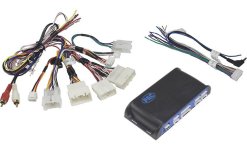
Have had my Dasaita Headunit for a bit over a month now, overall, I like it, but it's definitely not perfect. At full price I think I'd be a bit disappointed, but got it as an Amazon warehouse deal for $464 and overall does what I want, better screen and Android Auto. Paired it with TWO of this kit from crutchfield/Amazon and this adapter to utilize the stock GPS antenna as well as the stock XM antenna for WiFi paired with this adapter. The use of the XM antenna for WiFi isn't needed but I figured if it's there, I might as well use it. Fortunately Toyota went a bit wide on the frequency range since technically WiFi shouldn't work on an XM antenna, but it's been great for me so far, little bit better range than the tiny stock antenna that comes with the head unit, I'd imagine mostly due to location for reception.

Install was super simple, followed this video and was able to just take my sweet time and do a clean job. The trim was a better match than I was expecting, it does look pretty OEM.

My biggest complaint is the screen is pretty bright even at the lowest setting, took some getting used to for night driving, but not a huge deal to me and there are some work arounds if you don't mind playing around. I ended up adjusting the settings within the headunit's factory settings (code 126 to access) and then utilized this app to get it even dimmer. I ended up installing a different launcher to adjust the look.

The wireless Android Auto is hit or miss, I personally just use wired since my phone just sits in my dock anyways.
Having Google Maps without a phone is nice, although the layout is a bit weird given the wide screen. But great in a pinch. I rarely have had to use that though since I tend to always have my phone on me.

One thing to note if you plan on using wifi/bluetooth a lot, it seems that since it only has the single antenna you can really only use one at a time effectively. If you try to use both at the same time it can be a bit spotty, it can work, but it can be a bit more hit/miss. This was true with the stock antenna and the car's XM antenna.

The steering wheel controls are great, and honestly, that alone was worth the upgrade to me, being able to move to the next track and pause/mute was more intuitive.

The knobs aren't as nice as the ones on the OE unit, they're just hard plastic but I never use the knobs, I use the steering wheel controls so that hasn't bothered me, but definitely worth noting.

Since I didn't use the kit's GPS and I didn't install a front camera, the cabling was actually pretty minimal which was nice.

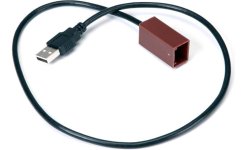
I however did opt to utilize all the USB ports and HDMI port. I had the blank spots in the glove box since my stock USB and 12v are on the center stack. Decided to populate those to better utilize the ports the Dasaita unit offers. Have this USB port in the 12v slot and this USB/HDMI adapter in the smaller blank button next to it.

For what it is, it's a pretty nice kit. It's not the fanciest most high-tech kit out there. But I definitely consider it an upgrade over the stock unit.

If you're interested in anything in particular, let me know, happy to answer any questions / share and pics/vids you may want. Still learning so might not have all the answers, haha
 
Last edited:
Register to hide this ad
What do you have the HDMI port for?

The HDMI is output on the head unit.
If you want input I used an adapter on the RCA cable to create a HDMI input that I use for an iPhone digital AV adapter.
 
What do you have the HDMI port for?

The HDMI is output on the head unit.
If you want input I used an adapter on the RCA cable to create a HDMI input that I use for an iPhone digital AV adapter.

I don't actually utilize the HDMI at all. It just happened to be one of the few USB that filled that slot that I liked. I was initially going to get a dual USB for it but ended up not liking any of her options I found.
 
Steering wheel settings

I installed this unit in my 2016 Runner, but cannot get the Steering wheel functions to work. Went to settings, and I see that under the CANBUS option it is selected to NO. When you pull down the Menu it gives you over 100 options to choose from...Do i need to select one of the Toyota options....if so, which one?
 
I installed this unit in my 2016 Runner, but cannot get the Steering wheel functions to work. Went to settings, and I see that under the CANBUS option it is selected to NO. When you pull down the Menu it gives you over 100 options to choose from...Do i need to select one of the Toyota options....if so, which one?

Got it working.....Looks like i needed to choose the CAN 08Toyota RAV4Corolla(Simple) option and reboot. It then let me choose wheel keys and select each button function.....Now i need to figure out why my Radio signal fades in and out, and most channels wont even register. Antenna is seeded properly.....any thoughts?
 
A couple weeks ago I just bought my first 4Runner, a 2011 Limited.

I found the Dasaita head units and purchased one for my 4runner via amazon.com

I'm just wondering how you know which canbus setting to choose in the settings? I'm getting no vehicle data showing up in my headunit like I thought might.

Thanks!
 
A couple weeks ago I just bought my first 4Runner, a 2011 Limited.

I found the Dasaita head units and purchased one for my 4runner via amazon.com

I'm just wondering how you know which canbus setting to choose in the settings? I'm getting no vehicle data showing up in my headunit like I thought might.

Thanks!

I used this for my 2011 4Runner SR5 aftermarket head unit to retain steering wheel, handsfree functionality, and optional NAV data input. It comes with an OBD-2 V3 2-pin connector with simple straight forward instructions.

PAC RP4.2-TY11 Wiring Interface
PAC RP4.2-TY11 Wiring Interface Connect a new car stereo and retain factory JBL system, steering wheel controls, and aux input in select 2005-19 Toyota, Lexus, and Scion vehicles at Crutchfield

RP4.2-TY11 Owners Manual
https://images.crutchfieldonline.com/ImageBank/v20230323160700/Manuals/541/541RP4TY11.PDF

Metra AX-TOYUSB-2 USB Port Cable (to utilize the USB in the glove box)
Metra AX-TOYUSB-2 USB Port Cable Allows you to connect the factory USB port on select 2010-up Toyota vehicles to a new car stereo at Crutchfield

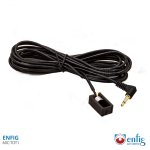
Everything works like factory. You can also buy a direct replacement mic with an 1/8th" jack that works better than the stock one.

Enfig MIC-TOY1 – Toyota and Lexus Factory Fit Custom Microphone
Enfig MIC-TOY1 – Toyota and Lexus Factory Fit Custom Microphone – Enfig Car Stereo

Don't even get me started on the Party Mode rabbit hole you'll go down with this truck.

Cheers!
 

Attachments

  • g541RP4TY11-F.jpg
    g541RP4TY11-F.jpg
    31.5 KB · Views: 4,669
  • g120TOYUSB2-F.jpg
    g120TOYUSB2-F.jpg
    18.9 KB · Views: 4,649
  • ENFIG_MIC_TOY1.jpg
    ENFIG_MIC_TOY1.jpg
    102.9 KB · Views: 4,694
  • CrutchfieldMasterSheet-0000530082.pdf
    CrutchfieldMasterSheet-0000530082.pdf
    1.5 MB · Views: 1,288
thank you for this write up. i have the same unit in my 4runner. How did you get around from not using the wirelss android auto to plug-in android auto?
 
My Dasaita head unit came with a wiring harness that fit my vehicle and all I'm missing is any vehicle data that should be received.


I'm also curious about what a couple connections from my stock head unit that aren't being used with the Dasaita harness and if one of these could provide GPS as I haven't yet plugged in the small GPS unit that came with the head unit.


I used this for my 2011 4Runner SR5 aftermarket head unit to retain steering wheel, handsfree functionality, and optional NAV data input. It comes with an OBD-2 V3 2-pin connector with simple straight forward instructions.

PAC RP4.2-TY11 Wiring Interface
PAC RP4.2-TY11 Wiring Interface Connect a new car stereo and retain factory JBL system, steering wheel controls, and aux input in select 2005-19 Toyota, Lexus, and Scion vehicles at Crutchfield

RP4.2-TY11 Owners Manual
https://images.crutchfieldonline.com/ImageBank/v20230323160700/Manuals/541/541RP4TY11.PDF

Metra AX-TOYUSB-2 USB Port Cable (to utilize the USB in the glove box)
Metra AX-TOYUSB-2 USB Port Cable Allows you to connect the factory USB port on select 2010-up Toyota vehicles to a new car stereo at Crutchfield

Everything works like factory. You can also buy a direct replacement mic with an 1/8th" jack that works better than the stock one.

Enfig MIC-TOY1 – Toyota and Lexus Factory Fit Custom Microphone
Enfig MIC-TOY1 – Toyota and Lexus Factory Fit Custom Microphone – Enfig Car Stereo

Don't even get me started on the Party Mode rabbit hole you'll go down with this truck.

Cheers!
 

Attachments

  • PXL_20230406_145221091.MP.jpg
    PXL_20230406_145221091.MP.jpg
    86.2 KB · Views: 4,594
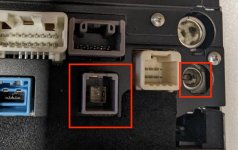
1 - XM Radio connector if equipped
2 - GPS NAV Antenna connector (the smaller of the two male leads)

I have seen an antenna adapter online somewhere that combine the two Antennas for aftermarket HU's wanting to maintain NAV function. The OB-2 connector should transmit GPS telemetry to the HU if supported.
 
Thank you! I was wondering if one of them was GPS Antenna connector.

I'll try to see if I can find an adapter to get it to plugin to my Dasaita head unit.
 
Had shared this over on Reddit but thought it'd be worth sharing here as well. Since I've had my 4Runner I've been searching and have seen a lot of people asking about the Dasaita headunit and figured I'd throw in my $0.02 since I haven't seen too many people use the stock GPS antenna and I haven't seen anyone use the XM
Antenna.

oYzYkFx.jpg


Have had my Dasaita Headunit for a bit over a month now, overall, I like it, but it's definitely not perfect. At full price I think I'd be a bit disappointed, but got it as an Amazon warehouse deal for $464 and overall does what I want, better screen and Android Auto. Paired it with TWO of this kit from crutchfield/Amazon and this adapter to utilize the stock GPS antenna as well as the stock XM antenna for WiFi paired with this adapter. The use of the XM antenna for WiFi isn't needed but I figured if it's there, I might as well use it. Fortunately Toyota went a bit wide on the frequency range since technically WiFi shouldn't work on an XM antenna, but it's been great for me so far, little bit better range than the tiny stock antenna that comes with the head unit, I'd imagine mostly due to location for reception.

Install was super simple, followed this video and was able to just take my sweet time and do a clean job. The trim was a better match than I was expecting, it does look pretty OEM.

My biggest complaint is the screen is pretty bright even at the lowest setting, took some getting used to for night driving, but not a huge deal to me and there are some work arounds if you don't mind playing around. I ended up adjusting the settings within the headunit's factory settings (code 126 to access) and then utilized this app to get it even dimmer. I ended up installing a different launcher to adjust the look.

The wireless Android Auto is hit or miss, I personally just use wired since my phone just sits in my dock anyways.
Having Google Maps without a phone is nice, although the layout is a bit weird given the wide screen. But great in a pinch. I rarely have had to use that though since I tend to always have my phone on me.

One thing to note if you plan on using wifi/bluetooth a lot, it seems that since it only has the single antenna you can really only use one at a time effectively. If you try to use both at the same time it can be a bit spotty, it can work, but it can be a bit more hit/miss. This was true with the stock antenna and the car's XM antenna.

The steering wheel controls are great, and honestly, that alone was worth the upgrade to me, being able to move to the next track and pause/mute was more intuitive.

The knobs aren't as nice as the ones on the OE unit, they're just hard plastic but I never use the knobs, I use the steering wheel controls so that hasn't bothered me, but definitely worth noting.

Since I didn't use the kit's GPS and I didn't install a front camera, the cabling was actually pretty minimal which was nice.

I however did opt to utilize all the USB ports and HDMI port. I had the blank spots in the glove box since my stock USB and 12v are on the center stack. Decided to populate those to better utilize the ports the Dasaita unit offers. Have this USB port in the 12v slot and this USB/HDMI adapter in the smaller blank button next to it.

For what it is, it's a pretty nice kit. It's not the fanciest most high-tech kit out there. But I definitely consider it an upgrade over the stock unit.

If you're interested in anything in particular, let me know, happy to answer any questions / share and pics/vids you may want. Still learning so might not have all the answers, haha

I had difficulty figuring out how to wire up my 2015 limited bc of the stereo system.
-Biggest complaint is that the radio is super loud even on the lowest setting. I went into setting and decreased the volume on each speaker, but it is still super loud (could have wired it incorrectly, but was the only way i could figure out to get sound in all the speakers).
Sound if fine with apple car play/my phone
-Wireless carplay works pretty well for me especially considering any other stereo with this is about 1200.
 
I had difficulty figuring out how to wire up my 2015 limited bc of the stereo system.
-Biggest complaint is that the radio is super loud even on the lowest setting. I went into setting and decreased the volume on each speaker, but it is still super loud (could have wired it incorrectly, but was the only way i could figure out to get sound in all the speakers).
Sound if fine with apple car play/my phone
-Wireless carplay works pretty well for me especially considering any other stereo with this is about 1200.

Interesting, I haven't had any volume level issues. Granted I really only use Android Auto or the headunits YouTube app.

Long term, I am not exactly sold on this Dasaita unit. The longer I have owned it the more frequently I get random bugs. But I also haven't seen any other options that I like
 
I ended up returning my Dasaita head unit and have installed the Sony XAV-9500 ES.

While I'm ok messing with Android and troubleshooting I didn't want my wife to struggle with the head unit if she ever needs to use my vehicle and I wasn't happy with the radio apps I tried - which is what my wife usually uses since she doesn't use android auto like I do.

If anyone chooses the XAV-9500 ES I highly recommend you purchase the Sony microphone mount from Trail Grid Pro so you can put your mic in the same spot as the factory mic. It's EASY to run it to that location and it's picking up audio perfectly for me.
 
I ended up returning my Dasaita head unit and have installed the Sony XAV-9500 ES.

While I'm ok messing with Android and troubleshooting I didn't want my wife to struggle with the head unit if she ever needs to use my vehicle and I wasn't happy with the radio apps I tried - which is what my wife usually uses since she doesn't use android auto like I do.

If anyone chooses the XAV-9500 ES I highly recommend you purchase the Sony microphone mount from Trail Grid Pro so you can put your mic in the same spot as the factory mic. It's EASY to run it to that location and it's picking up audio perfectly for me.

good choice, can you post pictures of the sony 9500? Did you keep it mounted the same way it came from TGP?
 
I didn't get it from TGP as their kit says '14-23 and I have a 2011.

I just happened across their mic mount and ordered it immediately.

Can post pics of it soon. Currently having an better quality backup camera installed.
 
I didn't get it from TGP as their kit says '14-23 and I have a 2011.

I just happened across their mic mount and ordered it immediately.

Can post pics of it soon. Currently having an better quality backup camera installed.

Curious to see mounting of it, can be more flush & lowered to not block the vents
 
Interesting, I haven't had any volume level issues. Granted I really only use Android Auto or the headunits YouTube app.

Long term, I am not exactly sold on this Dasaita unit. The longer I have owned it the more frequently I get random bugs. But I also haven't seen any other options that I like

i think mine had to do because of it being a limited and the sound system being a little different. TBH I might have messed up the wires. The instructions are not the best.
 

Members online

No members online now.

Forum statistics

Threads
278,306
Messages
3,554,045
Members
248,016
Latest member
Advally Service

Trending content

Back
Top