
You are using an out of date browser. It may not display this or other websites correctly.
You should upgrade or use an alternative browser.
You should upgrade or use an alternative browser.
New Maestro Radio Solution
- Thread starter Superjet
- Start date
I ended up going with the 9903s. All of the equipment should arrive today. [MENTION=147757]GearJunkie88[/MENTION] does the head unit auto dim when you turn the lights on? I was just wondering if the wiring harness makes this possible. Also, where did you route your Carplay/Android Auto cable? Thanks.

GearJunkie88
New member
I ended up going with the 9903s. All of the equipment should arrive today. [MENTION=147757]GearJunkie88[/MENTION] does the head unit auto dim when you turn the lights on? I was just wondering if the wiring harness makes this possible. Also, where did you route your Carplay/Android Auto cable? Thanks.
Dimmer: Yes, it dims with the headlights. The Kenwood allows you to adjust the brightness level when the headlights are off (I put it at max brightness for day viewing) and when the headlights are on (I put it at min brightness for night viewing).
USB: The Kenwood comes with a USB cable that has 1 plug on one end (plugs into the head unit) and 2 standard female USB plugs on the other end. One of those plugs is designated as the smartphone plug; the other is for a USB flash drive. I plugged the smartphone USB plug into the factory USB port that is on the center console (the one with the Aux plug and the USB plug). I used an adapter for that (more about that further down). I plugged a standard Apple Lightning cable into the console USB port, which is plugged into my iPhone. This makes it easy to reach the cable to plug in the phone.
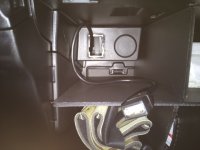
For the USB flash drive plug, I don't plan on using it often. I ran the cable from the head unit into the glove box. There is a panel in the glove box that has a couple of pop-out blanks (I think this is where the USB port and 12v "cigarette lighter" plug was installed in earlier 4Runners). I popped out the USB port blank and ran the Kenwood plug through there. Picture below.
USB adapters: Crutchfield automatically added the Metra AX-TOYUSB2 to my cart, saying it was the correct part. It is NOT the correct part. It does not bridge the gap between the female end of the Kenwood plug and the factory proprietary plug on the backside of the center console USB plug. You need the Metra AX-TOYUSB (notice no "2" at the end of that part number). Luckily, the correct adapter is included with the Maestro TO2 wiring harness.
Attachments
GearJunkie88
New member
I installed my old pioneer avh-4000nex in my 2016 Trail pre. I used the Crux swrty-61n. So I dont need the wiring part to make everything work. I just want to add idatalink to it. Is that possible or do I need to switch wiring harness and use idatalink?
Good question. I'm no car stereo technician but I'll give an answer... you may want to verify.
First, Maestro works with Maestro-capable head units. Make sure the Pioneer you have is Maestro-capable. It needs a special plug on the back of the head unit for the Maestro to plug in.
Second, the Maestro comes with about 783,962 wires (may be some rounding error). Some of those wires are connected to the head unit's wiring harness. Others are connected to things like your backup camera, GPS antenna, XM antenna, and the OBDII connector in the 4Runner.
Third, I don't know much about the Crux swrty-61n (I just looked at it on Crutchfield). It seems that is used to retain steering wheel controls. The Maestro does this (and more). It seems that the Crux would duplicate some of the Maestro functions. I don't think you could wire the Maestro into the system with the Crux. I think you would replace the Crux with the Maestro.
I'm inclined to guess that yes, you will need the Maestro harness.
Dimmer: Yes, it dims with the headlights. The Kenwood allows you to adjust the brightness level when the headlights are off (I put it at max brightness for day viewing) and when the headlights are on (I put it at min brightness for night viewing).
USB: The Kenwood comes with a USB cable that has 1 plug on one end (plugs into the head unit) and 2 standard female USB plugs on the other end. One of those plugs is designated as the smartphone plug; the other is for a USB flash drive. I plugged the smartphone USB plug into the factory USB port that is on the center console (the one with the Aux plug and the USB plug). I used an adapter for that (more about that further down). I plugged a standard Apple Lightning cable into the console USB port, which is plugged into my iPhone. This makes it easy to reach the cable to plug in the phone.
For the USB flash drive plug, I don't plan on using it often. I ran the cable from the head unit into the glove box. There is a panel in the glove box that has a couple of pop-out blanks (I think this is where the USB port and 12v "cigarette lighter" plug was installed in earlier 4Runners). I popped out the USB port blank and ran the Kenwood plug through there. Picture below.
USB adapters: Crutchfield automatically added the Metra AX-TOYUSB2 to my cart, saying it was the correct part. It is NOT the correct part. It does not bridge the gap between the female end of the Kenwood plug and the factory proprietary plug on the backside of the center console USB plug. You need the Metra AX-TOYUSB (notice no "2" at the end of that part number). Luckily, the correct adapter is included with the Maestro TO2 wiring harness.
Thanks [MENTION=147757]GearJunkie88[/MENTION]. That is helpful information.
I saw in one of your previous posts in the thread where you mentioned the AX-TOYUSB2 not being compatible with your vehicle. When I added the head unit to my cart at Crutchfield it gave additional kit options for the 4Runner over to the side. I clicked on that and one kit had everything but the TOYUSB2 and was about $15 cheaper so I added that kit knowing the T02 harness had the cable I needed thanks to your earlier post. I appreciate all your help.
I installed my old pioneer avh-4000nex in my 2016 Trail pre. I used the Crux swrty-61n. So I dont need the wiring part to make everything work. I just want to add idatalink to it. Is that possible or do I need to switch wiring harness and use idatalink?
The 4000nex has very limited Maestro support. Not worth it unless you upgraded to a 4200nex
I thought I would give an update on my installation. I would have already had this installed but I didn't like the color of the Scosche dash kit. I have been trying to paint it. I'm no painter which is why I'm still not finished. I didn't do a good job the first time so I sanded it down and started again. The second time it didn't look bad but I thought I could do better so I sanded again and started adding primer to it yesterday. I have a second Scosche kit ordered just in case I screw this current one up.
I have everything else prepped and ready to go. I soldered the harness over the weekend and I have the Maestro firmware flashed. I have it connected to the harness and ready to go.
Hopefully I can get the dash kit ready and get it installed this weekend.
Here is a picture of the head unit harness soldered to the Idatalink TO2 harness.

I have everything else prepped and ready to go. I soldered the harness over the weekend and I have the Maestro firmware flashed. I have it connected to the harness and ready to go.
Hopefully I can get the dash kit ready and get it installed this weekend.
Here is a picture of the head unit harness soldered to the Idatalink TO2 harness.

Auntie Soshul
New member
I thought I would give an update on my installation. I would have already had this installed but I didn't like the color of the Scosche dash kit. I have been trying to paint it. I'm no painter which is why I'm still not finished. I didn't do a good job the first time so I sanded it down and started again. The second time it didn't look bad but I thought I could do better so I sanded again and started adding primer to it yesterday. I have a second Scosche kit ordered just in case I screw this current one up.
I have everything else prepped and ready to go. I soldered the harness over the weekend and I have the Maestro firmware flashed. I have it connected to the harness and ready to go.
Hopefully I can get the dash kit ready and get it installed this weekend.
Here is a picture of the head unit harness soldered to the Idatalink TO2 harness.
I'll be following your progress, as I'm on the fence about changing the head unit and using the Maestro harness.
I got everything installed this weekend. I'm really liking it so far. It's great having access to all of that vehicle information at the push of a button. The audio sounds great as well once you get it dialed in. I really liked the audio produced by the stock head unit but the Kenwood sounds great. I can hear all of the little details from my flac audio files.
I was bummed there was no sensor for oil temperature and apparently the torque can't be read either. It was greyed out as an option in the gauges.
I still haven't went over the vehicle programming settings much. I will try to do that this week.
I was bummed there was no sensor for oil temperature and apparently the torque can't be read either. It was greyed out as an option in the gauges.
I still haven't went over the vehicle programming settings much. I will try to do that this week.

Ricomondo
New member
See above
[MENTION=131466]Superjet[/MENTION],
Ok folks I had my Kenwood DNX693S installed last night and I'm still messing around with it, but here are two things I'm seeing right now:
1) The Maestro RR unit seems to not provide for the up/down (arrows) functions on the steering wheel, so that I can flip through my preset stations for HD radio, Satellite radio etc. I can use the left/right (arrows), but all that does is advance the station by one, for example if listening to FM radio and I'm on preset 1 (97.9), it just moves the station to 98.0 or 97.6, it doesnt move to preset #2. Same with XM, if I'm on Lithium (#34) and use the arrows it goes to 34 or 36, not the next preset.
2) The USB on the center stack seems to not be usable for the apple carplay. When I plugged the iphone 6S+ into it, I got a "ipod not recognized" message. Went back to the install shop and they had installed the Kenwood Apple iphone/ipod cable USB in the glovebox. Thats not gonna fly as I need it closer. Will try and see if I can re route under the dash somewhere else.
I do have the axxess AX-TOY-USB2 withthe brown plug end, but dont think thats gonna work.
So far though, happy with how it came out. My radio does not have the advanced functions for the cars settings (unless I havent found them yet) all I see is gauges and tire pressure. Nothing to change settings for wiper interval etc.
Body shop did an excellent job painting the scosche faceplate as well
**EDIT** - [MENTION=147757]GearJunkie88[/MENTION],
Just saw your above post and I'm confused. I got some parts back with my install and didnt see the other adapter? perhpas they kept it?
Either way I'm confused as when I look up that adapter, the TOYUSB, I'm assuming the gray end plugs into the Kenwood HU, and then where does the USB plug fit? Will taht then plug into the center stack USB on the backside?
Last edited:

Liquidmantis
New member
Body shop did an excellent job painting the scosche faceplate as well
Any info on that? Paint code or anything? I haven't yet even gone to a body shop to talk to them about it but I've been sitting on an install kit that i need to get painted. I just haven't gotten around to blowing the money on the DNX893S that I plan to install as I keep getting distracted by other shiny things to get for the truck, like my Yaesu FTM-400XDR ham radio that's going to be here Monday...
Liquidmantis
New member
Nice, this is at least two cases I know of so it must be something body shops can easily do. How'd they do on the texture match? Does it have the same smooth glossy polished finish?
GearJunkie88
New member
Comments embedded below...
[MENTION=131466]Superjet[/MENTION],
Ok folks I had my Kenwood DNX693S installed last night and I'm still messing around with it, but here are two things I'm seeing right now:
1) The Maestro RR unit seems to not provide for the up/down (arrows) functions on the steering wheel, so that I can flip through my preset stations for HD radio, Satellite radio etc. I can use the left/right (arrows), but all that does is advance the station by one, for example if listening to FM radio and I'm on preset 1 (97.9), it just moves the station to 98.0 or 97.6, it doesnt move to preset #2. Same with XM, if I'm on Lithium (#34) and use the arrows it goes to 34 or 36, not the next preset.
To get the Kenwood to jump to the next/previous preset station, you have to set the "seek" method to "seek 2". "Seek 1" means to progress 1 station at a time (I think we used to call this "scan" back in the day). "Seek 2" means to progress 1 preset at a time (I think we used to call this "seek" back in the day). In the Kenwood world, the "seek" method on my head unit is at the top of the screen (for HD Radio and XM Radio)... it's a little rectangle button that says "Seek x". Once you get the seek method set, the steering wheel buttons you have programmed will advance the way you want it to. I would love it if I could program the left/right steering wheel buttons to jump forward/back one preset at a time (old timey seek) AND program the up/down steering wheel buttons to jump forward/back one station at a time (old timey scan). But alas, the Kenwood doesn't work that way.
2) The USB on the center stack seems to not be usable for the apple carplay. When I plugged the iphone 6S+ into it, I got a "ipod not recognized" message. Went back to the install shop and they had installed the Kenwood Apple iphone/ipod cable USB in the glovebox. Thats not gonna fly as I need it closer. Will try and see if I can re route under the dash somewhere else.
I do have the axxess AX-TOY-USB2 withthe brown plug end, but dont think thats gonna work.
Nope. The AX-TOY-USB2 won't work (as noted in one of my earlier posts). You need the AX-TOY-USB. The Maestro wiring harness kit (TO2) also comes with the adapter you need. Look at this picture on the Crutchfield page (https://www.crutchfield.com/p_794HRRTO2/iDatalink-HRN-RR-TO2-Factory-Integration-Adapter.html). On the left-hand side of the photo is a gray plug block thing. You can't really tell what the other end of that cable looks like because all of that goes into a bundle, but you can see the black USB male end right next to the gray plug block thing. That's what you need to connect the Kenwood ipod/iphone USB plug to the center stack USB plug. The black USB male plug end goes in the Kenwood female USB plug (the one you said they were going to put in your glove box). The gray part connects to the center stack USB plug.
BEFORE you go on a rampage trying to find out where that gray plug goes: It does NOT plug directly into the back of the USB plug in the center stack. There is a factory cable that is plugged into the back of the center stack USB plug. Follow that cable up into the dash a few inches... toward the head unit. On the end of that cable is a block pluggy thingy that you will plug the gray end of your adapter from the TO2 kit. BEWARE: This is how it was done on my 2016. I initially couldn't figure out where that gray plug went. A google search found lots of people having this problem and their solution was to remove the glove box and dig around for something behind it. I did this and the doo-dad that was supposed to be back there, wasn't back there. Apparently, that's relevant for older models. I wasted 2 or 3 hours chasing that rabbit down the wrong hole.
So far though, happy with how it came out. My radio does not have the advanced functions for the cars settings (unless I havent found them yet) all I see is gauges and tire pressure. Nothing to change settings for wiper interval etc.
I think your radio is a step-up from mine, so I'm pretty sure you have those advanced settings. I initially couldn't find them. I think it's available somewhere weird... like OEM settings or something. I'll have to look at my radio later... but you might be able to find them they way I did... keep pushing buttons for a few hours until you happen across the right combination.
Body shop did an excellent job painting the scosche faceplate as well
**EDIT** - [MENTION=147757]GearJunkie88[/MENTION],
Just saw your above post and I'm confused. I got some parts back with my install and didnt see the other adapter? perhpas they kept it?
That adapter is definitely in the TO2 kit. If they didn't use it, they should have given it back to you.
Either way I'm confused as when I look up that adapter, the TOYUSB, I'm assuming the gray end plugs into the Kenwood HU, and then where does the USB plug fit? Will taht then plug into the center stack USB on the backside?
No. Black male USB end goes in the Kenwood female USB "extension" cable. Gray end goes to the cable that connects to the center stack USB (again -- it does not plug directly into the back of the center stack USB plug assembly... you'll need to track down the end of that cable... it's not that far from the center stack USB plug assembly, but from what I recall, it was tucked up under something).
Ricomondo
New member
Nice, this is at least two cases I know of so it must be something body shops can easily do. How'd they do on the texture match? Does it have the same smooth glossy polished finish?
Yup!
Same smooth glossy sparkly finish.
Sent from my iPhone using Tapatalk
Ricomondo
New member
Comments embedded below...
[MENTION=147757]GearJunkie88[/MENTION],
Thank you!
I have the TOYUSB on order from Sonix and will report back when I get it all installed the proper way. I will probably do as you did and route the regular USB port into the glovebox and make sure I get the Iphone USB properly connected to the center stack. And thanks again for the tips on the seek/scan.
I'm going to go out now and play with the HU again but today I noticed when using the seek2, the XM stations only advance to the ones in that particular sub-preset; i.e. - XM1- presets 1-6. when I try to advance to XM2 - presets 1-6, it just goes back to advancing thru the first set; unless I physically touch the next block of presets, then it will advance. Is this correct?
GearJunkie88
New member
[MENTION=131303]Ricomondo[/MENTION]
Those groupings of 6 channels are called bands. I programmed one of my steering wheel buttons to advance to the next band. Then I can "seek 2" though that set of 6 preset channels. Took me a few read-throughs of the manual to figure that out. The way Entune deals with presets (36 presets and it doesn't matter which band they're from, the radio will switch to the correct band as you advance through the presets) is much better than Kenwood's method.
Those groupings of 6 channels are called bands. I programmed one of my steering wheel buttons to advance to the next band. Then I can "seek 2" though that set of 6 preset channels. Took me a few read-throughs of the manual to figure that out. The way Entune deals with presets (36 presets and it doesn't matter which band they're from, the radio will switch to the correct band as you advance through the presets) is much better than Kenwood's method.
Last edited:
Auntie Soshul
New member
Where do these wires go?
Last week, I received the iDatalink Maestro ADS-MRR and HRN-RR-TO1 harnesses from Crutchfield, along with other installation accessories and a Kenwood DDX394 head unit. I have to say, once you get the harnesses spread out, it's an intimidating sight! [MENTION=147757]GearJunkie88[/MENTION] wasn't exaggerating about the number of wires. Thankfully, only about 2/3 of them are actually used, and you'll have several harnesses left over. I hardly knew where to start, but taking it slowly, and reading and watching videos, I almost have it figured out. I know where most everything goes and how it's hooked up, and I'm done soldering the Kenwood and Maestro harnesses together. But I have a couple of questions for those of you who have done this:
Both the Kenwood and Maestro harnesses have a purple and white wire that is indicated for reverse sensing. Do these wires need to be connected together? There is also a separate wire with an RCA plug on it that plugs into the back of the head unit for backup camera. It has four tiny wires hanging out of it. What do these connect to? Does the camera feed connect to one of them? If so, which one?
Any help will be appreciated.
Last week, I received the iDatalink Maestro ADS-MRR and HRN-RR-TO1 harnesses from Crutchfield, along with other installation accessories and a Kenwood DDX394 head unit. I have to say, once you get the harnesses spread out, it's an intimidating sight! [MENTION=147757]GearJunkie88[/MENTION] wasn't exaggerating about the number of wires. Thankfully, only about 2/3 of them are actually used, and you'll have several harnesses left over. I hardly knew where to start, but taking it slowly, and reading and watching videos, I almost have it figured out. I know where most everything goes and how it's hooked up, and I'm done soldering the Kenwood and Maestro harnesses together. But I have a couple of questions for those of you who have done this:
Both the Kenwood and Maestro harnesses have a purple and white wire that is indicated for reverse sensing. Do these wires need to be connected together? There is also a separate wire with an RCA plug on it that plugs into the back of the head unit for backup camera. It has four tiny wires hanging out of it. What do these connect to? Does the camera feed connect to one of them? If so, which one?
Any help will be appreciated.
GearJunkie88
New member
I don't recall off the top of my head. It's been about 2 months since I installed everything. Hopefully someone who did this more recently can recall. If not, I can yank the head unit out and take a look.
Similar threads
- Replies
- 0
- Views
- 991

- Replies
- 2
- Views
- 1K


- Replies
- 8
- Views
- 12K
