OEM backup camera to aftermarket headunit.. Help

ejason

Member
I am trying to tap into the oem backup camera to a Pioneer 8100.
I have a 2010 Trail with factory JBL/Nav. wiring.
I've seen a posts but nothing is matching up. It's either a SR5 or tapping into the rear view mirror. Wiring is different.
I have the head unit going to camera when in reverse but I don't receive any video coming through.
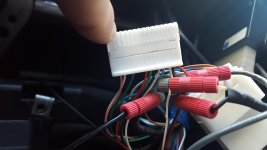
I made a RCA and tapped pin 23 (V-) shielded and 22 (V+). inner wire.

I know i'm missing something!!! Has anyone done this that has the factory nav wiring?
 

Attachments

  • 20160227_183628.jpg
    20160227_183628.jpg
    112.7 KB · Views: 4,714
Register to hide this ad
At navigation module:
24 Pin Plug
Camera 6v power is Red pin 24 (needs 6volts, not 12 volts, search 6v voltage regulator)
Camera ground Pin 21 Shield wire
Camera Video+ Pin 22 White
Camera Video- Pin 23 Black
 
With that Pioneer 8100, I would highly suggest a Maestro RR module with the TO1 harness.
It gives you a 6volt output for the OEM camera, plus so much more.

iDatalink - Maestro - RR-TOY01-DS

iDatalink - Maestro - TO1

If it was a Kenwood deck with Maestro support, you also get custom gauges and read/reset engine codes.

I liked the Kenwood for the Maestro support, but after playing with both Kenwood and Pioneer. I liked the interface of the Pioneer a bit better.
Thanks for the info.
 
Figured this out.
Super easy once I had the wires down. I wasn't grounding out the camera...

I didn't convert to 6v and the camera works great.

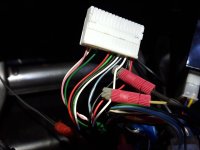
Pin 21 blue camera ground
Pin 22 white video
Pin 23 Black video shield
Pin 24 Red camera power
 

Attachments

  • 20160228_160232.jpg
    20160228_160232.jpg
    121 KB · Views: 3,508
Anyone know how to wire the factory cam into an aftermarket HU for this factory model HU? The Pioneer out of my 2018 ORP?

I think it's the 4 wire plug (I put the truck in reverse and pulled that out and it killed the video, plugged it back in and video came back) which is Black/White/Red/Orange.

I have a multi-meter and can test for voltage across two terminals but wouldn't be sure what to test for across the video terminals?

<a href="https://ibb.co/SJ7rCzd"><img src="https://i.ibb.co/KmzwvJL/radio-1.jpg" alt="radio-1" border="0"></a>
<a href="https://imgbb.com/"><img src="https://i.ibb.co/yW3KmmB/Radio-2.jpg" alt="Radio-2" border="0"></a>
<a href="https://ibb.co/vVs2WRT"><img src="https://i.ibb.co/djbnvxV/radio-3.jpg" alt="radio-3" border="0"></a><br /><a target='_blank' href='https://imgbb.com/'>facebook photo app</a><br />

Thanks in advance!!!
 
Or does anyone know if there's a way to test for video signal using a multimeter? 12v is easy obviously, but no clue if there's a change in impedance or something for the video?
 
Figured this out.
Super easy once I had the wires down. I wasn't grounding out the camera...

I didn't convert to 6v and the camera works great.

Pin 21 blue camera ground
Pin 22 white video
Pin 23 Black video shield
Pin 24 Red camera power

Blue and red being part of the factory harness, where are the spliced in wires running to? Are they part of the RCA wire coming from the camera? Inside the sheath?
I have a 2020 and am trying to get my back up camera working with an aftermarket Kenwood. I have the Maestro wiring harnesses and such and it is all connected according to the instructions. Just can't get video from the camera.

Thanks!
 
Blue and red being part of the factory harness, where are the spliced in wires running to? Are they part of the RCA wire coming from the camera? Inside the sheath?
I have a 2020 and am trying to get my back up camera working with an aftermarket Kenwood. I have the Maestro wiring harnesses and such and it is all connected according to the instructions. Just can't get video from the camera.

Thanks!

Make sure the option for backup camera use is on in the headunit. It should be a separate harness. You can also load Maestro diagnostics to see if you are getting a reverse signal.
 

Members online

Forum statistics

Threads
278,312
Messages
3,554,083
Members
248,016
Latest member
Advally Service

Trending content

Back
Top