LodeRunner
New member
I recently installed a Pioneer AVH-1330NEX in my '97 SR5. At the same time I installed a rocker switch into the white/black wire of the factory harness to send the antenna mast up/down. I put the rocker switch in the blank spot below the Rear Window switch. It turned out pretty slick.
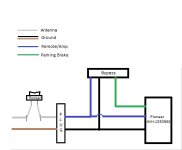
I did not tap into the parking brake circuit to allow for enabling of the video functions with the engage/disengage/engage routine required. Instead I opted later to install a MicroBypass to automatically enable the video functions. I followed all the instructions; splicing the remote/amp blue wire into the blue wire of the MB; the black ground wire into the black wire of the MB; the green parking brake wire into the green wire of the MB. This worked beautifully to unlock the video functions and the other display settings.
However, after I installed the MB I noticed that all of my audio settings (EQ, balance, fader, etc.) were now disabled except for the mute options. Because the blue remote/amp wire also feeds the white/black wire from the factory harness to the power antenna, I thought this may have something to do with it... but it shouldn't, right? I've tried powering up the unit with the antenna toggle in both positions with no effect. Again, I'm thinking that switch really shouldn't have anything to do with it, but I'm not an electrical genius by any stretch.
I disconnected the green parking brake wire from the MB, and now the audio settings are back. Of course, the video functions are disabled again.
I should add that I emailed the MicroBypass folks yesterday (Saturday) and they responded in less than an hour! They're working the issue as well, but I thought I would also post this here for experiences, particularly given the antenna switch mod that I know a number of you have done.
Any thoughts? I'm attaching a diagram for further clarity. Please excuse my Paint skills....
Any help is much appreciated!
LR
I did not tap into the parking brake circuit to allow for enabling of the video functions with the engage/disengage/engage routine required. Instead I opted later to install a MicroBypass to automatically enable the video functions. I followed all the instructions; splicing the remote/amp blue wire into the blue wire of the MB; the black ground wire into the black wire of the MB; the green parking brake wire into the green wire of the MB. This worked beautifully to unlock the video functions and the other display settings.
However, after I installed the MB I noticed that all of my audio settings (EQ, balance, fader, etc.) were now disabled except for the mute options. Because the blue remote/amp wire also feeds the white/black wire from the factory harness to the power antenna, I thought this may have something to do with it... but it shouldn't, right? I've tried powering up the unit with the antenna toggle in both positions with no effect. Again, I'm thinking that switch really shouldn't have anything to do with it, but I'm not an electrical genius by any stretch.
I disconnected the green parking brake wire from the MB, and now the audio settings are back. Of course, the video functions are disabled again.
I should add that I emailed the MicroBypass folks yesterday (Saturday) and they responded in less than an hour! They're working the issue as well, but I thought I would also post this here for experiences, particularly given the antenna switch mod that I know a number of you have done.
Any thoughts? I'm attaching a diagram for further clarity. Please excuse my Paint skills....
Any help is much appreciated!
LR