Please School me In Dashcams

JKRunner

New member
So as the title of this post reads, please school me in Dashcams.

Specifically at what are the best brands and the features that I should be focusing on, or staying away from. Also I would like to know which ones have the easiest installation. Lastly where you purchased your Dashcam from?

Thanks in advance.
 
Register to hide this ad
I am thinking about getting one. Here is a recent topic about Blackvue which is expensive but apparently pretty good.

I've thought about getting the Garmin Dashcam 55 which seems to be pretty good and is a lot less than the Blackvue. But I haven't decided yet. Seems like cheap ones are a dime a dozen.
 
I have had a blackvue for a few years now, still works great even in the constant heat of Miami.

As for schooling, I do not know much about them, there are ones with batteries which I heard to avoid due to heat, and there is an option to have in on all the time but you got to wire it a certain way, a kit is made for the Blackvue I think.

Mine is the simpler one without the wifi.

I have another one, have not installed it yet because no reason to, lol. It is a vantrue, it also has an interior facing camera, so if you are an uber driver or something, would be useful. I might make it a rear camera, who knows.
 

Attachments

  • DSCF0132.jpg
    DSCF0132.jpg
    86.4 KB · Views: 439
360 cam, 4g plan 24/7 right up to the cloud
Welp for whatever reason I can't post a link its waylens dot com/ 360
oh, can't post a pic. so never mind

 
Last edited:
I have Blackvue and wired with powermagic pro for constant recording. Very simple and I like how Blackvue is fully hidden out of my sight behind rearview mirror.

I have had a blackvue for a few years now, still works great even in the constant heat of Miami.

As for schooling, I do not know much about them, there are ones with batteries which I heard to avoid due to heat, and there is an option to have in on all the time but you got to wire it a certain way, a kit is made for the Blackvue I think.

Mine is the simpler one without the wifi.

I have another one, have not installed it yet because no reason to, lol. It is a vantrue, it also has an interior facing camera, so if you are an uber driver or something, would be useful. I might make it a rear camera, who knows.
 
i have a rexing V1 that comes on when the 4runner starts, has a red flashing light that tells me its recording. has audio that can be cut off. its really low profile and hiding the power cord was very easy. records to a micro sd card and ive watched the video on my computer and i can tell you its very good quality (1080) and i heard my brother crack open a bottle of coke like he was holding it right next to the mic.. ive only had it a little over a month, but so far i highly recommend it.
 
Mr.walleye Can you possibly provide a photo of how it looks mounted as well as show me a picture of where you have it wired/plugged in?

i have a rexing V1 that comes on when the 4runner starts, has a red flashing light that tells me its recording. has audio that can be cut off. its really low profile and hiding the power cord was very easy. records to a micro sd card and ive watched the video on my computer and i can tell you its very good quality (1080) and i heard my brother crack open a bottle of coke like he was holding it right next to the mic.. ive only had it a little over a month, but so far i highly recommend it.
 
Based on all the comments from this forum I sent with a BlackVue.
Decided on the 720 2 Channel which has a front and rear facing camera.
Bought it from Amazon during a Holiday Flash Sale.
Also have it hard wired, as all my accessories, as I don't like the cords crossing all around the cabin.

The main reason I went with this one is I can't see it at all, nor the lights from the camera behind the rear view mirror when sitting in the drivers seat.
The others seemed a little more bulks and I was looking for something that I can wirelessly transfer videos directly to my phone on.

Here is an example video from last December:
YouTube
Note that the video was removed from the SD card, then spliced together with all the clips, then I had to put a picture in picture view and splice all the rear view camera files, then reencode it all again and upload it ... and this is the quality it produced with just some internet free software.
So if you just want the raw video it's a little better quality that the video there.

Pros:
Can't see it from the drivers seat
Can hardwire it
Easy to set up and install
Can wirelessly download clips directly to phone
Phone clips have GPS map overlap (like a google map view) - This is pretty sweet
Has expandable memory (buy a bigger Micro SD card when they are on sale, I went with the 16GB version and then just bought a 256GB when Amazon had a sale)
Can record audio and audio recording can easily be turned off with a wave of your hand (literally) right near the unit.
Some units have recording after parking for XX Hours to detect impacts
Has (or had, I haven't looked into this in a while) optional Subscription Service allowing for auto uploads to cloud over wifi
Easy to change camera options when wifi connected to the camera from your phone

Cons:
Expensive, suggest buying the lowest memory model and upgrading the SD card when they are on sale.
As mentioned, license plates can be hard to read at distance, even at 1080.
Here is a vid on the same trip following a forum member.
YouTube
Here is another filmed more recently:
YouTube

GPS map over lay is not an option if you don't use the BlackVue software, it's just the raw video clip.
Sharing clips downloaded to your phone is a pita. They are too large for texts so if you witness an accident you'll have to email the clip.
Clips can't be easily spliced together and they have like a 3 second overlap, so when editing the clips and splicing them together using aftermarket software it can be difficult to line up all the right time sections.
Rear camera is a separate file so the video I made takes extra effort
Making anything like the video above means you have to remove the memory stick and download all the raw video files to your computer and then edit and reencode them from there.
If ordered with the Power Magic Pro it can be kind of clunky and cheap. My PMP was broken when it arrived, had to return it, and I've already cracked the plastic housing on the new PMP from accidentally kicking it under the dash.

 
Rexing
Papago
Aukey

Papago 520 caught an accident I was in. While changing lanes I had to come back in my lane, which someone else was also trying to occupy.
We collided. It was deemed my fault. Other witness lied, don't understand why.
Police report didn't look good for me at all (cop refused to see video). I reccommend not telling anyone you have a camera, wait until others leave to divulge to the officer. But as I learned, do not let them leave and then think you will connect with them. They simply don't give a shit.

Sent video to my insurance company. Turns out other driver had committed violations while on video. They found the accident to be 90% her fault. She had to repair my car and the third car involved.
All due to the dash cam. best $60 I have probably spent (short of condoms).

Rexing is up front in the 4runner
Aukey is aiming behind.
These mostly catch close calls with wildlife, although the rear camera did catch a uhaul trailer wheel coming off of the car trailer and collide with a car waiting for a red light.

Never a dull moment.

Capacitor models only, batteries leak.
Format the cards once a month or so.

Do not get the Vantrue ones. I had 3. they all have failed within 12 months. I did deal with their warranty, but in the end what a hassle.
 
Hardwired

Can all Dash Cams be hardwired? I am not a fan of cords all over the place and also don’t want to have to mess with it once it is installed.
 
Mr.walleye Can you possibly provide a photo of how it looks mounted as well as show me a picture of where you have it wired/plugged in?

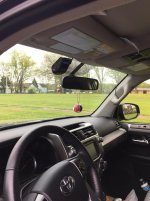
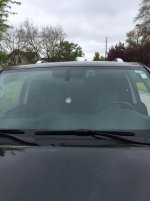
as you can see it is very low profile and hard to see from the outside looking in. once I get it hard wired in you wont see the cable going thru the pass side grab handle because I'll run the wire to the fuse panel on the drivers side.
 

Attachments

  • ca.jpg
    ca.jpg
    130.9 KB · Views: 160
  • c.jpg
    c.jpg
    132.9 KB · Views: 169
Can all Dash Cams be hardwired? I am not a fan of cords all over the place and also don’t want to have to mess with it once it is installed.

I do not know, but I tucked my cord in the interior panels, was pretty easy, cannot see any cords at all except where it plugs into the cig lighter, or whatever they are called now.
 
Can all Dash Cams be hardwired? I am not a fan of cords all over the place and also don’t want to have to mess with it once it is installed.

I use a street guardian because of customer service. I had a problem with mine emailed on a sunday night and within 30 minutes I was trouble shooted and shipped a replacement. It is very similar to aukey and rexing but with better service.

Yes all dash cams can be hardwired, I have a 40$ hardwire kit in other vehicles and in the 4runner i have just been running the cig lighter.

However a couple days ago I bought a little two prong tap for less than 20 bucks on amazon and poked the taps into the back of the autodim mirror slot and got a hardwire with little cost, no effort and very very short wire run like 3". This just records while the car is on, if you want an always on parking mode record you would need to buy a hardwire kit and wire it to a constant on as well.
 
Read facing camera

Based on all the comments from this forum I sent with a BlackVue.
Decided on the 720 2 Channel which has a front and rear facing camera.
Bought it from Amazon during a Holiday Flash Sale.
Also have it hard wired, as all my accessories, as I don't like the cords crossing all around the cabin.

The main reason I went with this one is I can't see it at all, nor the lights from the camera behind the rear view mirror when sitting in the drivers seat.
The others seemed a little more bulks and I was looking for something that I can wirelessly transfer videos directly to my phone on.

Here is an example video from last December:
YouTube
Note that the video was removed from the SD card, then spliced together with all the clips, then I had to put a picture in picture view and splice all the rear view camera files, then reencode it all again and upload it ... and this is the quality it produced with just some internet free software.
So if you just want the raw video it's a little better quality that the video there.

Pros:
Can't see it from the drivers seat
Can hardwire it
Easy to set up and install
Can wirelessly download clips directly to phone
Phone clips have GPS map overlap (like a google map view) - This is pretty sweet
Has expandable memory (buy a bigger Micro SD card when they are on sale, I went with the 16GB version and then just bought a 256GB when Amazon had a sale)
Can record audio and audio recording can easily be turned off with a wave of your hand (literally) right near the unit.
Some units have recording after parking for XX Hours to detect impacts
Has (or had, I haven't looked into this in a while) optional Subscription Service allowing for auto uploads to cloud over wifi
Easy to change camera options when wifi connected to the camera from your phone

Cons:
Expensive, suggest buying the lowest memory model and upgrading the SD card when they are on sale.
As mentioned, license plates can be hard to read at distance, even at 1080.
Here is a vid on the same trip following a forum member.
YouTube
Here is another filmed more recently:
YouTube

GPS map over lay is not an option if you don't use the BlackVue software, it's just the raw video clip.
Sharing clips downloaded to your phone is a pita. They are too large for texts so if you witness an accident you'll have to email the clip.
Clips can't be easily spliced together and they have like a 3 second overlap, so when editing the clips and splicing them together using aftermarket software it can be difficult to line up all the right time sections.
Rear camera is a separate file so the video I made takes extra effort
Making anything like the video above means you have to remove the memory stick and download all the raw video files to your computer and then edit and reencode them from there.
If ordered with the Power Magic Pro it can be kind of clunky and cheap. My PMP was broken when it arrived, had to return it, and I've already cracked the plastic housing on the new PMP from accidentally kicking it under the dash.

I have been lookin at the BlackVue 2 channel set up but have been trying to figure out how I'm going to mount the rear camera. Can you please share how you have yours mounted.
 

Members online

Forum statistics

Threads
278,309
Messages
3,554,071
Members
248,016
Latest member
Advally Service

Trending content

Back
Top