Programming 04 4runner keyless remote

When I get to step 6b and hold both lock and unlock, then hold lock, nothing happens.

Any ideas? Is there a particular fuse I should check?

I have the same problem.

nothing happens, no double lock/unlock to signal failed programming.

The red light on the new key does light up, so the batt is ok.

however, when I randomly press the buttons on my original remote, the double lock/unlock happens.

It seems the car doesn't recognize any signal from the new key.

Anyone have any thoughts?
 
Last edited:
Need to get an extra remote for my new (to me) runner. Thanks for the info on pairing it to the truck myself. Love this forum.
 
1. Start with the key out of the ignition. Open the driver door (all other doors are closed). Driver door is unlocked (other doors don’t matter).


2. Perform these steps within 5 seconds
1. Insert the key into the ignition (don’t turn it) Pull key out
2. Insert the key into the ignition (don’t turn it) Pull key out


3. Perform these steps within 40 seconds
1. Close, then open the drivers door.
2. Close, then open the drivers door.
3. Insert the key into the ignition (don’t turn it) and pull it out.


4. Perform these steps within 40 seconds
1. Close, then open the drivers door.
2. Close, then open the drivers door.
3. Insert the key into the ignition and leave in the ignition.
4. Close the drivers door.
Turn the ignition to ON (as far as you can go without cranking the engine), then back to off .
5. Remove the key from the ignition.


5. Within 3 seconds, the power door locks should lock then unlock automatically indicating successful entry into programming mode. Return to step 1 if the locks do not cycle at this point.


6. Perform these steps within 40 seconds
6a. Press the lock and unlock buttons on the transmitter simultaneously for 1.5 seconds
6b. Immediately after letting go of the lock and unlock buttons, press the lock button by itself and hold for 2 seconds. Within 3 seconds, the door locks should lock then unlock once indicating successful programming. If the door locks cycle twice, repeat steps 6a and 6b as the remote was not accepted.


7. Open drivers door

In less than three minutes this saved me $95 at the dealership to program my fob. Big thanks for the post. Makes me want to buy another one just to program considering how easy it was!
 
1. Start with the key out of the ignition. Open the driver door (all other doors are closed). Driver door is unlocked (other doors don’t matter).


2. Perform these steps within 5 seconds
1. Insert the key into the ignition (don’t turn it) Pull key out
2. Insert the key into the ignition (don’t turn it) Pull key out


3. Perform these steps within 40 seconds
1. Close, then open the drivers door.
2. Close, then open the drivers door.
3. Insert the key into the ignition (don’t turn it) and pull it out.


4. Perform these steps within 40 seconds
1. Close, then open the drivers door.
2. Close, then open the drivers door.
3. Insert the key into the ignition and leave in the ignition.
4. Close the drivers door.
Turn the ignition to ON (as far as you can go without cranking the engine), then back to off .
5. Remove the key from the ignition.


5. Within 3 seconds, the power door locks should lock then unlock automatically indicating successful entry into programming mode. Return to step 1 if the locks do not cycle at this point.


6. Perform these steps within 40 seconds
6a. Press the lock and unlock buttons on the transmitter simultaneously for 1.5 seconds
6b. Immediately after letting go of the lock and unlock buttons, press the lock button by itself and hold for 2 seconds. Within 3 seconds, the door locks should lock then unlock once indicating successful programming. If the door locks cycle twice, repeat steps 6a and 6b as the remote was not accepted.


7. Open drivers door

Worked like a charm today on my 05. Ebay remotes, no FCC ID on the back.
 
Has anyone had an issue with their remotes (old or new) intermittently working? I'm using an original remote - had it for 5+ years without problems.

Now, well within range, it won't work and then after repeatedly pressing the button, it will work and then continue to work for a while longer, then back to not working. When it does work, I've been across the parking lot, and then I could be standing next to the car and get nothing.

Checked the remote at AutoZone and it's transmitting, so I don't think it's the batteries. Any thoughts?
Hi Sigepbiker,
I'm having the same problem. Did you ever find a resolution for the erratic behavior of the key fob.
 
Just a heads up. If you disable the key reminder chime by taking out the bolt on the door jamb switch, or by cutting the #15 wire on the body ECU ( 4th Gen )you will not be able to program new remotes in the future until you re-enable the switch
 
Figured it out. The timing is actually pretty sensitive on holding the lock and unlock buttons in step 6a. The instructions say 1.5 sec, but it seems like that is the max. When I finally got it to work, I only held it for maybe 1 second. Every previous time I had probably held it at least 2 seconds. Just thought I would update this in case someone runs into the same issue.

YOU ARE A SAINT. I could not figure it out and that worked for me
 
Related to this, does anyone know the procedure to reset any keys/transponders assigned to the car? I.E. I lost a set of keys and want them wiped from my car's memory so I can only have keys assigned to it that I physically have.
 
You will have to wipe ALL of the keys/transponders and then reprogram the keys you want to use. I will see if I can find the instructions again.
 
How to program

Actually it's a super easy if you still have one master key that can start your 4runner. There was a pdf somewhere about how to do it on a Prado but
its not very clear(it would ask you to remove the key from ignition 3 times without mentioning putting it back in at all) so I'll try to provide a clearer one here:

1. Take the new key and one master key that can start your 4runner(old key) into the 4runner with you and close the driver's door.(immobilizer light should be blinking)

2. Insert old key, remove old key, Insert old key, remove old key,
Insert old key, remove old key, Insert old key, remove old key,
Insert old key (immobilizer light should be off from the first insertion)

3. open and close driver's door six times (immobilizer light should be off)
Step 2 and 3 need to be done in less than 35 seconds(pdf says 35 seconds)

4.remove the old key. (immobilizer light should come on(steady on, not blinking))

5. insert the new key(immobilizer light should be blinking)

Then just sit there and wait, after about one minute the blinking immobilizer light should go off and you're done.

Whole process need to be repeated for any additional keys, the just programmed key could be used as the "old key" for the additional keys.

If there are 5 master keys registered with the immobilizer, it won't accept any more(and I don't know how would it tell you this, so just do a erase if you can't get it to work after trying for a few times). You have to erase them using a similar method(bring in just an old key, insert+remove one more time and open+close one more time, after the 7th close of the driver's door the immobilizer light will stay lighted for one second, remove the old key quickly after that and all but that one you just removed are erased.)
 
1. Start with the key out of the ignition. Open the driver door (all other doors are closed). Driver door is unlocked (other doors don’t matter).


2. Perform these steps within 5 seconds
1. Insert the key into the ignition (don’t turn it) Pull key out
2. Insert the key into the ignition (don’t turn it) Pull key out


3. Perform these steps within 40 seconds
1. Close, then open the drivers door.
2. Close, then open the drivers door.
3. Insert the key into the ignition (don’t turn it) and pull it out.


4. Perform these steps within 40 seconds
1. Close, then open the drivers door.
2. Close, then open the drivers door.
3. Insert the key into the ignition and leave in the ignition.
4. Close the drivers door.
Turn the ignition to ON (as far as you can go without cranking the engine), then back to off .
5. Remove the key from the ignition.


5. Within 3 seconds, the power door locks should lock then unlock automatically indicating successful entry into programming mode. Return to step 1 if the locks do not cycle at this point.


6. Perform these steps within 40 seconds
6a. Press the lock and unlock buttons on the transmitter simultaneously for 1.5 seconds
6b. Immediately after letting go of the lock and unlock buttons, press the lock button by itself and hold for 2 seconds. Within 3 seconds, the door locks should lock then unlock once indicating successful programming. If the door locks cycle twice, repeat steps 6a and 6b as the remote was not accepted.


7. Open drivers door

These instructions worked on a 2007 SR5 Sport. Thank you!

FYI the local True Value hardware store carries the chip keys and can program them for you.
 
Last edited:
New Fob programmed. The doors lock and unlock, but the rear window doesn't work with the fob. Is there anything additional for the window to work? 06 sport.
 
Issues

Hi ALL,

2003 T4R Sport V8

I am closely following the provided steps and have no issues with steps 1-7, but am getting nowhere after that.

Instructions:
1. With the driver side door unlocked and open slide the key in and out of the ignition twice without turning it. (Should be done within 5 seconds)
2. Close the driver side door and then reopen it, and then close and reopen it again.
3. Put your key in the ignition again and remove it.
4. Close the driver side door and then reopen it, and then close and reopen it again.
5. Put the key in the ignition and then close the door
6. Turn the key to the "On" position without cranking the car and then turn it back to the "Off" position and remove the key.
***If you are only adding an additional key fob to the vehicle turn the key to "On" position only once. If you are "Rewriting All Key Fobs" and clearing the memory, turn the key to "On" position twice and then remove the key
7. You should have heard the door locks cycle after you removed the key. This means the vehicle is in program mode.
8. To program the new Toyota Key fob hold the "Unlock" and "Lock" button on the key fob for two seconds and then release. Then press the "Lock" button for up to three seconds and release. The door should lock and unlock.

If you are programming multiple remotes repeat step 8 for each remote within 40 seconds of step 7. If you wait to long or the other keyless remotes will not program you will need to start from the beginning.

Using this for steps 1-7:
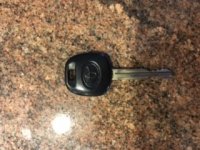
Old Key.jpg

Using this for Step 8:
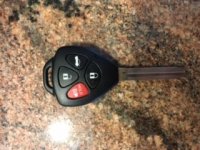
New Key.jpg

I have tried like 25 times and I get the same result every time (locks cycle after steps 1-7, nothing after step 8). ANY HELP?!?

 

Attachments

  • Old Key.jpg
    Old Key.jpg
    30.7 KB · Views: 454
  • New Key.jpg
    New Key.jpg
    30.3 KB · Views: 445

Members online

No members online now.

Forum statistics

Threads
278,306
Messages
3,554,045
Members
248,016
Latest member
Advally Service

Trending content

Back
Top