Replacing light behind fan control

ebg18t

New member
I thought I saw a DIY somewhere but I can't find it now. The light behind the fan control is dead. The LCD screen and the other 2 controls are still fine.
 
Register to hide this ad
this is the write up i used. Scroll down a ways, once you see the pic where he starts to take the flip out tray under the ac panel out, that is what you're looking for. Its really simple.

How to Remove the Navigation Head Unit from a 2003 Toyota 4Runner


this is a write up on how to take the control head apart, and replace the lights....

http://www.toyota-4runner.org/maintenance/34529-how-take-apart-4th-gen-c-controls.html


this is the write up I did after doing mine....

I have a 03 SR5, the limited takes dif bulbs I think.....Here are the following part numbers and quantities. I had the dealer print out the diagram of the control unit to show me which part #'s went where.

(3) 90010-09015
(2) 90010-09017
(1) 90010-09018
(2) 90010-09019

I didnt take any picks my self, my digital cam is broken, but view this thread and scroll down a ways, How to Remove the Navigation Head Unit from a 2003 Toyota 4Runner, this guy has some good pics on how to do it. I had my laptop in the passenger seat and followed his instructions as I went. Be careful when tightening the new bulbs in, is it is easy to strip the flat head slot in them. Honestly its easier than an oil change. It will take more force than you initially want to pull the control panel off, but thats how it needs to be done. After replacing the new bulbs mine snapped back in very easily. When following his thread once you pull the AC control panel out and unhook the cable, you wont need to take the control panel apart any further as he does in the thread. You can change the bulbs from that point and snap it back in . Let me know if you guys have any more ?'s I will help with what I can.
__________________
 
I guess I will borrow your thread.

when I push any button on the climate control panel, the Button will light up. However, in darkness, I found that there was no background light? I mean, I can not see what the other buttons means in dark because there is no light on the button except the one I already pushed.

This is my first toyota vehicle, I am not sure if this is normal or some broken bulbs.

what i mean is these buttons:

 

Attachments

  • QQ??20121006132209.jpg
    QQ??20121006132209.jpg
    20.3 KB · Views: 1,608
Last edited:
I guess I will borrow your thread.

when I push any button on the climate control panel, the Button will light up. However, in darkness, I found that there was no background light? I mean, I can not see what the other buttons means in dark because there is no light on the button except the one I already pushed.

This is my first toyota vehicle, I am not sure if this is normal or some broken bulbs.

what i mean is these buttons:
I have tried to find the backlight replacement instructions, but have had no luck.
 
I guess I will borrow your thread.

when I push any button on the climate control panel, the Button will light up. However, in darkness, I found that there was no background light? I mean, I can not see what the other buttons means in dark because there is no light on the button except the one I already pushed.

This is my first toyota vehicle, I am not sure if this is normal or some broken bulbs.

what i mean is these buttons:
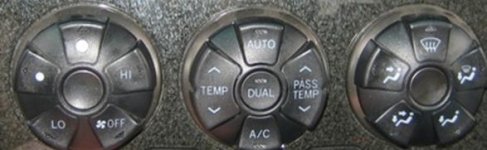
It's pretty easy to replace the illumination bulbs. I was even able to bargain my local dealer down to Amazon prices for the bulbs.

I don't have the time right now myself to find a you tube link, but I'll check back later and post one if you haven't found one.
 
We haven't found the backlight bulbs. I've replaced all of the bulbs and still my climate center is dark except for arrows, and only when I push them.
 
I am looking for the same information, found on wayback machine. You only need to do part four, and only need to remove one bolt: Remove this bolt before continuing
How to Remove the Navigation Head Unit from a 2003 Toyota 4Runner
Also this thread, page 2, talks about the lights. My fan lights are all out and the passenger temp selector is out. I'll take pictures and start a new thread when I do the work.
 
Last edited:
I know this is an older post, but did you ever figure this out? I have also changed all the climate control bulbs and everything is backlight except the fan control- only the arrows light up when they're pressed- no backlight so it's "dark" until you press an arrow.
 

Members online

Forum statistics

Threads
278,307
Messages
3,554,054
Members
248,016
Latest member
Advally Service

Trending content

Back
Top