sPod HD or Switch Pros 9100

Tejas

New member
I am in need of a switch system for my lights and I find myself torn between these two. I see a lot of people swear by the sPod but I'll be honest when I say that I like the user interface/tactile feel of the Switch Pros. Maybe it's just that I am in love with the SDHQ dash mount for the 9100 but I feel myself leaning towards it simply because of how it mounts versus how it works.

So what do you guys think? Why did you go with one over the other and which do you think is the better of the two?
 
Register to hide this ad
I went with the SwitchPros SP9100 after a lot of reading up. No regrets here and I love the switch panel. I have mine sitting in the same spot as the SDHQ panel, but it’s just glued there.
 
I hope to be buying a a Switch Pro soon. Im about 99% sure thats the route ill go. Manly due to the S-pod being an open box under the hood. Seems like alot of dust and stuff will get in there.
 
There are advantages and disadvantages to both I think and there are a ton of reviews out there for both. I recently ran through this and chose an Spod
I have the Spod Bantam with the HD control pad (Non touch screen version)
It works great for me, easy to wire to and provides good protection for the electrical system. I like that the Spod is fully closed, the Switch Pros is kind of exposed for my tastes. (Under hood)
The Switch Pros control pad is slightly smaller and will fit in the location just above the mirror controls and below the AC vent in the 5th gen. The Spod HD pad will not fit here. The Switch Pros pad is also thinner. I think for control pad placement this is a distinct benefit of the Switch Pros.
The Spod all 8 circuits are 30 Amp where the Switch Pros is 4 x 35 Amp and 4 x 18 Amp. This probably wouldn't matter unless you have a bunch of high draw items.
With the Spod you can link 4 of the under hood units and control them all from one pad via the Bluetooth app.
With Switch Pros you would need multiple control pads to achieve the same thing. Again this is probably not an issue unless you have a bunch of accessories
I know the Spod is not setup to act as a three way switch. Not sure about Switch Pros. You could add an additional physical switch for this if it was important. (I abandoned that in my setup)
I love the ability to dim all the lights and strobe or flash. Both systems do this and it's really useful.
I think either is a good choice. A friend ran me through his Switch Pros setup just last week and functionally they are really similar.

I may be incorrect in some of these items so don't necessarily use my post as gospel.
 
I hope to be buying a a Switch Pro soon. Im about 99% sure thats the route ill go. Manly due to the S-pod being an open box under the hood. Seems like alot of dust and stuff will get in there.

The sPOD is an open box under the hood??? Mine actually has a sealed cover that latches over the top covering all of the connections! Switch pros is the one that is totally exposed (under the hood). That's the reason i went sPOD. I'm just throwing that out there since you stated that the sPOD being exposed is the main reason you are going with switch pro. Maybe you got these 2 mixed up?
 
The sPOD is an open box under the hood??? Mine actually has a sealed cover that latches over the top covering all of the connections! Switch pros is the one that is totally exposed (under the hood). That's the reason i went sPOD. I'm just throwing that out there since you stated that the sPOD being exposed is the main reason you are going with switch pro. Maybe you got these 2 mixed up?

No, not mixed up. There is a latching cover, but on the bottom, there are large holes that allow the wires to enter the box. From my research there is no gasket or cover for these holes, or am I wrong?
POD860007LEDG.jpg

The SwitchPro, all the sensitive internal stuff is, well internal. the wires are on the out side, but they are shielded.
 
No, not mixed up. There is a latching cover, but on the bottom, there are large holes that allow the wires to enter the box. From my research there is no gasket or cover for these holes, or am I wrong?
POD860007LEDG.jpg

The SwitchPro, all the sensitive internal stuff is, well internal. the wires are on the out side, but they are shielded.

Within those open "oval cut outs" it has rubber gaskets with a slit through it where just your wires pass through and it will keep debris out. Both systems definitely have their advantages and disadvantages. I've used both and they are both super nice products that make life a lot easier without a nest of wires running all through your T4R. Can't go wrong whichever you choose!
 
I don't know if they fixed it, but I noted a year ago SPod had a table on the back of their brochure that was supposed to help you but got the simple formula Watts = Volts * Amps wrong.
Running numbers for your setup is a good thing any way you decide to go.
 
Last edited:
I have the SP 9100 and it works great for my needs. My only complaint is that the bluetooth app is pretty finicky on my Pixel 2 but it works a lot better on my samsung s8. Probably not a problem with my switchpro but with my phone. For the most part you can't go wrong with either. The fact that they both allow you to program the switches, dim, strobe, etc, just make them that much more convenient to use over standard switches.
 
I went with the switch pros 9100 and the SDHQ panel mount.

I like that its small and sleek to look almost factory on the dash.
And I like that i can easily customize the buttons on the phone app, for example I have 2 buttons that automatically turn on with the ignition, I don't remember if the SPOD does those kinds of things without actually wiring it that way?

Also the comment about daisy chaining? The description for the Switch Pros says " Daisy Chain up to 3 Switch Panels to One Power Module"
 
Sorry to jack the thread. (Not really)

But how do you wire accessories to the switch pro? I'm looking at the installation sheet and it looks like you need to add pins to the 16-pin?
 
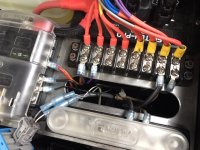
This is the switch pro terminals, you just hook your wires to whichever 1 thru 8 connector you want that accessory on.
Excuse my mess in pic, rerouting some stuff.

Its the terminal strip with the different colored wires going to it. I also have an added ground strip to hook all my grounds too and a separate fuse box to left I added for stuff that is always connected to the battery(not included with switch pro)
 

Attachments

  • wiring.JPG
    wiring.JPG
    135.3 KB · Views: 5,956

Attachments

  • strip.jpg
    strip.jpg
    126.3 KB · Views: 1,494

Members online

No members online now.

Forum statistics

Threads
278,309
Messages
3,554,071
Members
248,016
Latest member
Advally Service

Trending content

Back
Top