Swapping 2011 Trail OEM radio with 2013 OEM radio /w NAV

niadh0

Member
Hi all,

need help.

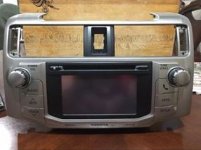
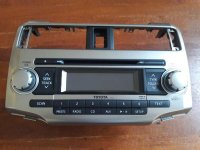
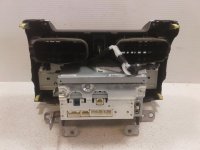
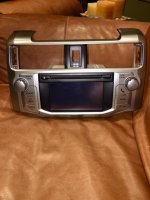
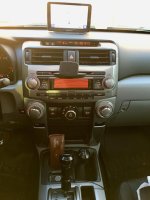
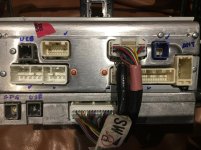
I have been looking to get rid of my 2011 Trails OEM radio without any LCD screen and NAV, and replace it with another stock radio with Nav/LCD screen from a 2013+ models. I just came across one at a decent price and before I buy it I want to get your opinions on the following questions? I am attaching a picture of the 2013 OEM radio. I also found a pic of the 2011 OEM radio (back) from the internet.

- my current backup camera screen is embedded into my mirror. i actually like it. will this continue to work? i believe it should.
- will all my current wires fit into the 2013 radio? i believe it should as i currently have no nav, no backup camera where as the new unit from 2013 does (meaning it should have room for more harness wires than my current)
- I have a fin-antenna on the 2011 Trail, does this mean I should have non-connected wire behind my current radio for the GPS/Nav? - that I can just connect into the 2013 radio?
- fitment would be fine i think. it should be a swap. but again ask if anyone has done this before.

Many thanks,
Nilesh
 

Attachments
  • 33063462_1687833791252617_3921101461013921792_n.jpg
    33063462_1687833791252617_3921101461013921792_n.jpg
    141.8 KB · Views: 3,892
  • 32977027_1687772741258722_4626868478710644736_n.jpg
    32977027_1687772741258722_4626868478710644736_n.jpg
    18.2 KB · Views: 3,496
  • 0fd9261d4e8742e489ce082a9e75a03b.jpg
    0fd9261d4e8742e489ce082a9e75a03b.jpg
    39.2 KB · Views: 3,911
  • s-l1600.jpg
    s-l1600.jpg
    124 KB · Views: 3,470
Last edited:
Register to hide this ad
Here is the back of the 2011 stock radio.
I have been on the forum here since 2011, I don't recall anyone doing it, but if you have all the connectors, should work.

axxman-albums-4runner+oem+nonnav+stereo+upgrade-picture51248-2011-4runner-stereo.jpg
 
Last edited:
Do the buttons light up orange still? I think it was 14 they went with white?

The orange gauges with red needles is one of my biggest gripes with the early 5th gens
 
it will take me a couple of months by the time i get the package, get the extra parts and install it all. i will try to do step by step instructions as i do it and will post back with an update.

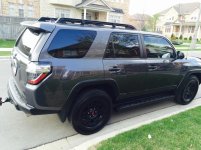
the seller just ship the radio yesterday to a michigan address and i will have someone bring it to Toronto Canada soon. He said it was pulled from a 13 model and it has the Orange lights so it will match perfectly with the rest of the orange LEDs in my 11TE. I am not sure if the silver trip will match as mine has darker gray metallic that almost looks like the color of my TE.
 

Attachments

  • IMG_6832.jpg
    IMG_6832.jpg
    136.8 KB · Views: 3,262
Update

Ok folks... so i finally received the head unit today. It is a 2013 non-JBL, no-NAV, unit with LCD. it has an extension box attached at the bottom. I am attaching a few pictures

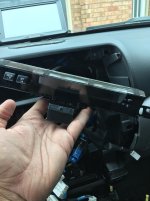
>> The first pic is the face of the unit
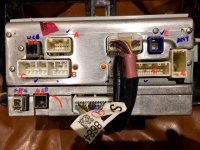
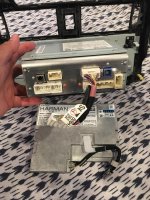
>> the second pic is the back side of the 2013 unit. I have labelled all the connection points.
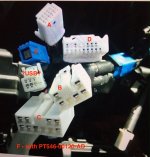
>> the third picture is taken from this forum. it shows how many wires are available in my 2011 TE once I take out the stock unit no-jbl, no-nav, no-screen
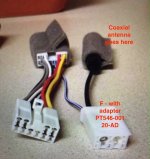
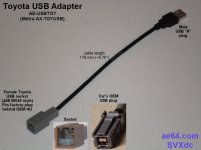
>> the fourth picture is to show you toyota adapter for converting coax antenna to connect with the new unit Part# PT546-00120-AD. i found this in the thread above mentioned by smallfry

I will do the install once I have the antenna adapter harness shown in the fourth pic.

QUESTIONS:

(1) what happens to the wire labelled as "?USB?" from my old unit? there is no place to plug it in in the new unit. Is that for USB? if not, do I need any adapter to connect it to "G1" or "G2" on the new unit? both G1 and G2 are identical. How does the USB feed get into the new unit?

(2) could anyone confirm that PT546-00120-AD is what I must have to connect the co-ax antenna to the new unit? is there any simpler method that I am missing out?

(3) What connection goes in "H"? the unit does not have NAV. but my best guess tells me that the GPS antenna goes in "H".

thanks. I will keep this up-to-date. BTW, when I bough the new 2013 unit I didn't notice that it didn't have NAV (not Ensure i guess also)... but that is fine as I have a 7inch garmin above the dash and often use Waze. no wonder i got it for real cheap.
 

Attachments

  • IMG_0556.jpg
    IMG_0556.jpg
    99.6 KB · Views: 3,448
  • IMG_0551.jpg
    IMG_0551.jpg
    114.9 KB · Views: 3,437
  • IMG_0557.jpg
    IMG_0557.jpg
    96.5 KB · Views: 3,328
  • IMG_0558.jpg
    IMG_0558.jpg
    109.4 KB · Views: 3,846
I finally installed the radio I got from a 2015 4runner after being back and forth on selling it. Everything works with the parts from that one post. The one thing I haven't gotten to work yet is the USB, the aux jack works but not USB. I have an idea on that though and need to order a part. I did lose 'party mode' but I never used it anyways.

'H' is for the sat antenna.
 
Subscribed.
Very interesting, but... if there is not nav in the '13 unit, is there any functional advantage over the '11 unit?

The main thing I'd want is a bigger back-up camera screen. And I listed to Sirius all the time, so that functionality is important to me. I question the quality of the NAV system.
 
You are correct. I am not sure at all about the audio quality of the unit. I just like the look of it (with a larger touch screen) compared to the boring 11TE screen where everything has to be operated using buttons and knobs. My wife's 10LE has the NAV with touch screen and she hates my car every time she drives it (it is rare)... especially because connecting two bluetooth phones to the 11TE stock unit and selecting this at the time of use is just pain in the butt. So for me the looks and the touch screen are a winner. The NAV would have been nice but i would have never used it as I use Wave and a 7inch Garmin mounted just above the stock unit on the dash. Plus I completely failed to notice when i bough the 2013 unit that it did not have the NAV... i paid just over $150. i won't be wire tapping for the backup camera as i like the mirror view... cleaner/sharper on the smaller screen.

now back to the wiring... the 11TE stock unit has SAT init. so where is the SAT connection on the back of the 11TEStock unit? perhaps I will find out when I open it up... so in the list of open questions...

1) which port on the 2013 is the USB connection? 11TE has USB. Do i need any adapter like the attached picture?
2) which port on the 2013 is the SAT Antenna (see the latest pic here, i am talking about the bottom left hole... is it SAT for sure? 11TE has SAT too)

anyways, the best way to find out all of this is when i connect the unit and see what is not working.... just waiting for my am/fm coax antenna adapter.

will keep you posted. thanks.
 

Attachments

  • IMG_0565.jpg
    IMG_0565.jpg
    125 KB · Views: 3,808
  • IMG_0566.jpg
    IMG_0566.jpg
    135.3 KB · Views: 3,225
  • AE-USBTOY.jpg
    AE-USBTOY.jpg
    57.8 KB · Views: 3,162
I finally installed the radio I got from a 2015 4runner after being back and forth on selling it. Everything works with the parts from that one post. The one thing I haven't gotten to work yet is the USB, the aux jack works but not USB. I have an idea on that though and need to order a part. I did lose 'party mode' but I never used it anyways.

'H' is for the sat antenna.

thanks, I will find out about the SAT antenna once i open my HU.

Did you have to buy any adapters to make everything work? Based on the pictures I posted, does anything else pop out?
 
Subscribed.
Very interesting, but... if there is not nav in the '13 unit, is there any functional advantage over the '11 unit?

The main thing I'd want is a bigger back-up camera screen. And I listed to Sirius all the time, so that functionality is important to me. I question the quality of the NAV system.

LATEST: I contacted the seller just now to ask about the unit. The 2013 HU I bought was pulled out of 2013 Limited and has NAV and Entune Apps. So now i might as well look for a cheap GPS antenna cable too
 
thanks, I will find out about the SAT antenna once i open my HU.

Did you have to buy any adapters to make everything work? Based on the pictures I posted, does anything else pop out?

I just bought those adapters from the one post and everything plugged in.
 
I just bought this OEM Highlander GPS antenna for $20 USD (ebay=> https://www.ebay.com/itm/192595990763?ViewItem=&item=192595990763 ). The deck came with a cut out connector (it shows in one of the pic above bottom left corner)... i just verified that i can open the grey plastic connector and attach it to the GPS antenna i just bought from ebay. Lets see how this works out. I didn't find any information on the net about the interchangeability of the OEM GPS antennas (among Toyotas or between Lexus and Toyota models). All part numbers of the GPS Antennas are different model by model.... so hoping for the best in case it work... not willing to spend more and NAV/GPS was never a priority for me 4Runner OEM GPS antenna retails for over $300USD min. Keeing it interesting....

so last puzzle now left is... where is the Microphone cable on both the old and the new deck? and where is the USB cable from my TE? .... does the cable labelled as "?USB?" in the picture above carry both the USB and the Microphone?
 
Last edited:
Update

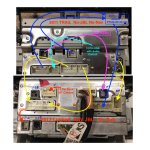
#1 PLEASE ignore the Wiring map I posed above. I opened up the radio to see what all wires were behind the radio today.

#2. I am attaching a new PICTURE of the wiring map. I am just waiting for a wire adapter from Amazon and once I have it I will do the install

#3. The GPS antenna belonging to Toyota Highlander arrived last week from ebay for $20. It did not have the end connector so I fixed it by connecting it with the end connector that came with the new deck (the buyer kept it on the unit for some reason)

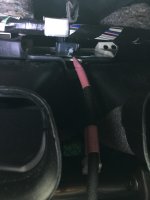
#4. I opened the digital display panel above the deck and figured out where I can mont he GPS Antenna (see the pic). I also opened up my 2010 Limited to see where the factory GPS antenna was mounted. it is exactly at the same place (above the vent and inside a plastic pocket. I just need to stuff some foam / sponge under the GPS antenna in my 2011 Trail

#5. there are two USB connector ports (the tray ones) on the new Unit. I am not sure how I can convert the 12-pin cable from my trail. I could not find any thing on the net

#6. the new radio has a 16 pin connector for the backup camera. I won't be tapping into the rearview display in my mirror unless it is a very simple process (also does anyone have any instructions?). UPDATE: i just found this info on how the rear camera => http://ae64.com/Rear-camera-16p-operation.htm
 

Attachments

  • IMG_0668.jpg
    IMG_0668.jpg
    126.3 KB · Views: 1,176
  • IMG_0654.jpg
    IMG_0654.jpg
    129.8 KB · Views: 728
  • IMG_0649.jpg
    IMG_0649.jpg
    125.5 KB · Views: 725
Last edited:
UPDATE:

I got the full install done. At the same time I added OEM+ 500Q reference DSP with a 8inch single sub.

*** working...
Radio AM/FM
XM Radio
All speakers via the OEM+ 500Q
Nav (using the highlighter GPS Antenna... yahoo... initially the map and the GPS pointer on the map was all over the pace.... needed to calibrate the GPS signal by driving around in circles... clockwise and anti-clock wise)

*** no working...
USB input
AUX input
this is due to one cable that could not be connected

Also the 2013 Limited non-JBL, NAV, LCD head unit did not end Remote-Trigger-On for the external Amp (OEM+ 500Q DSP Amp) to turn on. The 2013 Stock unit did. so I had to jump the cable. details are here => http://www.toyota-4runner.org/5th-g...t-wiring-stereo-amp-question.html#post3060769
 
Last edited:

Members online

Forum statistics

Threads
278,315
Messages
3,554,131
Members
248,016
Latest member
Advally Service

Trending content

Back
Top