Things you did not know about your 4runner

I noticed the other day that if I'm inside the truck, lock the doors with the key fob, the unlock button will not work. That's good to know in case you somehow lock your keys in the 4runner
 
I'm sure it's in here somewhere but you can turn off all your nannies for a little play time if interested. Just hold down the traction button for about 3-4 seconds. This will turn off all traction control. :)

The past several pages are repeats too lol but that's OK. It's tough to read a thread this long. I think there is a really good thread on all the nannies and what you can and cannot do in certain situations.
 
Usually this happens because the HVAC system will wait until you have warm fluid to work with before its starts blowing air. This makes sure that the air that comes out is actually warm, instead of blowing cold air into the cabin. Most vehicles with automatic climate control will do this (all the way back to my 2002 Acura). I don't think the TEP has auto climate control, but I would assume it is providing the same function. Also, keeping your heater off will allow the engine to warm up more quickly, and provide you heat in the cabin more quickly. Like many things in life, a little patience in the beginning may save you more time down the road.

My '92 Dodge Stealth with auto climate control would wait for the air to warm up before blowing it on you...

On the 4Runner I haven't had the patience to wait and see if it'll turn on by itself either. I have a full manual SR5 set up, it doesn't seem to be consistent either. I find it kind of annoying, if its manual then it should do as it is set to do! Curious to know if anyone's figured out what triggers it.
 
My '92 Dodge Stealth with auto climate control would wait for the air to warm up before blowing it on you...

On the 4Runner I haven't had the patience to wait and see if it'll turn on by itself either. I have a full manual SR5 set up, it doesn't seem to be consistent either. I find it kind of annoying, if its manual then it should do as it is set to do! Curious to know if anyone's figured out what triggers it.

Possibly outside temp. I say this because outside temp seems to play a role in whether the recirc comes on automatically or not when you turn on A/C.
 
"The eco light can be turned off in the display settings, I guess if you find it distracting."

When I turn my eco light off, it comes back on the next time I start the car. Is that your experience as well?
 
"The eco light can be turned off in the display settings, I guess if you find it distracting."


When I turn my eco light off, it comes back on the next time I start the car. Is that your experience as well?


Haven't really paid attention, it's my wife's daily driver, next time I'm in it I'll take a look!


Sent from my iPhone using Tapatalk
 
"The eco light can be turned off in the display settings, I guess if you find it distracting."

When I turn my eco light off, it comes back on the next time I start the car. Is that your experience as well?

Mine never came back on when I turned it off. Now, how to i get rid of the eco bar. That, to me, is more annoying than the green eco light.
 
The eco light can be turned off in the display settings, I guess if you find it distracting.
23ad426fb45019aa3573433f0291b8c6.jpg


Sent from my iPhone using Tapatalk

How did I not know this? I'm doing this immediately.
 
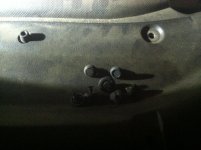
Found out you can leave a firewall plug from a relay box job, on the plastic radiator cover for 1000 miles and it's still there to surprise you

Also, on a trip to a colder area, if it's below a certain temp outside when you put the tranny in S mode, does it go into S3 instead of S4? I can't remember if it was below 20 or 30 and It did this the two times I shifted to S for passing. Maybe the northerners know?
 

Attachments

  • image.jpg
    image.jpg
    138.8 KB · Views: 2,910
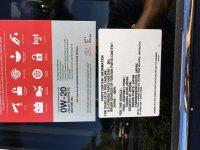
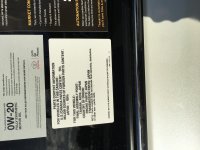
I discovered today while I was perusing the dealership during my 4runners 25k service that the 4Runner actually has more parts made in Japan then the Landcruiser. 100% vs. 95%...go figure! Bottom picture was from the Landcruiser, the top a 2016 4Runner. Sorry too lazy to flip.
 

Attachments

  • IMG_6802.jpg
    IMG_6802.jpg
    135.9 KB · Views: 2,801
  • IMG_6803.jpg
    IMG_6803.jpg
    134.2 KB · Views: 2,846
My buddy has a 2014 limited and the head unit has the option to switch the map into "night mode". My Sr5 premium doesn't seem to have this option to dim the brightness of the GPS map. Does anyone else with an SR5 have this option?
 
My buddy has a 2014 limited and the head unit has the option to switch the map into "night mode". My Sr5 premium doesn't seem to have this option to dim the brightness of the GPS map. Does anyone else with an SR5 have this option?
Does yours ever go into Night Mode? If it doesn't, try turning down brightness on your dash. I had mine set to max (just past the click), but when I turned it down, the maps went into Night Mode...while headlights are on.
 
Does yours ever go into Night Mode? If it doesn't, try turning down brightness on your dash. I had mine set to max (just past the click), but when I turned it down, the maps went into Night Mode...while headlights are on.

No, mine doesn't go into night mode. I have the brightness turned all the way down. I feel like I have been through all of the setups looking for the "night mode" button too. I saw where it showed night mode on his.
 
No, mine doesn't go into night mode. I have the brightness turned all the way down. I feel like I have been through all of the setups looking for the "night mode" button too. I saw where it showed night mode on his.

not the brightness of your display. but the brightness of the dash. located left of your steering wheel. As long as you are not maxed out on the dial it will enter night mode at night.
 
not the brightness of your display. but the brightness of the dash. located left of your steering wheel. As long as you are not maxed out on the dial it will enter night mode at night.


Thanks!! That did it. Can't believe I have been driving this thing for a year and never figured it out.
 
here is one I stumbled on today in my '11 LE (with keyless entry, obviously).

I usually hit the lock button on the remote as I'm walking away to lock my truck. But today after I got out and shut the door, I waked around to get something out of the front passenger side and noticed what looked to be a scratch on the chrome face of the door handle. So, I did what every person on the forum would do... I wiped my finger across the chrome, luckily it was nothing, but the strangest thing happen while I was doing this.... THE DOORS LOCKED. At that point I'm thinking, WTF just happened, I hope my my key's aren't in the car. And whalaa, my keys were in my pocket.

So there I am in a parking, fascinated by the fact that I can lock my doors without having to reach for the fob. I just became that much more lazier!

It works on both the front drivers side and the passenger side door handles.

So here's what I learned...

To Un-lock - Touch the inside of the door handle.
To Lock - Wait a couple of seconds, touch the outside face of the door handle. And be sure NOT to touch the inside of the door handle. Locking the doors won't work if the handle senses your hand the inside of the handle.
Not sure if this has been covered as I'm only through page 14 of this thread but.... FYI plastidipping the door handles does not affect this function at least up to 5 coats.

Sent from my Pixel using Tapatalk
 

Members online

No members online now.

Forum statistics

Threads
278,312
Messages
3,554,089
Members
248,016
Latest member
Advally Service

Trending content

Back
Top