TOYOTA TIS Techstream

Thanks!
I'll try the cable check trick. If that doesn't work I'll order another cable.

It has oil temp! Very nice.
As far as I know, you'll have to jump up to a Mongoose cable to increase functionality over these XHORSE MVCI based cables. $495, ouch; though I am tempted.
 
I want to reprogram range computer. When it reads "0" i still have 5 gallons of gas in tank. Any ideas on how to correct that in Techstream? Resetting doesn't help, already tried that. Any one have any idea if it is possible to modify that and other things if so how?
 
As far as I know, you'll have to jump up to a Mongoose cable to increase functionality over these XHORSE MVCI based cables. $495, ouch; though I am tempted.
I'm guessing my cable is a dud, much like some of the Chinese OBD-II Bluetooth dongles. A new XHORSE should fix the issue so I can see the Engine/Tranny PIDs.
 
I'm guessing my cable is a dud, much like some of the Chinese OBD-II Bluetooth dongles. A new XHORSE should fix the issue so I can see the Engine/Tranny PIDs.

XHORSE MVCI? I saw it on careucar just now, wondering if it's better than mini vci?:der:
 
Last edited:
As far as I know, you'll have to jump up to a Mongoose cable to increase functionality over these XHORSE MVCI based cables. $495, ouch; though I am tempted.

What's a Mangoose cable...Why I'm so giddy? I need a simple tool that read and delete codes, which one should i buy? MINI VCI? MVCI? Mangoose cable?
 
Last edited:
XHORSE MVCI? I saw it on careucar just now, wondering if it's better than mini vci?:der:
XHorse, mvci, min vci, etc, etc. they are all the same. Unless you are spending $500-$2000, it's all the same reverse engineered, mostly functional XHORSE mvci chipset in a cable from any one of several manufacturers from China.

Other than that, there is the Mongoose, which is what most non-Toyota dealer shops use, and runs $500+
Drew Technologies : Introduction

Otherwise, you are looking at spending thousands on a toughbook, cable and techstream, from Toyota.
 
XHorse, mvci, min vci, etc, etc. they are all the same. Unless you are spending $500-$2000, it's all the same reverse engineered, mostly functional XHORSE mvci chipset in a cable from any one of several manufacturers from China.

Other than that, there is the Mongoose, which is what most non-Toyota dealer shops use, and runs $500+
Drew Technologies : Introduction

Otherwise, you are looking at spending thousands on a toughbook, cable and techstream, from Toyota.

I just got xhorse mvci
 
Why there no TIS for idiots? I can`t make it work, winXP 32b laptop, J2534 interface, techstream failed to connect to interface.Vim select screen detail button inactive, therefore I can`t select interface.
 
Why there no TIS for idiots? I can`t make it work, winXP 32b laptop, J2534 interface, techstream failed to connect to interface.Vim select screen detail button inactive, therefore I can`t select interface.

got it working, interface driver 1.4 was a problem, 2.01 works fine.
 
folks - If I upgrade/update to 9.30 etc latest program from within the TIS program (I currently have 8.30), will it reset all my registration keys and stuff it up?
 
Received my XHORSE yesterday. I played around with it a little last night. Works great with my Toughbook CF-31. Basically the same setup that I used while at Lexus.
I did have an issue twice to where the TS stopped working and froze up. I'll track that problem down later. My Genisys diagnostic tool does everything that the TS does except for the C-Best features.
 
Allow me to try to answer some questions I have been asked.

If you have any questions on what the TS will do for you simply click Help from the top menu.

Each model year there's more information and adjustments on the vehicle. As an example I noticed that in the Data List on Jeremy556 it shows his engine oil temp. On my 08 V8 I have no data for that. Each year they add more and more customize settings.

If you ever get fully frustrated with the TIS software that travels thru the internet highway you can always subscribe to TIS for a 2 day trial and grab the software. The TIS has so much info it will make your head spin. It even states mine was built on Xmas Day! Full factory service manual, body, TSB's, etc and etc for every Toyota, Lexus and Scion vehicle. For me in my business it is priceless.

No matter how well you get the TS working you will not be able to re-program keys or Re-Flash, update the ECM's. You have to subscribe to the Security version of the TIS in order to get the key codes. You have to subscribe to the Professional version for the ECM programming.

Toyota has nothing to do with TIS for the most part. They simply provide the information to Snap-On who is in charge of TIS and TS.

This is just a couple of things that I felt might help clear some confusion up.

www.techinfo.toyota.com
 
Last edited:
Can't get "Engine ECT" on Techstream

I've tried to search but there's just too much Techstream info here to sift through and find what I need to know, if it's even here, so hopefully someone knowledgeable can help.

I tried to check ATF fluid level (preparing to R&R some fluid) and I can't get the Techstream to read the fluid temp. The service manual says:

"(a) When using the Techstream:

Enter the following menus: Powertrain / ECT / Active Test / Connect the TC and TE1."


However, I get to the "ECT" menu (actually says "Engine & ECT") but that's as far as it goes.

I have a cheapo Mini VCI from ebay and the Techstream that came with it (version 7.something) running on Windows XP. I have no problem doing customizations.

Do I need a different Mini VCI or different software? Or both? Suggestions?
 
Last edited:
I've tried to search but there's just too much Techstream info here to sift through and find what I need to know, if it's even here, so hopefully someone knowledgeable can help.

I tried to check ATF fluid level (preparing to R&R some fluid) and I can't get the Techstream to read the fluid temp. The service manual says:

"(a) When using the Techstream:

Enter the following menus: Powertrain / ECT / Active Test / Connect the TC and TE1."


However, I get to the "ECT" menu (actually says "Engine & ECT") but that's as far as it goes.

I have a cheapo Mini VCI from ebay and the Techstream that came with it (version 7.something) running on Windows XP. I have no problem doing customizations.

Do I need a different Mini VCI or different software?

You need to click on the tab/box on the Engine/ECT. The box will turn yellow. Click on the right arrow on the bottom right.
 
You need to click on the tab/box on the Engine/ECT. The box will turn yellow. Click on the right arrow on the bottom right.

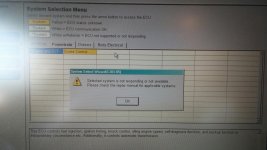
Guess I wasn't clear. I've done that, but here's the result when I click the arrow. (you can't see it very well, but the blue box says " *ENGINE AND ECT " - note the asterisk).
 

Attachments

  • 1024141225_resized.jpg
    1024141225_resized.jpg
    136 KB · Views: 3,253
I D/L'd v9.00.026 but the driver from that doesn't recognize the cable. Techstream works fine on my Win 7, 64 bit system, but cable is - no go. I get "Unable to connect to VIM" message. What can I do to make it work?
[MENTION=1747]<<<<[/MENTION] (or anyone more competent than myself) how did you get past the "Unable to Connect to VIM" message?

i have the Techstream 9.10.037 software working on an old XP laptop. i used the Tiskey software and the red light on the cable is illuminated but i can't connect to the truck. the .msi file i used was recognized as a PowerPoint file, which seemed weird, but i'm not a Windows guy so when the cable lit up i figured i was good to go.

any ideas? :confused:
 

Members online

Forum statistics

Threads
278,312
Messages
3,554,085
Members
248,016
Latest member
Advally Service

Trending content

Back
Top