TOYOTA TIS Techstream

Fotga's VCI cable/software ... did they send me the wrong software?

Question to anyone who purchased their "MINI VCI for TOYOTA TIS Techstream Diagnostic Cable & Software" from "Fotga" through Amazon - did you follow the installation instructions from the CD that had you choose "BMW UK" for your configuration? The installation didn't have any options regarding Toyota, so I wasn't sure if selecting BMW UK was simply required in order to install the software (and you could later select your specific make and model when running it) or else if it was the wrong software to be installing in the first place. Thanks in advance!
 
I saw absolutely nothing about BMW, and I just reinstalled TIS on a fresh installation of win7 32bit on my old Acer Aspire 1 netbook just a couple weeks ago.

The software is available online, look a bit above your post, there's links for all of the same software I just used. It isn't too hard to install on a windows machine, follow the instructions from one of the links above and you shouldn't have a problem, that's all I did.

Here, I'll make it easier for ya, this is the instruction page I followed:

blog.obd365.com/2016/02/22/how-to-install-toyota-tis-techstream-v10-30-029/
 
Last edited:
Thanks, that looks vastly different from the install I did earlier. I'll de-install what I did earlier and give that a shot. I appreciate the help!
 
I just successfully (yay) activated the remote window/sunroof open on my 2016 Trail... did I miss the bit where you also wind down the rear window, or is that not in there?

Also... is there any possible way to control how many presses unlock all doors? My 2012 Camry let you program on the nav screen. I was really hoping for a one-click and all is unlocked. Or at least a one-click liftgate unlock. :confused:
 
Yeah, I was able to turn off my seat belt ding with Techstream. However my questions are:

1) Can I turn off the reverse camera? Meaning, when I go in reverse, the LCD just stays on the Home screen or Audio screen or Nav screen? (I have a CBI bumper so my camera is useless anyway)

2) Can I turn off the start notification that makes you click "CONTINUE" when you start up?

Thanks - Bart
 
Yeah, I was able to turn off my seat belt ding with Techstream. However my questions are:

1) Can I turn off the reverse camera? Meaning, when I go in reverse, the LCD just stays on the Home screen or Audio screen or Nav screen? (I have a CBI bumper so my camera is useless anyway)

2) Can I turn off the start notification that makes you click "CONTINUE" when you start up?

Thanks - Bart

1) No
2) No
Not with techstream at least.
 
What is the main advantage over Techstream? It looks like the majority of use is to disable the seat belt ding. For a one way feedback, I have always used a Bluetooth OBD-II dongle connected to a mobile app (Torque).

I have searched but have not found a list of functionality this offers?


Thanks!
 
What is the main advantage over Techstream? It looks like the majority of use is to disable the seat belt ding. For a one way feedback, I have always used a Bluetooth OBD-II dongle connected to a mobile app (Torque).

I have searched but have not found a list of functionality this offers?


Thanks!

I was successful with implementing the long-press unlock that winds down all windows and opens the sunroof. That's kinda neat if you want to air-out a hot vehicle.

There's other tweaks too... I'll try to take a bunch of screenshots this weekend, since I have a bunch of questions for other people about them.
 
What is the main advantage over Techstream? It looks like the majority of use is to disable the seat belt ding. For a one way feedback, I have always used a Bluetooth OBD-II dongle connected to a mobile app (Torque).

I have searched but have not found a list of functionality this offers?


Thanks!

The biggest benefit for me is TechStream allowed me to program my own immobilizer key and save like $300 vs. having the dealer do it. $69 for an authentic Toyota fobhead key on eBay + $3 to have it cut + activate it with TechStream sure beats $197 for the key and $150 to program it from the stealership.
 
You are also able to run a lot of diagnostics and be able to reset/modify data for a bunch of things.

I also have Torque, it is not quite the same. Yes, they will both read and show you data from your sensors, but torque really stops there. Carista, another app for android (and I believe iphone also), allows you to modify things, such as light delays, alarm beep level, keyfob options to open windows/sunroof, several other functions, but it too stops short and does not allow modification of all functions.

Techstream will also allow you to monitor and set your tpms, as well as program a new set and be able to swap between the two sets (summer/winter tires).

It is NOT meant to be a consumer program, as you can screw up a lot of things on your vehicle if you start screwing with the wrong settings! It is a hacked or modded version of toyota's service department software to diagnose and service vehicles.

If you look through this whole thread, there are some screen shots and a good deal of information about the program/cable. There are also a few other threads on it, search around for TIS or Techstream, you will find a ton of stuff on Google about it.
 
Fogs

Anyone know of Techstream can allow you to change the bit for the Fog's?

i.e. the canbus system doesen't look for the headlights to be on before allowing the Fogs to turn on.

I know there is a wiring Mod, but would like to do in software if possible.
 
Anyone know of Techstream can allow you to change the bit for the Fog's?

i.e. the canbus system doesen't look for the headlights to be on before allowing the Fogs to turn on.

I know there is a wiring Mod, but would like to do in software if possible.

Pretty sure the 4Runner isn't doing that through canbus.

Does the 4R even have canbus?
 
I was successful with implementing the long-press unlock that winds down all windows and opens the sunroof. That's kinda neat if you want to air-out a hot vehicle.

There's other tweaks too... I'll try to take a bunch of screenshots this weekend, since I have a bunch of questions for other people about them.

That would be fantastic. Any idea if this applicable to 4th gen as well?
 
I got the software working on windows xp no issues


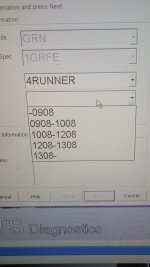
I am not sure what to select as the vehicle type. I select 4 Runner then in the drop down list I have multiple number to select from(different model types) .

I have a 2016 Limited. What should I select?
 
When its plugged into the obdii port, it should automatically select it for you and you just have to choose between smart key or no smart key feature.
 
Here's a pick of what I was referring to. I selected the 1308 (I think its the year and up) then picked smartkey. I was able to change settings.
 

Attachments

  • 20160624_060428.jpg
    20160624_060428.jpg
    121.1 KB · Views: 1,762

Members online

Forum statistics

Threads
278,312
Messages
3,554,085
Members
248,016
Latest member
Advally Service

Trending content

Back
Top