XM Presets 12 LE WITHOUT Entune

Bay33saw

New member
OK I have a 2012 LE with out the Entune.

When I listen to sat radio it will not let me choose any pre-sets. AM & FM have 6 preset tabs that hold the radio stations.
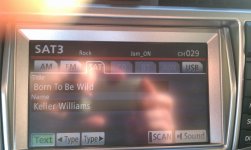
When in Sat mode it does not gve me the option, my manual says I should have 3 Sat modes with 6 presets in each one but mine does not, if I press the sat (On the Nav screen) it just goes to Sat 2 and if I press again it goes to Sat 3.

Any ideas please:biggrin2:
 
Register to hide this ad
OK I have a 2012 LE with out the Entune.

When I listen to sat radio it will not let me choose any pre-sets. AM & FM have 6 preset tabs that hold the radio stations.
When in Sat mode it does not gve me the option, my manual says I should have 3 Sat modes with 6 presets in each one but mine does not, if I press the sat (On the Nav screen) it just goes to Sat 2 and if I press again it goes to Sat 3.

Any ideas please:biggrin2:

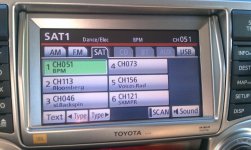
When my NAV system is in "SAT" mode, I have 6 programmable presets for each SAT mode (SAT1, SAT2, and SAT3) for a total of 18 presets. When you're in SAT mode, what's on your NAV screen? You can't see the presets if your looking at your map so you'd need to press the "AUDIO" button to toggle the MAP to AUDIO mode. Then you should see your presets. To set a preset, just press and hold it until it changes. Repeat for each one.
 
When my NAV system is in "SAT" mode, I have 6 programmable presets for each SAT mode (SAT1, SAT2, and SAT3) for a total of 18 presets. When you're in SAT mode, what's on your NAV screen? You can't see the presets if your looking at your map so you'd need to press the "AUDIO" button to toggle the MAP to AUDIO mode. Then you should see your presets. To set a preset, just press and hold it until it changes. Repeat for each one.

Exactly the same in my wifes Lexus, when I am in "Audio" listening to XM I don't see any presets at all just the channel number in the top right of the Nav screen. I'm at work right now but I'll try and post some pictures later today. No presets at all
 
Exactly the same in my wifes Lexus, when I am in "Audio" listening to XM I don't see any presets at all just the channel number in the top right of the Nav screen. I'm at work right now but I'll try and post some pictures later today. No presets at all

Something seems wierd there. If I'm in audio mode, across the top, I have "AM/FM/SAT/CD/USB/BT" As I click thru each source, I can see the different presets. I'm a bit puzzled as to why you wouldn't have them. Seems very odd. I'll have to take a pic of mine for reference.
 
Something seems wierd there. If I'm in audio mode, across the top, I have "AM/FM/SAT/CD/USB/BT" As I click thru each source, I can see the different presets. I'm a bit puzzled as to why you wouldn't have them. Seems very odd. I'll have to take a pic of mine for reference.

Yup I have 6 presets in AM and FM. I don't get presets in SAT/CD.USB or BT
 
Yup I have 6 presets in AM and FM. I don't get presets in SAT/CD.USB or BT
You don't see the presets because the initial screen just shows artist/track information. There's another soft key to press to get the presets to appear. I can't think of which one off the top of my head, but after I drive home this evening from work I'll post back if someone else hasn't already.
 
You don't see the presets because the initial screen just shows artist/track information. There's another soft key to press to get the presets to appear. I can't think of which one off the top of my head, but after I drive home this evening from work I'll post back if someone else hasn't already.

I hope your right otherwise it's a trip to the dealer....:thanks:
 
Moist, did you do the following;

Radio "on".
Press "setup".
Press "6" (More)
Press "2" (Preset)
Here it will show you how many "presets" have been chosen and it should show 6.

After you choose the number of presets, that will be 6, let the screen return to normal.
Now press your preset button and it should go through all AM, FM and 3 pages of SAT.
HINT: Don't rely on the "mode" button on the steering wheel to go through your presets. I thought it would but the correct way (according to the dealer) is to press the preset button to change your AM/FM/SAT/etc....

Hope this helped.
 
Moist, did you do the following;

Radio "on".
Press "setup".
Press "6" (More)
Press "2" (Preset)
Here it will show you how many "presets" have been chosen and it should show 6.

After you choose the number of presets, that will be 6, let the screen return to normal.
Now press your preset button and it should go through all AM, FM and 3 pages of SAT.
HINT: Don't rely on the "mode" button on the steering wheel to go through your presets. I thought it would but the correct way (according to the dealer) is to press the preset button to change your AM/FM/SAT/etc....

Hope this helped.

I'll give it a try, but from memory I don't have preset numbers on my nav screen....may be wrong but I'll give it a try when I get off work.
 
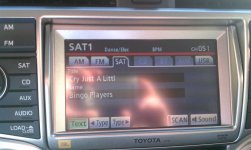
When you press SAT, then audio, do you see the song thats playing? If you do, press the "text" button near the bottom left and your presets should appear.
 
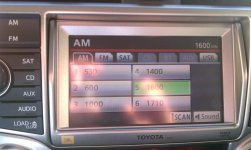
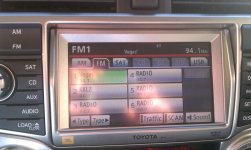
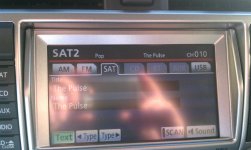
Ok here are some pictures the first are of AM then FM both of the AN and FM have pre-sets, when I switch to SAT 1 I dont see any pre-sets, when I press SAT again it just goes to SAT 2 and again to SAT 3 when I press the SAT tab
 

Attachments

  • AM.jpg
    AM.jpg
    136.3 KB · Views: 550
  • FM.jpg
    FM.jpg
    136.8 KB · Views: 540
  • SAT 1.jpg
    SAT 1.jpg
    135.9 KB · Views: 562
  • SAT 2.jpg
    SAT 2.jpg
    136.2 KB · Views: 586
  • SAT 3.jpg
    SAT 3.jpg
    135 KB · Views: 569

Members online

Forum statistics

Threads
278,311
Messages
3,554,082
Members
248,016
Latest member
Advally Service

Trending content

Back
Top