Wiring a Late Model OEM Toyota Radio

tgreenwood75

New member
Hey there,

I have read the numerous threads regarding putting a modern Toyota/Scion head unit with bluetooth into older rigs but have not come across the same problem I am having.

I have a 2001 4runner with the standard stereo and am hoping to swap in a radio from a 2012 Rav4 with bluetooth. I picked up the head unit off of Craigslist but cannot get audio to come out of it. The plugs (minus antenna of course) match up with the connectors that go into the factory amp. I removed the amp, and connected those two plugs to the back of the Rav4 radio.

The unit powers on and switches between functions without flaw but will not produce sound through the CD function, nor does it have all menu options when I press 'setup.' Am I missing a key step or component?

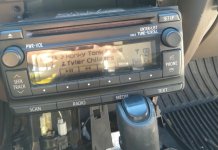
If helpful, I can photograph the unit I am installing, it is a model # 86120-0R130 out of a 2012 Rav4 Limited.

Thanks in advance!
 
Register to hide this ad
You need to remove the wire for the power antenna motor from one of the plugs and you should get audio. I just wired in a switch for the power antenna.
 
You need to remove the wire for the power antenna motor from one of the plugs and you should get audio. I just wired in a switch for the power antenna.

Interesting! Would not have guessed it...

You're talking the tan/salmon colored relay box with plugs on the bottom? I disconnected this box completely but did not know I needed to remove a wire. Can you give more detail on which wire and what you did?
 
I think it need to see an antenna.

There is a post in the audio section of that very problem. As soon as he installed his antenna adapter he had sound.

@%1;


Sent from my iPhone using Tapatalk
 
Last edited:
I believe I did the black and white wire pin#8 . You can try disconnecting the antenna relay first and verify first.
 
Thank you both for the input! I will get it all setup with the antenna adapters and see how it works then.

Hopefully the antenna was the cause of my problem!
 
Thank you both for the input! I will get it all setup with the antenna adapters and see how it works then.

Hopefully the antenna was the cause of my problem!


Look in the audio section for a title with 2016 radio from southern bike. And read the last few posts from southernbike.

I’ll bump it to the top


Sent from my iPhone using Tapatalk
 
Thanks [MENTION=99144]19963.4lsr5[/MENTION], I had actually read that post but did not understand the phrasing and context of the problem until I ran into the same issue! Now that I've figured out exactly what I need, all additional adapters are ordered up and I should be set. Seeing everyone else's touchscreen setups is making me want to upgrade before I even finish this install!
 
Thanks [MENTION=99144]19963.4lsr5[/MENTION], I had actually read that post but did not understand the phrasing and context of the problem until I ran into the same issue! Now that I've figured out exactly what I need, all additional adapters are ordered up and I should be set. Seeing everyone else's touchscreen setups is making me want to upgrade before I even finish this install!


I love the T1819 but wanted a dedicated NAV unit in the 4Runner. It also rocks better. (At least in my little Saturn SL sounds great with 4 6.5” 3 way speakers) And I had done all the work fitting the T1819. I ended up using a 2013 Corolla unit. Mainly because it had built in XM radio if I ever wanted to use that. The T1819 required a external module. Plus I couldn’t find the newer NAV units with the entune module.

I miss the call button the T1819 radio has that the NAV doesn’t. Plus you can’t make calls through the NAV if your moving.

Enjoy. It’s a great “mod” if you spend a lot of time in your rig. I spend 50min each way to work.


Sent from my iPhone using Tapatalk
 
Got my antenna adapter plugged up and now have sound but still no bluetooth connectivity!

I was worried that this might be the case without running a microphone. I don't care about the microphone but want an audio connection. What harness do I need or what can I modify to allow bluetooth pairing? I know I stumbled upon one person who claimed they paired theirs by splicing some wires but not adding any additional cables.

Thanks again!
 
Got my antenna adapter plugged up and now have sound but still no bluetooth connectivity!

I was worried that this might be the case without running a microphone. I don't care about the microphone but want an audio connection. What harness do I need or what can I modify to allow bluetooth pairing? I know I stumbled upon one person who claimed they paired theirs by splicing some wires but not adding any additional cables.

Thanks again!


There is a mod to have Bluetooth but I don’t know what it involves. The mic is only 54 dollars.


Sent from my iPhone using Tapatalk
 
Thank you for all your help [MENTION=99144]19963.4lsr5[/MENTION]

So it is the microphone itself that needs to be attached? Or is it the 28-pin harness?

In [MENTION=82698]Southernbike[/MENTION] 's install, he used listed microphone PT546-00120-CH along with a 28 pin conversion harness. Will I need both of these? Could I instead link in a cheapo microphone like this (Amazon.com: Genuine Toyota Accessories PT923-00097-MC Microphone: Automotive) direct to the HU or does this go through the 28-pin?
 
PT546-NU160 is the mic I used.

The AD and CH harness adapters break out the antenna and MIC connections

Search for the Bluetooth mod if you do not want to buy the mic.

The guy at the end of the southernbike thread did the mod.

I use my phone in my car all the time so I bought the mic

That mic you posted may work if it’s got the same plug.


Sent from my iPhone using Tapatalk
 
Last edited:
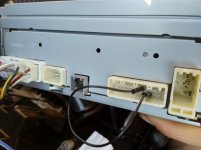
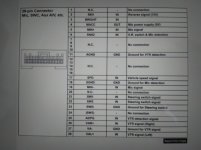
Today I discovered a different way to do the bluetooth mod. I did not have the wiring harness, so I made my own jumper wire to jump the microphone sensor to the microphone ground on the 28-pin plug.

Only took 30 min total and was free with parts and tools I had in my garage. The photos should exhibit what I did but I simply located the SNS2 pin for Mic Detection (pin 6) and the appropriate ground (pin 18) and looped them with a single wire. The wire was attached using connectors stolen from an RC servo and they fit stereo pins snugly. I crimped, soldered, then heat shrinked the connections to be safe. You could probably do it a more ghetto way as it is merely a signal wire but this may be a permanent fix for me.

The benefit was not spending $100 for a wiring adapter and microphone online and (for me) not waiting on them. As compared to previous mic mods, you don't need to cut into a $30 Toyota harness and it is more easily reversible because it does not require any parts or cutting.
 

Attachments

  • IMG_20200626_073110.jpg
    IMG_20200626_073110.jpg
    113 KB · Views: 1,122
What model OEM radio is that?

What did you do for the antenna without the adapter to convert it to the antenna connector we have?

I do like my hands free calling through my radio. It was worth the 54 for the mic cable.

When I bought my newer radios (2012 and 2013 T1819 and a 2013 NAV unit I only bought them with the adapters. So I never had to purchase the AD and CH connectors. I paid 50 dollars for a T1819 locally on Craig’s List and 75 for a T1819 on eBay.


Sent from my iPhone using Tapatalk
 
It is a Toyota 86120-0R130 out of a 2012 Rav4.

I purchased the antenna harness but not the harness which controls bluetooth, usb, or steering wheel. It was the pins where this harness would be (28-pin plug) that I used the jumper wire.

Only buying the antenna harness kept costs down for me. I paid $30 for the radio off craigslist and $30 for the antenna harness/adapter.
 
It is a Toyota 86120-0R130 out of a 2012 Rav4.

I purchased the antenna harness but not the harness which controls bluetooth, usb, or steering wheel. It was the pins where this harness would be (28-pin plug) that I used the jumper wire.

Only buying the antenna harness kept costs down for me. I paid $30 for the radio off craigslist and $30 for the antenna harness/adapter.


Did you need the CH or AD adapter cable to adapt to your factory wiring?

One of those cables plugs into the antenna port and adapts it to the old long metal plug.

My T1819 in my Saturn has a really noisy cooling fan. I still have the T1819 I originally installed and hope to change it this week. I’ll see which cable plugs into the antenna. I think it’s the same one that breaks out the mic to use the small Prius mic.

I’m just trying to nail this info down for future reference.


Sent from my iPhone using Tapatalk
 
Did you need the CH or AD adapter cable to adapt to your factory wiring?

One of those cables plugs into the antenna port and adapts it to the old long metal plug.

My T1819 in my Saturn has a really noisy cooling fan. I still have the T1819 I originally installed and hope to change it this week. I’ll see which cable plugs into the antenna. I think it’s the same one that breaks out the mic to use the small Prius mic.

I’m just trying to nail this info down for future reference.


Sent from my iPhone using Tapatalk

Sorry, I should have been more specific on part numbers because I know it can be confusing. I purchased only PT546-00120-AD to connect my antenna. This adapter was necessary to have sound output, the radio powered on but was silent without it.

I did not purchase the PT546-00120-CH adapter because this corresponds to bluetooth, microphone, steering wheel controls, and USB. These were not functions that I needed and I thought that a jumper wire to trick the stereo into believing I had a microphone was quicker and more cost effective for my uses.
 
I was recently wondering how universal head units and antenna jacks were. I guess the answer is "not very"
 

Members online

Forum statistics

Threads
278,316
Messages
3,554,123
Members
248,016
Latest member
Advally Service

Trending content

Back
Top