
2014 SR5 Premium. Finally!

SurferRob

New member
I finally was able to take delivery of my 2014 SR5 Premium friday night. It took about 2 months to get. This is my 3rd 4Runner in 9 years. I drove the crap out of my 4th gen, then got a 2011, then the dealer made me an offer I couldn't refuse. So far, I am really happy with how it drives compared to the 2011. Nice improvements so far.

I am learning the NAV system, it's my first car with one. The only thing I need some help with is with my phone and a setting. Maybe someone here can help. Currently my iPhone 5 is up to date with the OS and synched and working with car. The one thing that isn't working is when I receive a text, nothing happens, the phone is just silent. Is there a way to still get the sound/alerts from the phone? I am not really interested in seeing the text on screen. I think I am just missing something simple. Anyway, any help would be awessome.

Thanks
Rob
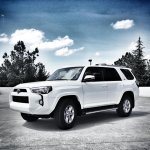
photo.jpg
 

Attachments

  • photo.jpg
    photo.jpg
    74.4 KB · Views: 1,054
Register to hide this ad
Looking good, perfect Raleigh weather for the sunroof! Wish I could help on the Entune, still learning it myself. I am just up the road in Southpointe area.
 
So far, I am really happy with how it drives compared to the 2011. Nice improvements so far.

Congratulations Rob! I didn't care for Pearl White, but your rig in the new white shade looks great.

Question....what specific driving differences have you noticed?
 
Hey Maz, thanks. I actually don't like the perl either, this is solid white and with the black windows and the smokey lights did a number on me!

This is gonna sound weird, but it feels a little more solid. The 5th gen has has a lot of nose dive but it feels less to me on the 2014. Also, the breaks feel different, in a good way. I think I remember someone saying they changed those up a bit. The breaks feel like they engage better if that makes any sense.
 
I finally was able to take delivery of my 2014 SR5 Premium friday night. It took about 2 months to get. This is my 3rd 4Runner in 9 years. I drove the crap out of my 4th gen, then got a 2011, then the dealer made me an offer I couldn't refuse. So far, I am really happy with how it drives compared to the 2011. Nice improvements so far.

I am learning the NAV system, it's my first car with one. The only thing I need some help with is with my phone and a setting. Maybe someone here can help. Currently my iPhone 5 is up to date with the OS and synched and working with car. The one thing that isn't working is when I receive a text, nothing happens, the phone is just silent. Is there a way to still get the sound/alerts from the phone? I am not really interested in seeing the text on screen. I think I am just missing something simple. Anyway, any help would be awessome.

Thanks
Rob

View attachment 119335


From what I've read it's a difference in technology that Apple uses vs bluetooth in other phones. That's just the way it is with the iPhone and I just chalk it up to being an unintended "safety" feature. I don't need to be looking at texts or emails while I'm driving... The only way I have been able to get the audible alerts is to use the iPhone to play music via bluetooth. On a side note, my coworker also has an iPhone and a Dodge Charger and his iPhone does the same thing when paired via bluetooth to the car.
 
Last edited:
Stifler, I agree with you. Those are the running boards that came off my 2011. My wife wasn't happy about me taking them off but it had to be done. In order for her to "o.k." the new deal I agreed to put them on the new ride. I don't hate them, but I do like better with out!

Ryanbt: thanks for the update. I am fine too, not getting the alerts, just wasn't sure if I was missing and easy fix. Thanks.

Rob
 
Try checking Settings > Bluetooth > click the little "i" button next to TOYOTA 4Runner > then turn on "Show Notifications." I'm pretty sure that's what did the trick for me. :yo:
 
Just Loaf it....you were right, that made the message display on my screen. Thanks for the tip on that. Any chance you know how to only get the sound notification on my phone, as if it's not synched, if that makes any sense?
 
Ok, I gave it some thought and I've got no idea. I know my messages are set to give me a second reminder and when that happens, only my phone will chime and nothing will happen on the vehicle side. How to make that happen on the first notification is beyond me... sorry!
 
Try checking Settings > Bluetooth > click the little "i" button next to TOYOTA 4Runner > then turn on "Show Notifications." I'm pretty sure that's what did the trick for me. :yo:

Good Find, Just Loaf It!! This must be a newer feature to the iOS. I had my coworker check (he hasn't done the latest few updates and doesn't have that option in his cell phone!
 
Right on Native. I'd love to remove them but the wife needs them! Gotta keep her happy I guess. I've had mine a week, really, really happy with it over the 2011.
 

Members online

Forum statistics

Threads
278,310
Messages
3,554,079
Members
248,016
Latest member
Advally Service

Trending content

Back
Top