4Runner Startup/Display Off Images

Found the Toyoda logo and sized it for the Entune display, I believe 1280x679 is a resolution I saw referenced.
 

Attachments

  • Toyoda_Entune_Image.jpg
    Toyoda_Entune_Image.jpg
    79.2 KB · Views: 5,620
Maybe I missed it.

I did this mod and it was great, but my pic only shows up for literally 1/2 a second at most.

Is there a way to change that?
 
I have a feeling that people would be crying about how long the load time is on the nav unit if this image were to display any longer. Then there would be a thread asking how to shorten this.

A screensaver option would be nice where the image pops up if you have not touched the screen in some time but then again for every + there is a -

What a stupid design then.

What is the point of having an image on the screen for so brief a time period you can't even make out what it is?

It's almost like the blink of an eye.
 
It is kinda dumb but I like details like this. And you can load 3 images at a time so I constantly change it. It's fun to see the folks that ride with me notice it and it's good conversation starter. I like the Toyoda emblem gonna have to use that one
 
Correct, there is no way to adjust it. IMO the only reason to do this mod (as I have done) is to set it to be the screen "off" image, then just turn the screen off and the image is displayed all the time. You obviously can't use nav but all other functions - radio, BT, etc., work fine with the screen off. Otherwise it's a waste of effort to install the image only to see it for a nanosecond on power up.


How do you turn the screen off?
 
How do you turn the screen off?

Home screen -> settings -> (upper right corner) screen off

Once you turn it off it will stay off even if you cycle the ignition. If you are listening to the radio and change the channel or skip a song via BT the screen stays 'off' but the new channel or song appears briefly in the top of the display before disappearing. I can't recall how phone calls or texts appear since I don't use BT anymore (locking up too often) but IIRC they over ride the 'off' screen while you are in use.
 
Save your image in the "Off" folder mentioned in the instructions. Then following the same steps, set it as the Screen Off image (not the startup image). By doing that, the screen goes through the default startup image and warning and then displays your custom image constantly for the duration of your ride. For this to work, you also have to turn your screen off in the settings. Luckily the 4R remembers that your screen was turned off and stays off even after restarting the truck. Every time I start my 4R the default image appears, then the warning, then my custom image is displayed continuously until I turn off the 4R.

Maybe I missed it.

I did this mod and it was great, but my pic only shows up for literally 1/2 a second at most.

Is there a way to change that?
 
Save your image in the "Off" folder mentioned in the instructions. Then following the same steps, set it as the Screen Off image (not the startup image). By doing that, the screen goes through the default startup image and warning and then displays your custom image constantly for the duration of your ride. For this to work, you also have to turn your screen off in the settings. Luckily the 4R remembers that your screen was turned off and stays off even after restarting the truck. Every time I start my 4R the default image appears, then the warning, then my custom image is displayed continuously until I turn off the 4R.

This is brilliant. Thank you for being helpful.
 
I have a pic of my girlfriend underwater in a bikini (from behind) taken in Cozumel last year. She hasn't noticed it flash by on startup yet.

;)

Sorry, not posting it here.....

:-/
 
I just tried this on my 2016 TE and couldn't get it to work ('cannot connect to USB device').

  • I've got the filenames correct and the folders are the only things on this card
  • The formatting of the USB stick is correct (FAT32),
  • It's a 16GB card, so oversizing shouldn't be an issue
  • The format has been tried with both jpg and jpeg extensions
  • I've tried having the device in the port before starting as well as after starting
  • The device loads on 6 other computers I have in my house just fine.
  • My android phone works just fine when connected, so I know the port is live.

Any ideas? Are there minimum resolution requirements before this thing will work or something stupid like that?

I can't believe Toyota can engineer such a great vehicle only to fall down with their clunky entune system. Everything else about connectivity is done through bluetooth on this thing, yet file transfers still require a usb connection? Just plain silly.

 
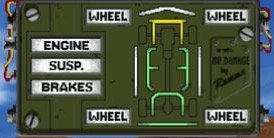
I want to do something like this, vehicle damage toggle screen from an old video game. Need to find a better quality image though.
 

Attachments

  • IMG_3689.JPG
    IMG_3689.JPG
    15.6 KB · Views: 3,245
I just tried this on my 2016 TE and couldn't get it to work ('cannot connect to USB device').

  • I've got the filenames correct and the folders are the only things on this card
  • The formatting of the USB stick is correct (FAT32),
  • It's a 16GB card, so oversizing shouldn't be an issue
  • The format has been tried with both jpg and jpeg extensions
  • I've tried having the device in the port before starting as well as after starting
  • The device loads on 6 other computers I have in my house just fine.
  • My android phone works just fine when connected, so I know the port is live.

Any ideas? Are there minimum resolution requirements before this thing will work or something stupid like that?

I can't believe Toyota can engineer such a great vehicle only to fall down with their clunky entune system. Everything else about connectivity is done through bluetooth on this thing, yet file transfers still require a usb connection? Just plain silly.

Keep trying. Seriously. It took mine maybe 3 tries to "take". 2014 though.
 

Members online

No members online now.

Forum statistics

Threads
278,312
Messages
3,554,089
Members
248,016
Latest member
Advally Service

Trending content

Back
Top