Apple CarPlay/Upgraded Head Unit

First post to the forum!!

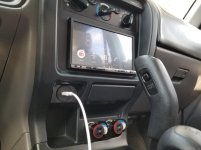
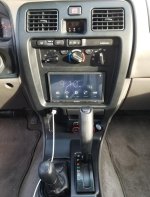
My son and I just finished a head unit upgrade in his 2001 SR5. Santa delivered a Sony XAV-AX3000 with Apple CarPlay and Android Auto. So far, we’re really impressed. This was a very exciting upgrade for a high school student who doesn’t own any CDs, and wouldn’t know what to do if you handed him a cassette tape.

Parts used:
  • Sony XAV-AX3000 (On Sale at Best Buy for $280 + tax)
  • Metra 70-1761 wire harness ($4.79 from Amazon)
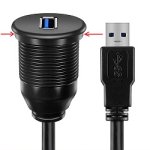
  • Single Port 3ft USB 3.0 Male to Female AUX Car Mount Flush Cable ($9.90 from Amazon)
  • Metra 40-UV43 Male to Female Motorola Antenna Cable ($5.83 on Amazon)
  • Scosche MDAB 1988-Up GM Micro/Delco Antenna Adapter Tip ($6.69 on Amazon)


Installation was fairly straightforward, but it had a few challenges:
  • Wire harness prep… We soldered and shrink-wrapped all the wires in the harness – no crimp connectors. This took a while, but it resulted in a very solid and tidy bundle of wires. We chose to connect the parking brake wire to ground instead of wiring it to the actual E-brake handle. Normally this “feature” would prevent you from viewing pictures or videos from a USB stick unless you had the parking brake on. Grounding the wire as we did defeated this protection. It was just easier, and we didn’t think watching USB movies is something we really needed anyway.
  • USB extension… The Sony manual warns against extending the USB port, but we extended it by 3 ft anyway. We wanted a clean look, so we chose to replace the cigarette lighter and keep the two lower sockets for other accessories. There were two challenges: We had difficulty getting the original cigarette socket and bulb out of the dash bezel. It just wasn’t clear how to get that thing out without completely destroying it. Eventually we got it. Second, the USB mount from Amazon was a slightly bigger than the hole through the bezel, so I had to grind down the inner circular edge with a belt sander. This was tricky, but we managed to get it to drop into the hole and mount flush against the metal bezel. We also painted the metal bezel before installing the locking nut behind it. In the end I wish we had found a USB panel mount what was small enough to fit inside the white plastic ring of the original cigarette lighter. It looks clean the way it is, but the USB port is difficult to see at night. It would have been really cool to have a lighted ring around the USB port.
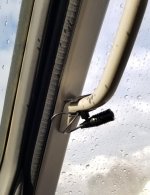
  • Microphone… It was difficult to decide where to put the included microphone. The microphone comes with a clip intended for a visor, or something else. We opted to clip it to the handle on the A-pillar. The mic is very sensitive. You could probably mount it *behind* the dash and it would still work. We could have tucked it away somewhere less conspicuous, but we left it on the handle for now. From the head unit the wire runs underneath the carpet behind the pedals and up to the handle.

We plan to add a backup camera at some point, so we routed additional wires from the head unit under the driver’s carpet to make them easier to tap into later: ACC Power and Ground (to power the camera), Reverse In, and Camera RCA In. Note that some people power their cameras with the reverse light circuit. However, running the ACC Power back to the camera seems like a better way to go. The Sony HU has a backup camera soft button, so you can view the camera without putting the car in reverse. You couldn’t do that if your camera was hard-wired to the reverse lights. Anyway, that’s a project for another day…

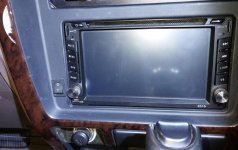
This purchase was mainly inspired by my desire for my son to keep both hands on the wheel. With Apple CarPlay it seems like you should be able to plug in your cell phone (before you start driving) and then PUT IT DOWN. There’s really no reason to mount the phone anywhere else on the dash or windshield. The other inspiration was the burned-out backlight in the original radio. At night the radio was completely dark, and I’ve read that repairing them nearly impossible.

I hope this was helpful. I spent a lot of time researching this forum prior to this purchase. I really appreciate all of helpful contributions on this thread, as well as many others.
 

Attachments
  • NewRadio1.jpg
    NewRadio1.jpg
    102 KB · Views: 2,760
  • NewRadio2.jpg
    NewRadio2.jpg
    73.8 KB · Views: 1,868
  • Microphone.jpg
    Microphone.jpg
    132.6 KB · Views: 1,687
  • USB_resized.jpg
    USB_resized.jpg
    17.5 KB · Views: 1,716
Last edited:
Follow up...

I have discovered one glaring shortcoming on this Sony head unit. I cannot turn it off! It turns out that you can mute any given sound source, and even blank the screen, but you cannot power off the unit. Because of this, you cannot retract the antenna while the car is on. So, drive-thru car washes are off the table until I can install a kill switch.

Apparently this affects several models in the XAV series as other customers are complaining about it too:

Customer Community

Customer Community

If I had known this I probably would have passed on these Sony units. Has anyone else had to deal with this? Has anyone put a kill switch in line with the ACC wire to their radio?

Cheers,
Scott
 
First post to the forum!!

My son and I just finished a head unit upgrade in his 2001 SR5. Santa delivered a Sony XAV-AX3000 with Apple CarPlay and Android Auto. So far, we’re really impressed. This was a very exciting upgrade for a high school student who doesn’t own any CDs, and wouldn’t know what to do if you handed him a cassette tape.

Parts used:
  • Sony XAV-AX3000 (On Sale at Best Buy for $280 + tax)
  • Metra 70-1761 wire harness ($4.79 from Amazon)
  • Single Port 3ft USB 3.0 Male to Female AUX Car Mount Flush Cable ($9.90 from Amazon)
  • Metra 40-UV43 Male to Female Motorola Antenna Cable ($5.83 on Amazon)
  • Scosche MDAB 1988-Up GM Micro/Delco Antenna Adapter Tip ($6.69 on Amazon)


Installation was fairly straightforward, but it had a few challenges:
  • Wire harness prep… We soldered and shrink-wrapped all the wires in the harness – no crimp connectors. This took a while, but it resulted in a very solid and tidy bundle of wires. We chose to connect the parking brake wire to ground instead of wiring it to the actual E-brake handle. Normally this “feature” would prevent you from viewing pictures or videos from a USB stick unless you had the parking brake on. Grounding the wire as we did defeated this protection. It was just easier, and we didn’t think watching USB movies is something we really needed anyway.
  • USB extension… The Sony manual warns against extending the USB port, but we extended it by 3 ft anyway. We wanted a clean look, so we chose to replace the cigarette lighter and keep the two lower sockets for other accessories. There were two challenges: We had difficulty getting the original cigarette socket and bulb out of the dash bezel. It just wasn’t clear how to get that thing out without completely destroying it. Eventually we got it. Second, the USB mount from Amazon was a slightly bigger than the hole through the bezel, so I had to grind down the inner circular edge with a belt sander. This was tricky, but we managed to get it to drop into the hole and mount flush against the metal bezel. We also painted the metal bezel before installing the locking nut behind it. In the end I wish we had found a USB panel mount what was small enough to fit inside the white plastic ring of the original cigarette lighter. It looks clean the way it is, but the USB port is difficult to see at night. It would have been really cool to have a lighted ring around the USB port.
  • Microphone… It was difficult to decide where to put the included microphone. The microphone comes with a clip intended for a visor, or something else. We opted to clip it to the handle on the A-pillar. The mic is very sensitive. You could probably mount it *behind* the dash and it would still work. We could have tucked it away somewhere less conspicuous, but we left it on the handle for now. From the head unit the wire runs underneath the carpet behind the pedals and up to the handle.

We plan to add a backup camera at some point, so we routed additional wires from the head unit under the driver’s carpet to make them easier to tap into later: ACC Power and Ground (to power the camera), Reverse In, and Camera RCA In. Note that some people power their cameras with the reverse light circuit. However, running the ACC Power back to the camera seems like a better way to go. The Sony HU has a backup camera soft button, so you can view the camera without putting the car in reverse. You couldn’t do that if your camera was hard-wired to the reverse lights. Anyway, that’s a project for another day…

This purchase was mainly inspired by my desire for my son to keep both hands on the wheel. With Apple CarPlay it seems like you should be able to plug in your cell phone (before you start driving) and then PUT IT DOWN. There’s really no reason to mount the phone anywhere else on the dash or windshield. The other inspiration was the burned-out backlight in the original radio. At night the radio was completely dark, and I’ve read that repairing them nearly impossible.

I hope this was helpful. I spent a lot of time researching this forum prior to this purchase. I really appreciate all of helpful contributions on this thread, as well as many others.

Bumping an old post. I also used the same exact flush mounted USB in the cig lighter hole but it didn't provide enough data/power for Carplay to work efficiently. Did you have any issues at all with the radios performance?
 
Bumping an old post. I also used the same exact flush mounted USB in the cig lighter hole but it didn't provide enough data/power for Carplay to work efficiently. Did you have any issues at all with the radios performance?

Frankly, I don't find myself using the USB connector that often. I just can't train myself to take my phone out of my pocket and plug it in every time I jump into the car. Yet, when I do take the time to connect it, I haven't noticed any issues with Android Auto when I try. Honestly, I haven't been impressed with this Sony. I can't turn it OFF, so I can't drive through a car wash because the antenna won't go down unless I turn the ignition off. Personally, I would hold out for a model that offers all wireless Carplay/Android auto - one that will turn OFF.

Hope that helps...

Regards,
Scott
 
Frankly, I don't find myself using the USB connector that often. I just can't train myself to take my phone out of my pocket and plug it in every time I jump into the car. Yet, when I do take the time to connect it, I haven't noticed any issues with Android Auto when I try. Honestly, I haven't been impressed with this Sony. I can't turn it OFF, so I can't drive through a car wash because the antenna won't go down unless I turn the ignition off. Personally, I would hold out for a model that offers all wireless Carplay/Android auto - one that will turn OFF.

Hope that helps...

Regards,
Scott

Another thought - there is likely to be an antenna trigger wire on the radio. You could add an additional switch to break/connect this wire and place the switch in a free port on the dash. You'd likely always leave the antenna down but if you wanted to use the radio then click the switch.

I had to do this on an older, different car. Works well.

Jason
 
CD player

This does look really nice. My wife wants a CD player though as she has a collection of music CD's. So we have been browsing Crutchfield also. Anyone have a CD player? They have some double-dins but also some single dins that they include a little shelf with. Thinking about the Alpine but just not sure. We have the original radio. Both the CD player and the cassette stopped working years ago. Now the volume button barely works. Me, I'd be OK with just an AM radio, but my wife wants to have a CD player so, we're going to be getting a CD player.
 
This does look really nice. My wife wants a CD player though as she has a collection of music CD's. So we have been browsing Crutchfield also. Anyone have a CD player? They have some double-dins but also some single dins that they include a little shelf with. Thinking about the Alpine but just not sure. We have the original radio. Both the CD player and the cassette stopped working years ago. Now the volume button barely works. Me, I'd be OK with just an AM radio, but my wife wants to have a CD player so, we're going to be getting a CD player.


I got the Alpine 172BT a little over a year ago for $120 from Crutchfield because of my CD collection and I love it. Added an antenna switch after the car wash had its way with my antenna. Been washing by hand since then. Glad I bought it when I did!
36e2ae2cf2fa92b6b5b4120e4bb9ba77.jpg


Sent from my iPhone using Tapatalk
 
Antenna switch

Why did you need to add an antenna switch? Does it not normally come with that? I remember replacing my antenna a few years ago.
 
Why did you need to add an antenna switch? Does it not normally come with that? I remember replacing my antenna a few years ago.

Bump, my antenna won't go down unless the truck is turned off. I'd like to find an antenna switch/fix as well.
 
Bump, my antenna won't go down unless the truck is turned off. I'd like to find an antenna switch/fix as well.

Just add a switch in the antenna power wire. Looks like that's a black wire with
a white stripe coming out of the factory amp. Most aftermarket units, it's a blue
wire.
 
Just add a switch in the antenna power wire. Looks like that's a black wire with
a white stripe coming out of the factory amp. Most aftermarket units, it's a blue
wire.
Also, if your head unit also has an "antenna" wire (blue with white stripe), use that - it will keep your antenna down unless AM or FM is selected as the source. You can still use a switch to put the antenna down, but it will be mostly 'automatic'...

-Charlie
 
Just add a switch in the antenna power wire. Looks like that's a black wire with
a white stripe coming out of the factory amp. Most aftermarket units, it's a blue
wire.

My power antenna actually snapped off yesterday. Has anyone done a knobby antenna conversion?
 
My power antenna actually snapped off yesterday. Has anyone done a knobby antenna conversion?
Tons. Look up the "Tacoma Whip Mod" for another possibility.

I keep mine lubed with graphite lube (and rarely use it) and it has been good for many years now, after a few early failures of the motor/gears.

-Charlie
 
Also, if your head unit also has an "antenna" wire (blue with white stripe), use that - it will keep your antenna down unless AM or FM is selected as the source. You can still use a switch to put the antenna down, but it will be mostly 'automatic'...

-Charlie

The blue wire on my Alpine BTE 172BT powered the antenna regardless of the input so I had to add a switch. The guy at Crutchfield had me wire the blue striped wire to the amp which still gets power no matter the source so I don't think that would have made a difference.

Curious where you all have mounted your kill switches?
Any recommendations for what switch to buy?

I bought the switch here based on a forum post and mounted to left of my steering wheel.


EuIrLTx.jpg
 

Members online

Forum statistics

Threads
278,310
Messages
3,554,080
Members
248,016
Latest member
Advally Service

Trending content

Back
Top