Apple iOS 5

Great news on the iOS5! I should have my iPhone 4S this weekend and love the Bluetooth audio already. Having the text data show up will be awesome! Thanks for posting your experience.
 
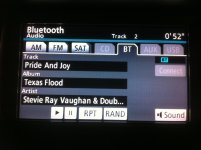
So I just realized that not only does it show the name of the song, but by hitting the 'text' button you can cycle through and also display artist name, album name, and running time. Neat.

Just in case anyone doubts me. LOL.

IMG_0244.jpg~original

IMG_0245.jpg~original

IMG_0246.jpg~original

IMG_0247.jpg~original

Hmmmm, how many songs did you go through before you decided which one to show us? :wink2:
 
are there any other features the new ios fixes? I have an SR5 with the bluetooth no nav. I have synched my phone but the car wont recognize my contacts. Any chance this will/can get fixed?
 
are there any other features the new ios fixes? I have an SR5 with the bluetooth no nav. I have synched my phone but the car wont recognize my contacts. Any chance this will/can get fixed?

Not an ios issue. Basically, in order to get the automatic contact transfer, you need navigation. I don't think there is enough memory built into the standard head unit to handle the number of contacts that your phone has. My recommendation is to hold your home button on the phone for 3 seconds and utilize the voice control feature. When it dings, say "Call John Doe" and it will voice dial that way.
 
thanks dude.

For some reason though I thought I had read that people with other phones, not iphone, were able to get the contacts to show up on the head unit when a call would come in.
 
thanks dude.

For some reason though I thought I had read that people with other phones, not iphone, were able to get the contacts to show up on the head unit when a call would come in.

I think you can program like 10 contacts in. Those will all show up when someone calls you, but you have to program them manually.
 
Hmmmm, how many songs did you go through before you decided which one to show us? :wink2:

Hahaha. I was originally listening to a jay-z song when I first got in but figured someone would have some kind of opinion on it. First thing that came to mind to put on? The Beatles! who can hate on the Beatles?!
 
Hahaha. I was originally listening to a jay-z song when I first got in but figured someone would have some kind of opinion on it. First thing that came to mind to put on? The Beatles! who can hate on the Beatles?!

I personally prefer Jay-z over the Beatles. My taste has been brought into question many times before, though. :)

*hides*
 
Quick google searching shows bluetooth having a data transfer rate of greater than 1MB/s. Most digital music is sampled at 256mbps or less. Thus, other than noise, one would think that there would be no difference in quality between the USB connection and bluetooth. I also find it hard to believe that the iPhone would compress on the fly and respond as quickly as it does. I'm sure there might be something I'm missing, but compressing doesn't make sense to this layman.

Personally, I've been very happy with the sound quality through the bluetooth.

I know what you're saying, but somehow my ears tell me that USB provides more bass (or defined bass) and seems a tad louder. My brother said the same thing you said, but my ears tell me different. Either way, USB connection has been stinking up my music recently...slight noise at various times in the music. So, i am using BT Audio and using USB to charge.

(BTW, this is on the Prius, so, may not apply to 4runners.)

 
Last edited:
Works on Nav Too!

Glad this works - it's been bugging me since I've had the iPhone.
 

Attachments

  • Bluetooth.jpg
    Bluetooth.jpg
    135.9 KB · Views: 636
Quick google searching shows bluetooth having a data transfer rate of greater than 1MB/s. Most digital music is sampled at 256mbps or less. Thus, other than noise, one would think that there would be no difference in quality between the USB connection and bluetooth. I also find it hard to believe that the iPhone would compress on the fly and respond as quickly as it does. I'm sure there might be something I'm missing, but compressing doesn't make sense to this layman.

Personally, I've been very happy with the sound quality through the bluetooth.

I know what you're saying, but somehow my ears tell me that USB provides more bass (or defined bass) and seems a tad louder. My brother said the same thing you said, but my ears tell me different. Either way, USB connection has been stinking up my music recently...slight noise at various times in the music. So, i am using BT Audio and using USB to charge.

(BTW, this is on the Prius, so, may not apply to 4runners.)

i don't think it's your ears, Thai... or mine either...

BT audio is delivered via the A2DP profile in iOS. while theoretically the BT bandwidth may be sufficient to stream uncompressed audio, A2DP generally sends a compressed stream and supports a number of different codecs for doing so. i honestly don't know which codec Apple uses. it may be SBC, which is the most basic and lossy codec, but it sounds pretty good to my ears so i tend to think not. in any case, Apple may not specify what it uses, but it is almost certainly compressed. so, as i understand it, BT streaming, while handy and much more user-friendly than navigating the USB input, does seem to come at a little sacrifice of quality. :smashputer:

hey, i'm not really complaining. i've yet to get the right set of optimized "magic playlists" on my iPod in the glovebox, so i use BT all the time myself. :fro:
 
AbmWxOPCMAAxGl0.jpg:large


My iOS5 is up and running. The only annoyance, now, is that "pause" pops up between each song for a split second while the data is being sent over.
 
^Ya, i noticed that. I also noticed that it seems to respond a little quicker when you hit the skip button....
 
I did, but you can't program the name.

on the stock sr5 stereo it is 20 contacts that can be programmed.

1. when programming, it asks to "program manually" or "program by phone" choose program by phone,

you need to have a phone with bluetooth, not an iPhone, that can transfer cards, I had an old nokia I programmed the 20 contacts I wanted to save. when you choose transfer by phone, it will tell you when to send the contact over, you have to do it one by one, not possible to transfer all at once.

there is a tutorial and video on this somewhere in the forum.
 

Members online

Forum statistics

Threads
278,309
Messages
3,554,066
Members
248,016
Latest member
Advally Service

Trending content

Back
Top