Automatic headlights at night : possible mod?

Has anyone thought of or tried using Carista or something similar to enable the auto light feature in the ECM after installing the sensor and stock? There is a write up on trail4runner for the Carista and it states that is an option that can be modified. Link to the write up below along with the options list available with it.

https://trail4runner.com/2018/08/16/carista-for-5th-gen-4runner/

4RUNNER CUSTOMIZABLE FEATURES
Below is a list of all the Customizable features for the 5th Gen Toyota 4Runner (defaults)

Doors / Windows / Remote
Wireless Door Locking – Enabled
Blink Turn Signals When Locking/Unlocking with Remote – YES
Beep When Locking/Unlocking with Remote – Yes
The volume of Beep When Locking/Unlocking with Remote – MAX
Beep when Opening/Closing Windows with Remote – YES
Warn (Beep) When Door Can’t Be Locked Because It’s Still Open – YES
Panic Function on Remote – ENABLED
Re-Lock doors automatically if you unlock, but don’t open a door – YES
Re-lock doors automatically if you unlock, but don’t open a door within… – 60 Seconds
Auto-lock doors when moving – OFF
Lock doors when shifting into gear – ON
Unlock doors when shifting into park (P) – ON
Unlock all doors when driver’s door is opened – OFF
Close rear hatch window by turning and holding key in door lock – YES
Open rear hatch window by turning and holding key in door lock – YES
Open windows and sunroof by turning and holding key in door lock – OFF
Close windows and sunroof by turning and holding key in door lock – OFF
Open windows and sunroof via long-press on remote – OFF
Close passenger’s window using a single button press -YES
Rear-left window single-touch-close – YES
Rear-right window single-touch-close – YES
Passenger window single-touch-close from driver’s switch -YES
Rear-left window single-touch-close from driver’s switch – YES
Rear-right window single-touch-close from driver’s switch – YES
Rear hatch window auto-close – YES
Rear hatch window auto-open – YES
Rear hatch window open/close delay – 0.8 SECONDS
INSTRUMENT DISPLAY / DINGS
Seat belt warning ding (driver) – ENABLED
Seat belt warning ding (front passenger) -ENABLED
ECO Drive indicator zone – ON
INTERIOR/ EXTERIOR LIGHTS
Coming-home lights duration – 30 SECONDS
Auto headlights activation threshold – NORMAL
Instrument lights dimming sensitivity – NORMAL
Instruments restoring sensitivity – NORMAL

Dim interior lights after… – 15 SECONDS
Turn on interior lights when you shut off engine – YES
Turn on interior lights when you unlock doors – YES
Interior footlight (brighten doors open, dim when driving) – YES
Turn on interior door-handle & center console lights dimly (flood lights) when ignition is on and shifter is not in park (P) – YES
Turn on exterior footlight (on side mirror) when doors unlocked via remote – YES
Turn on extra foot light (on side mirror) when doors unlocked via interior switch – YES
Turn on exterior footlight (on side mirror) for… – 15 SECONDS
Interior light control – ENABLED
OTHER FEATURES
Run rear wiper automatically after rear window washer use -ON
Additional ‘tear’ wipe after rear window use – ON
Rear wiper intermittent run time interval – 3 SECONDS
Rear wiper retract time – 3 SECONDS

 
Currently working on a simple, effective, work-around solution (Some minor dash panel removal may be required...):playball:

What progress have you made? What assistance is still needed? I have a 2019 TRD OR and willing to trace wires or assist as needed.
 
Last edited:
Has anyone thought of or tried using Carista or something similar to enable the auto light feature in the ECM after installing the sensor and stock?

INTERIOR/ EXTERIOR LIGHTS
Auto headlights activation threshold – NORMAL

I installed the sensor and stalk, and used Carista to change the "Auto headlights activation threshold" setting... still no auto headlights.
 
Greetings,

I have a 5th Gen 19' 4Runner TRD Off Road. I have installed the auto headlight sensor (part# 89121-50020) and it works (dims/brightens the dash and infotainment based on ambient light). In Techstream it is also detected and reads the current light value off the sensor. However it doesn't actually turn on the headlights. I have eliminated the switch stalk as being the culprit since it is electrically identical between the the two parts (#84140-35171 for TRD PRO/Limited & #84140-35181 for all others). The stalk only differs in the 'DRL' setting being labeled 'AUTO' on the TRD PROs and Limiteds.

The Body Control Module for the various trims differs in part configuration number. For example, my BCM is part# 89220-35340. I am absolutely certain I can swap in a TRD PRO BCM (#89220-35420) and gain fully functional auto headlights at this point. However, I am also absolutely certain these BCM's are physically & electrically identical. The only differ in programming.

So, does anyone know how to reprogram a BCM from a TRD OR to that of a TRD PRO?

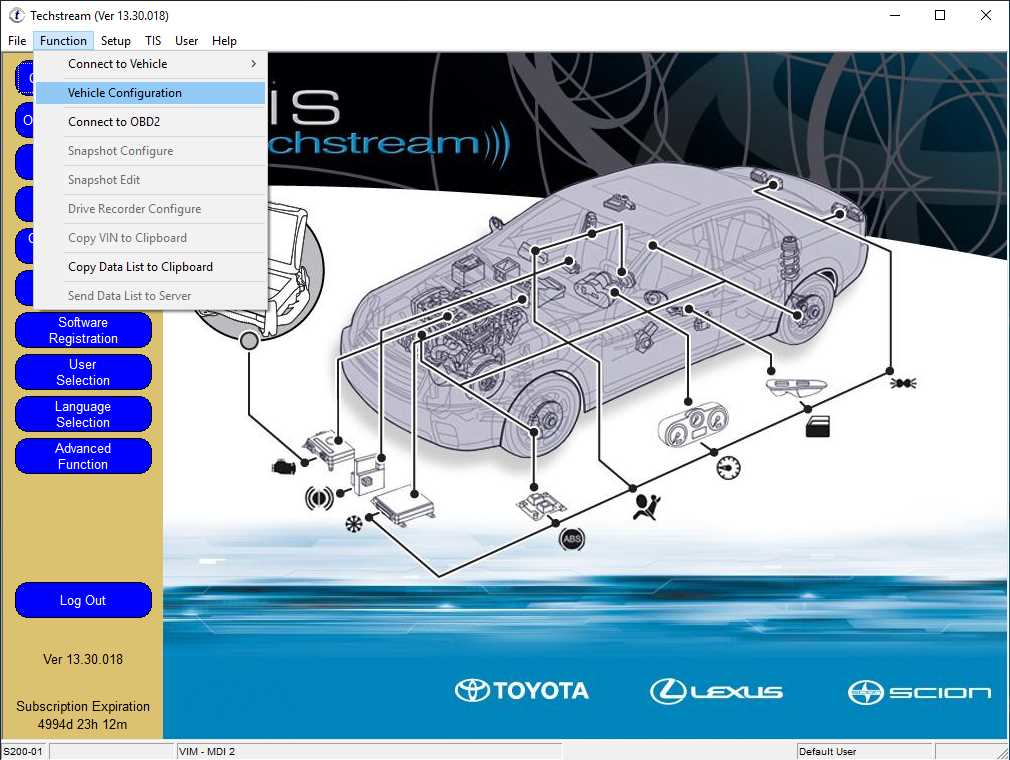
I suspect this functionality may be present in Techstream under the Vehicle Configuration function.

Can anyone share some information on Techstream's Vehicle Configuration function? I.e. what does it do, how does it work, what code is required, and how do you get that code?

52a5021c8cb8ed36b3d599accd92f262.png


8392abad947ccb1700c3d3c7570e5b86.png
 
I swapped the BCM in mine when I did the crawl conversion as well. Ended up not needing to do this. The secondary CAN BUS node hardware was already present on my SR5 MPX BCM.

Can you explain this a little more? Are you saying you can add Crawl Control to the SR5 without swapping the BCM?
 
Yeah, so basically the MPX has two can nodes CANH and CANL which is the main CAN BUS high and low lines that connect all to the main CAN bus. Then there is CANN and CANP pins which the crawl control switch connects to. Remember the main body ecu also doubles as the gateway control ecu so in regards to CC and MTS it is passing the info from the crawl switch to the skid control ecu. You will still need to add a trail overhead console and a trail instrument cluster for the icon lights as they are not in the SR5 cluster. Let me know if that makes sense or if you want me to explain more. I will try and snap a pic with f the circuit board later today.


A little more detail would be awesome. You're explaining great, I just haven't researched enough to understand exactly what you mean. If I am willing to use different switches that don't have the right icon lights, do I still have to replace the overhead console and instrument cluster? Could I use a smaller, add-on display to achieve the same effect? I'm just trying to add the crawl control with having to obtain the least amount of additional parts as possible and I don't care too much about the cosmetics. This is a work truck.
 
Here is my understanding of the MPX's so far:

- The programming is the same. All the functions you see under the customize setting on techstream is the same for these ECU's. Doesn't matter part number wise. This seems to be the case with most if not all of Toyota's ECU designs (minus ECM's for different engines). It is the physical hardware, i.e. population of components on the board that varies from part number.

Unless they are doing something along the lines of jumpers (0 ohm resisters on board, DIP switches, whatever) to change unit configuration, I don't think the programming is the same.
Case in point, some of the auto headlight config items are absent from customize section in Techstream for the non-Limited/non-TRD PRO 4Runners. Now, the sensor itself has no logic, it's just an analog photocell. Yet the sensor value is able to be read by Techstream on my TRD OR. That's happening through the BCM/MPX.
Clearly all the hardware is present, otherwise it wouldn't be able to read the sensors value. Even still, it won't operate like a unit programmed for auto headlights. To me that leans heavily to this being a software / calibration / configuration limitation and not hardware.
 
Last edited:
The icon lights are in the cluster, you know like the headlight "On" icon, etc. The SR5 cluster does not have the icons on the instrument cluster fascia for the LED light behind to shine through. The LED's are not there either. You do need the CRAWL control switch from the overhead console. Look on Ebay, occasionally there are complete trail overhead consoles on there. Let me know if you want help finding one, or have any questions on doing the mod. You will need to add a few wires BTW.

I’m a little confused on why I need the actual switch from the overhead console and I’m not able to just install one in an empty spot. Assuming I know what it does, I don’t need an LED lit icon. I’ll start doing some hw so I have some basic direction and I’ll let you know when I have questions. Thanks very much!
 
I've never seen the way to actively read the photocell. Is this under active test? What features are absent on the menu for the headlights?
I'll make a video when I get home of the photocell status and the customization functions.

I assumed, but don't know, that the stalk only signals the MPX which in turn actually controls the relay for the lights. There is an active test for the headlights that I will attempt to see what happens.

Regarding the flash I have a hot air rework station and the equipment to read & write (assuming it's not protected) the flash part. We could cross flash modules as proof-of-concept. If that doesn't work, the only thing left is component level differences.

For the masses, it's actually more realistic to have a simple how to for adding the missing components, if that's the fix.
If it turns out to be a firmware difference It'll be much harder, if not impossible, to flash these in-place unless the Toyota tool/method is leaked.
A few of us could easily rework flash parts and update them but that's outside the ability of most.
 

Members online

Forum statistics

Threads
278,310
Messages
3,554,078
Members
248,016
Latest member
Advally Service

Trending content

Back
Top