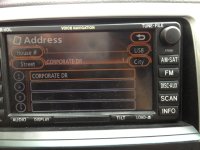
Award for worst factory nav goes to .......

coconutpete

New member
The "designers" at Toyota who somehow snuck the abomination that is the factory nav into production.

I had a job interview yesterday - punched the address in - that works pretty well. Then I set off.....

Can't push buttons while in motion (this is the United States of Sue'ya after all" so at EVERY red light before I got to the highway (and it was quite a few) I sat there and tried to find the "start guidance" or "go" or "start" button to get it to start giving me directions ..... never even found it. This system is so non-intuitive that it actually drove me to look up directions on my iphone while I was driving since it's actually built for humans. Wow. I can edit the town, edit the street, edit the street number or switch to another screen but the "go" buton is nowhere to be found.

I was originally planning on selling the factory unit on eBay when I found an aftermarket replacement I like, but I changed my mind. I'm going to take it to a field and go alll "office space" on it - the satisfaction will be WELL worth the few hundred bucks I could have sold it for.

Rant over.
 
Last edited:
Register to hide this ad
how hard is it to hit "route"?

Seriously, i loved my stock Nav unit and its ability. Maybe you should have tried to learn the system PRIOR to depending on it for this situation, then you might have been a little more ready. Or you can blame the system that seems to work fine for everyone else.
 
Can't push buttons while in motion (this is the United States of Sue'ya after all" so at EVERY red light before I got to the highway (and it was quite a few) I sat there and tried to find the "start guidance" or "go" or "start" button to get it to start giving me directions ..... never even found it. This system is so non-intuitive that it actually drove me to look up directions on my iphone while I was driving since it's actually built for humans. Wow. I can edit the town, edit the street, edit the street number or switch to another screen but the "go" buton is nowhere to be found.

Rant over.

I figured this had to be a rental but your signature indicates it's your truck. I had to read your post a couple times to understand your issue with it. Apparently you never used the navigation before or any of the numerous threads about not being able to change settings while moving.

I'll be watching for your next rant about not having an auto down button for all your windows and what a hardship it is to open them. Damn Toyota engineers!
 
If he has the portable TomTom nav I can understand his frustration, although it sounds like he should have learned to use it prior to depending on it.

But still, the portable TomTom Nav doesn't have very good reviews. I own a different TomTom Nav, the 2510 or something like that and it has some really annoying quirks to it, I'll be switching to Garmin at some point.
 
Award for the worst factory nav unit goes to... BMW and worst information system EVER...

That stupid dial/knob crap is the most annoyingly stupid and frustrating thing in the entire world... The ONLY thing I find useful/entertaining/easy about that knob is twisting it around and around a bunch and watching it spin back by itself (though the newer ones don't do that... boo!)

Back to the 4Runner, welcome to Toyota, Lexus, Honda, Acura, Nissan, and most everyone these days seems to be implementing some form of that lock-out on their Navs... the Acura MDX would do something similar, the Toyota/Lexus Nav units have always done this, BMW's is such a pain in the ass I don't bother touching it while driving, I'd be better off staring at a Youtube video on my phone... I'd probably spend less time with my eyes on the phone than on that damn dial set-up...

Point being, its the United States of America, run by idiots, for the idiots, and controlled by the goverment because the people are idiots... Same reason you have that annoying little chime in most cars telling you to put on your seat-belt (though you should be wearing them anyways, if not for anything but avoiding low-speed deployment of the SRS system because you didn't have your seatbelt on. Trust me, you get the repair bill for those puppies you'll wish you died in the accident!)

If the factory set-up frustrates you that much, there is a way to snip the speed signal wire input and bypass that feature... but it might make the GPS slightly inaccurate.
 
The "designers" at Toyota who somehow snuck the abomination that is the factory nav into production.

I had a job interview yesterday - punched the address in - that works pretty well. Then I set off.....

Can't push buttons while in motion (this is the United States of Sue'ya after all" so at EVERY red light before I got to the highway (and it was quite a few) I sat there and tried to find the "start guidance" or "go" or "start" button to get it to start giving me directions ..... never even found it. This system is so non-intuitive that it actually drove me to look up directions on my iphone while I was driving since it's actually built for humans. Wow. I can edit the town, edit the street, edit the street number or switch to another screen but the "go" buton is nowhere to be found.

To start, Toyota doesn't make nav units, they make cars. The nav unit is made by Fujitsu Ten. Secondly, relying on your gps last minute to get you to a job interview maybe isn't the best idea especially if your not sure how to work it.

Lastly, chances are if something has annoyed you this much, its probably annoyed someone else who was ambitious enough to fixed the problem and make a write up about it...like this one: Toyota 4Runner Factory Navigation Override and Unblock Bypass Module


Is that the portable tomtom Nav you're referring to?

I don't believe he would have the tomtom unit because those came in Urbanrunners and the OP has a Limited
 
Last edited:
I also have the '08 Limited with factory nav. The manual for the system is quite long, but well detailed.

If you want to be REALLY frustrated, try using the voice command feature. This allows you to "speak" a new destination while the vehicle is under way. My wife and I were trying to find an address in a Minnesota city named Edina (pronounced eee-deye-na). We tried every kind of pronunciation we could think of. We were laughing so hard with the results that would come up, the whole thing became too much of a distraction. We finally pulled over and entered it manually.

There are special nav DVDs you can buy that allow one to override the system and enter a new destination while under way. Try searching on "Navigation Software Override". I think the thread is just a couple of pages back from this one on the same 4th gen forum. Note: I have nothing to do with the seller whatsoever.
 
Nope, not the tomtom one. I have a tomtom portable (not from a toyota, just one we purchase years ago) that we love because the button on it makes sense - i can't remember what it says, but it's intuitive, "start" or "go" or something like that.

Thanks for listening to me rant. I feel better.

I'll look for the "route" button when I'm in the car next.

I had a BMW with the first gen iDrive, the one everyone hates. It wasn't the best thing in the world but at least "start guidance" made sense as far as what the function was.

I understand Toyota didn't "make" the unit, but someone at Toyota still had to sign on the dotted line indicating "yes, we like the way this works".

The "DEST" button or "destination button" lets you put in a destination - to me it makes sense that the "route" button lets me change details abou the route - "route" doesn't say "start" to me, but according to the answers in this thread I seem to be in the minority.

I bought this truck because I love it and I have no regrets - the factory nav unit is easy to replace, I can't add doors, extra cylinders or gears etc.

OK - I think that covers it.
 
I figured this had to be a rental but your signature indicates it's your truck. I had to read your post a couple times to understand your issue with it. Apparently you never used the navigation before or any of the numerous threads about not being able to change settings while moving.

I'll be watching for your next rant about not having an auto down button for all your windows and what a hardship it is to open them. Damn Toyota engineers!

I prefer one-touch down on all windows, but it's not a huge deal for me. I will make sure to try to make my next rant worht reading though.

And yes, correct - I never used the nav before. It was by chance that I got a 4R with it, I was looking for a limited and I had certain criteria - I found a great deal on a truck with nav so I bought it. I know the roads around me so I see no need to use NAV to get to work and home every day.

I must have taken a wrong turn somewhere, I turned left on internet, and then right on message board where I thought people shared opinions and asked questions - I'll double check my directions next time - hey maybe I'll even use my NAV :wave:
 
I must have taken a wrong turn somewhere, I turned left on internet, and then right on message board where I thought people shared opinions and asked questions

That's your problem right there! See the right you took was actually onto Toyota fan boys message board where we don't take kindly to you nay-sayers :D

In all seriousness tho, every unit has its faults and the one in you truck is no exception. I've never used the OEM but I have an Eclipse (also made by Fujitsu Ten) and I like it alot more than my hand held Garmin altho it does have some quirks.

I'm sure if you do your research, you'll find an aftermarket one that really satisfies you.
 
I must have taken a wrong turn somewhere, I turned left on internet, and then right on message board where I thought people shared opinions and asked questions.

oops, you did make a wrong turn!

You turned left on the internet, right on the message board, then left on rant where people post bombastic crap they would normally think better of before hitting the submit button.
 
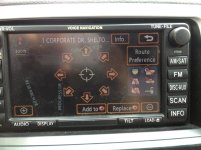
OK ... call me what you want. I just walked out to the parking lot and attempted to get guidance to an address. What button do I hit next?
 

Attachments

  • aimage.jpg
    aimage.jpg
    128.1 KB · Views: 230
  • bimage.jpg
    bimage.jpg
    130.3 KB · Views: 209
OK ... call me what you want. I just walked out to the parking lot and attempted to get guidance to an address. What button do I hit next?

Either one will do. I know its not intuitive as "Start". Toyota NAV system isn't the best, but it gets the job done (90% of the time for me). Once you get used to it, most (except punching addresses in as you drive which my Honda lets me..... that still drives me nuts) quirkiness of the system becomes second nature.
 
just push replace. it clears the previous destination that was never reached. if you hit the menu button, you can cancel or resume.

but to start, just hit the replace and you're on your way...with guidance
 
I'm sorry - I'm not 100% understanding you. Either one of which two?


Thanks.

Add To button "Adds" a destination to a previous destination that apparently you haven't reached yet. I think................... sorry, I need some coffee

Replace button erases the destination before.

Either "button" will take you to your destination you entered.

So, to answer your question, press the REPLACE button.
 
it'll make a lot more sense once the old destination is cleared out. you select your address, it shows up on your map and then it does it's thing. i'm pretty sure once it shows up on the map i just start driving unless i want to change a route if there are options.
 

Members online

Forum statistics

Threads
278,316
Messages
3,554,120
Members
248,016
Latest member
Advally Service

Trending content

Back
Top