Backup Camera -Reverse Wire

The strangest thing that happened was the rear hatch electric opener switch stopped working at some point during the install. I had dis-connected the rear door ECU so that I could get access for running the video cable. But, I reconnected it and it still wouldn't open. I tried re-setting it by disconnecting the negative battery cable, but didn't seem to help. After about an hour, my son walked out and tried it and it started working again. We have no idea what happened. The switch is newly replaced due to the original melting and has worked fine.

Thats funny the same thing happened to mine it stopped working then about an hour later it started working again must have some kind of reset built in

There is a reset/anti theft strategy built in when you disconnect the rear hatch motor, simply hit the unlock button and it will work again.
 
Assistance needed

So I installed a back up camera this morning. I tapped the reversing camera power into what I believe was the reversing lamp positive lead. By all reports and youtube vidoes this is the red wire with yellow strip.

However, after I spliced this, my rear view camera is always on. Has anyone else had this issue or have suggestions?

I'm not very electrically savvy. I know some people have mentioned using a voltage meter (which I dont have) to see what turns on when you put it in reverse

I have a 2008 Sr5 4x4

Update
- I was able to confirm this was the wire for the reverse light by placing electrical tape over this area of the harness and blocking the connection. It may be a faulty camera
 
Last edited:
So I installed a back up camera this morning. I tapped the reversing camera power into what I believe was the reversing lamp positive lead. By all reports and youtube vidoes this is the red wire with yellow strip.

However, after I spliced this, my rear view camera is always on. Has anyone else had this issue or have suggestions?

I'm not very electrically savvy. I know some people have mentioned using a voltage meter (which I dont have) to see what turns on when you put it in reverse

I have a 2008 Sr5 4x4

Update
- I was able to confirm this was the wire for the reverse light by placing electrical tape over this area of the harness and blocking the connection. It may be a faulty camera


I was wondering if I could ask for some help on my backup camera. Currently own a 2007 toyota 4runner.

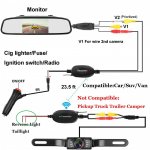
I got a wireless (bluetooth) unit as shown in the picture.

I wanted to wire it to the reverse light so that it activates when in reverse.

The camera has two wires coming from it, one red, one black (green circle).

71sLUCtN-SL._SL1500_.jpg

I imagine that the red wire goes to the reverse light (I believe it's the red one with yellow stripe), but I have no idea where the black one goes?
 

Attachments

  • 71sLUCtN-SL._SL1500_.jpg
    71sLUCtN-SL._SL1500_.jpg
    110.8 KB · Views: 2,105
You could also strip the end and crimp on a ring terminal and then just hook it on bare metal bolt. I would imagine there would be good spots on the inside of the tailgate.

That’s what I did when I installed one of those “wireless” cameras in my daughter’s Camry. I found one of the tailight studs that was easy to access, took the nut off, and used a star washer under the ring terminal to help it bite in and get good contact to the sheet metal. Worked fine, but overall I’m not thrilled with the performance of the camera, and would not get it for mine when I do the stereo. The picture gets wonky at times, I suspect because of interference between the trunk area and the dash. It may be where the transmitter/receiver are located, but I found where I thought were the best/cleanest locations for them, and I’m not going to mess with it at this point since it does work. It’s just that occasionally when she first hits reverse, it gets scrambled a bit as if it were a tv with bad channel reception through an antenna (which this setup kind of is). In fairness, they may be built better these days, as I bought that camera over 5 years ago when there really wasn’t a lot of wireless options out there, and it just never got installed, so when my daughter bought her new Sony Ax1000, I thought that I may as well use it on her car, and if it worked well, order another for my truck. I think I’ll opt for a direct wired model for mine though, based on that experience. Literally the ONLY difference is the wire running to the front, you still have to wire everything else the same, so you are not saving much effort or time, just having to snake one wire under the carpet, or across the headliner.
 
Thats funny the same thing happened to mine it stopped working then about an hour later it started working again must have some kind of reset built in

Waaaayyyy late to the thread but the switch not working caught my eye. I had the same issue and have the following hypothesis after a moment of panic about digging back in to do more work:

The car was locked. After unlocking the doors, the switch worked.
 
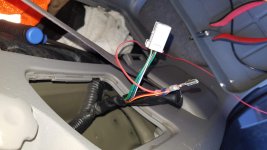
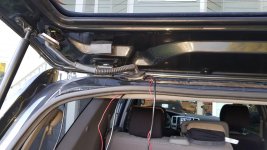
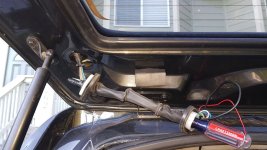
Here is how I did this

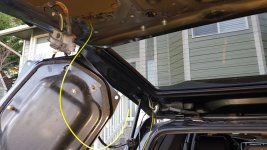
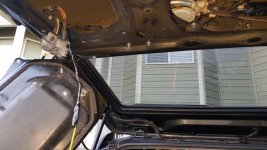
I just popped the pin out of the vehicle side of the tail light connector and added the "reverse signal" wire to it. Then I routed it thru the grommets and weather seals, and fished it thru the back door. Kinda tough keeping everything out of the way of the window, but i eventually got it the wire path situated.
 

Attachments

  • 20181206_140837.jpg
    20181206_140837.jpg
    127.7 KB · Views: 1,962
  • 20181206_144108.jpg
    20181206_144108.jpg
    140.1 KB · Views: 1,049
  • 20181206_144435.jpg
    20181206_144435.jpg
    139.2 KB · Views: 1,023
  • 20181206_150102.jpg
    20181206_150102.jpg
    140.5 KB · Views: 1,030
  • 20181206_150650.jpg
    20181206_150650.jpg
    135.1 KB · Views: 1,015
Yea - its a challenging process. I had more trouble getting it through the hatch bezel and through that grommet. I think i cut one of my license plate lights.

Ive gotta do it all again now, bc my camera died
 

Members online

Forum statistics

Threads
278,305
Messages
3,554,042
Members
248,016
Latest member
Advally Service

Trending content

Back
Top