Destroyed My Key Fob

Hepar

New member
Just as the title says. Smashed my FOB accidentally. Just curious if anyone knows the best place (and best prices) to get a replacement.

I know it's a question that has been asked before, but figured I'd ask as it's been a while and maybe some new source has popped up.

Thanks!

<a href="http://s1131.photobucket.com/user/jusui/media/photo-2.jpg.html" target="_blank"><img src="http://i1131.photobucket.com/albums/m547/jusui/photo-2.jpg" border="0" alt=" photo photo-2.jpg"/></a>
 
Register to hide this ad
ebay I thought.. Be sure you're getting the actual device and not just the shell. I think there's a pretty user friendly program guide somewhere too.

How'd you manage that btw?
 
Last edited:
How'd you manage that btw?

Lol. I was driving my other car and tossed the keys onto the seat. Somehow they fell slightly behind them and it's a car with a bench seat that flops forward to get access to the back seat. It then somehow managed to sit perfectly atop this one spot where when the seat went back to its normal position, it smashed it like it was in a wrecking yard.

Anyone use the aftermarket ones they sell on ebay?
 
Lol. I was driving my other car and tossed the keys onto the seat. Somehow they fell slightly behind them and it's a car with a bench seat that flops forward to get access to the back seat. It then somehow managed to sit perfectly atop this one spot where when the seat went back to its normal position, it smashed it like it was in a wrecking yard.

Anyone use the aftermarket ones they sell on ebay?

Interesting way to go... Can't say I've ever heard of that method lol.

I can't say I have any suggestions or reviews with a new non-oem fob. Maybe just try buying a used oem one that appears to be in a better condition.
 
Thanks for the tips guys. I didn't feel like waiting for an auction to end, so I bought one of the aftermarket ones. I'll probably grab an OEM one sometime down the road.
 
Make sure your lock actuators(?) work well; your power locks work well. I can't program a new fob for mine because of the lock/unlock cycle part. After a few hits my locks get slow and not all of them go at the same time. My fob right now only locks the doors, for some reason the unlock and window button stopped working. Good Luck!
 
I was contemplating buying a keyfob for my 2000 4 runner,all the auctions plus shipping was costing more than $50 shipped to canada :/
So I picked up a central locking remote from tmart.com for 20$ free shipping,
install was super easy, only 5 wires to splice
and now I have two remotes, I was going to do a write up for the install but wasn't sure if anyone would be interested. :pizza:

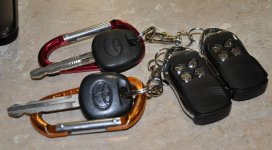
here's the new remotes I have.
and the link to the remote unit:
Car Universal Simple Remote Central Locking - Tmart.com

I don't need a " panic button " since i drive a 4 runner :biggrin1: :biggrin1:
the remote has a trunk release button than could be used to send a signal to lower the rear window but an additional module is required, I'm thinking about using it to trigger an " oogah" horn to scare people in a car park:biggrin1::biggrin1:
hey for $22 bucks and less than an hour to install, totally worth it.:biggrin1:
 

Attachments

  • new central locks 2000 4runner.jpg
    new central locks 2000 4runner.jpg
    88.7 KB · Views: 1,366
Last edited:
Make sure your lock actuators(?) work well; your power locks work well. I can't program a new fob for mine because of the lock/unlock cycle part. After a few hits my locks get slow and not all of them go at the same time. My fob right now only locks the doors, for some reason the unlock and window button stopped working. Good Luck!


Just curious if you tried manually moving the sticky lock with one hand while pushing the button with the other?
I had this problem and tried and tried and tried more times then I'm proud to admit and then finally I noticed the driver lock only doing these half up and downs while I was cycling the button and so I did the above mentioned ( up button while pulling up, down button while pushing down) and it worked.
Might work for you, if not already tried?
 
Just curious if you tried manually moving the sticky lock with one hand while pushing the button with the other?
I had this problem and tried and tried and tried more times then I'm proud to admit and then finally I noticed the driver lock only doing these half up and downs while I was cycling the button and so I did the above mentioned ( up button while pulling up, down button while pushing down) and it worked.
Might work for you, if not already tried?

I did read somewhere that you can do that. Gave it a few tries and gave up. Might try it again now that its cooler out.
 
Just a little update. Got the remote and I am pleasantly surprised by it. Build feels just like the OEM version, just minus the Toyota symbol and FCC info on the back. Easy to program too. Might pick up a 2nd one just for a backup.

<a href="http://s1131.photobucket.com/user/jusui/media/photo-1-1.jpg.html" target="_blank"><img src="http://i1131.photobucket.com/albums/m547/jusui/photo-1-1.jpg" border="0" alt=" photo photo-1-1.jpg"/></a>
 

Members online

Forum statistics

Threads
278,310
Messages
3,554,079
Members
248,016
Latest member
Advally Service

Trending content

Back
Top