

Gamma Ray
Banned
I was distraught when I got my 4Runner last year. Positively distraught, I say. The last 2019 that was listed on the dealer's website actually wasn't on the lot. That meant I couldn't get a 4Runner with a CD player. I have an hour-long drive to see some friends of mine, so bringing a couple CDs with me has always been a great way to pass the hour each way. I can't do that with my new 4Runner because there's no CD player built in. Sure, I get that fancy Android Auto, but I don't get any of that sweet CD player action! Even worse, there's not even an aux port in the 2020+ 4Runner! How rude! Well, here's a way around it!
Why would you add a CD player in the manner I'm about to outline? Here's a list of pros and cons.
Pro: You get a CD player in your 4Runner.
Pro: It's pretty cheap.
Pro: Android Auto/Apple CarPlay remains usable.
Pro: It's not a permanent fixture.
Pro: Bluetooth is completely unused.
Pro: You'll be ahead of the resurgence in CD popularity in the year 2035.
Con: It's a little inconvenient.
Con: Depending on how you make your setup, you lose your French Fry holder.
First thing's first, go to this website and enter in your zip code. No need for a state. Vacant Channels on the FM Dial It will give you a lot of frequencies that you can use with the FM transmitter in this setup. Get those frequencies and save them for later. Even "next best" frequencies can work very well. I use a "next best" myself.
Here's the complete list of necessary devices for this project. All necessary parts, including cables, are included.
CD Player: Amazon.com: Portable CD Player 1400mAh CD Walkman Gueray Rechargeable CD Player Portable CD Discman Personal CD Player with Headphones Jack USB Supply CD Music Disc with LCD Display (Black): Electronics
FM Transmitter: Amazon.com: FM Transmitter, Doosl Universal Wireless in-Car Radio Adapter FM Modulator Music Player & Hands-Free Calls for iPhone, Android
While this next part isn't strictly necessary, it is part of the setup in my guide and makes the whole thing a lot more convenient. Word to the wise, any time you get something like this, get one with a metal housing. It helps prevent RF interference that might make your 4Runner get wacky, so don't cheap out on it.
USB Car Charger Adapter With Two USB Ports: Amazon.com: Hussell Car Charger Adapter - High Performance, Aluminum, Portable 3.0 Car Chargers with Dual USB Ports - Compatible with iPhone & Android Cell Phone Devices
So, once you've got everything, connect everything together! No, seriously! The pics may help explain what is what and what goes where, but you just have to connect, connect, connect! Get to it! Don't worry! You'll be fine!
One thing you might wish to keep in mind is that while there are USB connections being made, they're only facilitating power. Don't worry about data connections or directly interfacing this equipment with the radio.
One other thing is that while you'll be using the headphone jack, you won't be using actual headphones. Don't bother using the headphones the CD Player comes with.
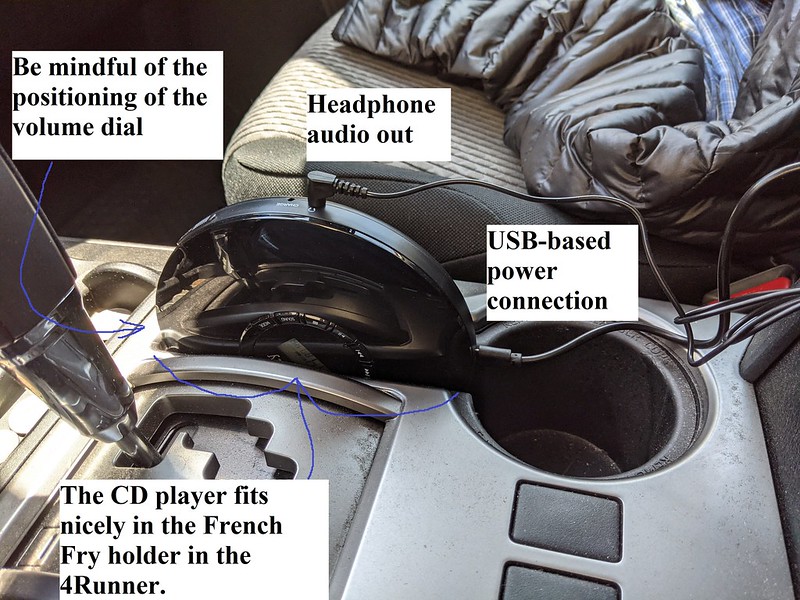


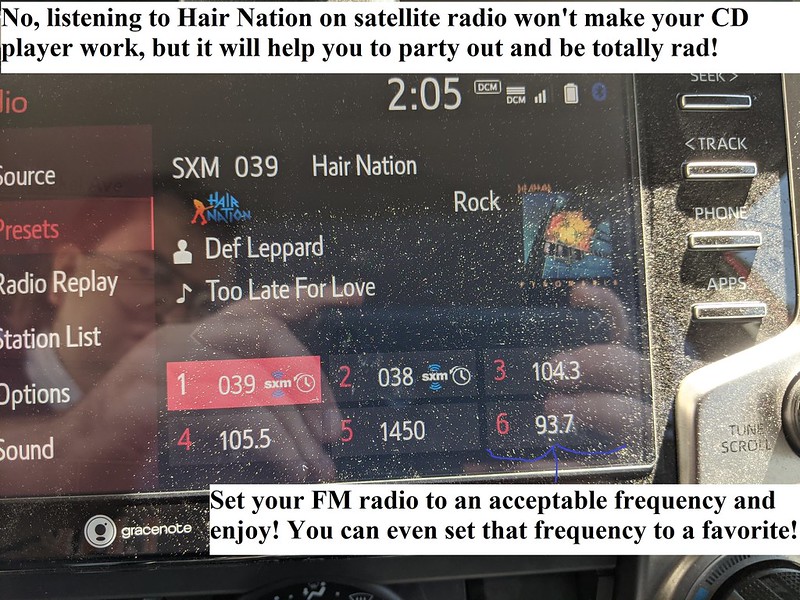
So, just connect everything, tune your FM Transmitter to the appropriate frequency, set your 4Runner's FM radio the same frequency, and start playing the CD. You should begin hearing it once the CD Player spools up. Don't forget to set the frequency as a favorite in your 4Runner if you want.
FAQ time!
Q: The audio sucks.
A1: Adjust bass/treble/balance in the 4Runner's FM radio menu. The FM Radio's bass/treble/balance settings are saved independently from the satellite radio, so if you're dabbling in the FM Radio for the first time after enjoying satellite radio you might find that it's not to your liking. I personally like all of the settings in the center except for bass. I have bass turned down two or three notches. It helps to keep my SR5 from pushing the bass further than it's capable of.
A2: There are various sound modes available on the CD player itself. Try pressing the button on the CD player to change sound modes. The standard mode it defaults to every time you power it up is usually fine for me, though.
A3: The volume dial on the CD player might be too high. I've found that the sound can hit a plateau if the CD player's volume is too high. Turn it down on the CD player's dial lower while turning the 4Runner's volume up.
Q: There's a USB cable protruding into my cup holder.
A: Rotate the CD player! If you have enough slack in the cables, you can free up the cup holder. Just be mindful of where the volume dial is while you're rotating the CD player. You might accidentally adjust it if you're not careful.
Q: Will this work on other vehicles without a CD player?
A: Most likely! As long as you've got the available USB ports for power, built in or with a car charger adapter, and a functioning FM radio and speakers, you can adapt this guide to whatever other car you've got. And even if you don't have available USB ports, that takes us to our next question.
Q: USB cables for power suck, and I don't want them in my 4Runner.
A: That might not be a problem! Depending on what equipment you're using, you might be able to prep it by charging it at home. Even for my official list of equipment above and in the guide in this topic, you don't need to use the USB power cables all the time. Both the CD player and FM transmitters have built in rechargeable batteries. If you forget to plug in the power for these devices, they might still work for you.
Q: Do I really have to put the FM transmitter alllllllllllllllllll the way over there? Can't I just plug it directly into the CD player?
A: Yes, you have to put the FM transmitter allllllllllllllllll the way over there. And no, I've tried plugging the FM transmitter directly into the CD player, and it's not good enough. I didn't test for why, whether it's the fact that the FM transmitter positioned by the French Fry holder is just too far from the 4Runner's antenna or if there's some inherent interference from putting the FM transmitter right up against the CD player, but the fact of the matter is that in this setup in this guide, you'll get bad interference from the environment that the setup won't be able to overcome if you don't separate the FM transmitter from the CD player and put it allllllllllllllllllllll the way over there. Having the Vehicle OCD organizer helps, but as long as you get nice separation, it won't matter how the FM Transmitter is kept over there.
Q: I can't plug in my phone for Android Auto/Apple CarPlay.
A: You connected the CD player or the FM Transmitter wrong, or you have something else unrelated plugged in where it shouldn't be. Don't use the USB port by the radio and vent controls. Keep that one free for your phone.
Q: I can't find a CD option on my 4Runner.
A: You won't find one. What you're essentially doing here is making your own extremely low power FM radio station. You're using that low power FM radio station to carry your CD's audio. As far as your 4Runner is concerned, it's solely tuning into the FM radio. Note that this means you won't be able to use the 4Runner to pause, skip tracks, etc. You will have to use the CD player itself for that.
Q: Something something Bluetooth
A: I decided to avoid using Bluetooth entirely. If you have another device you wish to use with Bluetooth, it won't compete with the CD player. Based on my own observations when using Android Auto, it will automatically turn your phone's Bluetooth on when you plug it into the designated USB port even if your phone's Bluetooth is turned off. I guess Android Auto uses both USB and Bluetooth communication. When I listen to CDs, I'll also be using GPS. Since I like the Android Auto GPS, I didn't want to have anything messing with Bluetooth. That's why I stuck entirely with the FM transmitter. Yes, you could substitute the CD player with one that supports Bluetooth and keep everything else about this guide the same and have a more versatile setup. More power to you! But I'm not going to go that route, and it's less of a universal solution.
Q: I have a stick up my butt and think that CDs are so passe, and I have no idea why anybody would listen to them anymore.
A: I recommend you remove the stick from your butt! But even if you don't, we're still going to keep on enjoying our CDs over here while you're getting splinters in hour hiney!
Why would you add a CD player in the manner I'm about to outline? Here's a list of pros and cons.
Pro: You get a CD player in your 4Runner.
Pro: It's pretty cheap.
Pro: Android Auto/Apple CarPlay remains usable.
Pro: It's not a permanent fixture.
Pro: Bluetooth is completely unused.
Pro: You'll be ahead of the resurgence in CD popularity in the year 2035.
Con: It's a little inconvenient.
Con: Depending on how you make your setup, you lose your French Fry holder.
First thing's first, go to this website and enter in your zip code. No need for a state. Vacant Channels on the FM Dial It will give you a lot of frequencies that you can use with the FM transmitter in this setup. Get those frequencies and save them for later. Even "next best" frequencies can work very well. I use a "next best" myself.
Here's the complete list of necessary devices for this project. All necessary parts, including cables, are included.
CD Player: Amazon.com: Portable CD Player 1400mAh CD Walkman Gueray Rechargeable CD Player Portable CD Discman Personal CD Player with Headphones Jack USB Supply CD Music Disc with LCD Display (Black): Electronics
FM Transmitter: Amazon.com: FM Transmitter, Doosl Universal Wireless in-Car Radio Adapter FM Modulator Music Player & Hands-Free Calls for iPhone, Android
While this next part isn't strictly necessary, it is part of the setup in my guide and makes the whole thing a lot more convenient. Word to the wise, any time you get something like this, get one with a metal housing. It helps prevent RF interference that might make your 4Runner get wacky, so don't cheap out on it.
USB Car Charger Adapter With Two USB Ports: Amazon.com: Hussell Car Charger Adapter - High Performance, Aluminum, Portable 3.0 Car Chargers with Dual USB Ports - Compatible with iPhone & Android Cell Phone Devices
So, once you've got everything, connect everything together! No, seriously! The pics may help explain what is what and what goes where, but you just have to connect, connect, connect! Get to it! Don't worry! You'll be fine!
One thing you might wish to keep in mind is that while there are USB connections being made, they're only facilitating power. Don't worry about data connections or directly interfacing this equipment with the radio.
One other thing is that while you'll be using the headphone jack, you won't be using actual headphones. Don't bother using the headphones the CD Player comes with.
So, just connect everything, tune your FM Transmitter to the appropriate frequency, set your 4Runner's FM radio the same frequency, and start playing the CD. You should begin hearing it once the CD Player spools up. Don't forget to set the frequency as a favorite in your 4Runner if you want.
FAQ time!
Q: The audio sucks.
A1: Adjust bass/treble/balance in the 4Runner's FM radio menu. The FM Radio's bass/treble/balance settings are saved independently from the satellite radio, so if you're dabbling in the FM Radio for the first time after enjoying satellite radio you might find that it's not to your liking. I personally like all of the settings in the center except for bass. I have bass turned down two or three notches. It helps to keep my SR5 from pushing the bass further than it's capable of.
A2: There are various sound modes available on the CD player itself. Try pressing the button on the CD player to change sound modes. The standard mode it defaults to every time you power it up is usually fine for me, though.
A3: The volume dial on the CD player might be too high. I've found that the sound can hit a plateau if the CD player's volume is too high. Turn it down on the CD player's dial lower while turning the 4Runner's volume up.
Q: There's a USB cable protruding into my cup holder.
A: Rotate the CD player! If you have enough slack in the cables, you can free up the cup holder. Just be mindful of where the volume dial is while you're rotating the CD player. You might accidentally adjust it if you're not careful.
Q: Will this work on other vehicles without a CD player?
A: Most likely! As long as you've got the available USB ports for power, built in or with a car charger adapter, and a functioning FM radio and speakers, you can adapt this guide to whatever other car you've got. And even if you don't have available USB ports, that takes us to our next question.
Q: USB cables for power suck, and I don't want them in my 4Runner.
A: That might not be a problem! Depending on what equipment you're using, you might be able to prep it by charging it at home. Even for my official list of equipment above and in the guide in this topic, you don't need to use the USB power cables all the time. Both the CD player and FM transmitters have built in rechargeable batteries. If you forget to plug in the power for these devices, they might still work for you.
Q: Do I really have to put the FM transmitter alllllllllllllllllll the way over there? Can't I just plug it directly into the CD player?
A: Yes, you have to put the FM transmitter allllllllllllllllll the way over there. And no, I've tried plugging the FM transmitter directly into the CD player, and it's not good enough. I didn't test for why, whether it's the fact that the FM transmitter positioned by the French Fry holder is just too far from the 4Runner's antenna or if there's some inherent interference from putting the FM transmitter right up against the CD player, but the fact of the matter is that in this setup in this guide, you'll get bad interference from the environment that the setup won't be able to overcome if you don't separate the FM transmitter from the CD player and put it allllllllllllllllllllll the way over there. Having the Vehicle OCD organizer helps, but as long as you get nice separation, it won't matter how the FM Transmitter is kept over there.
Q: I can't plug in my phone for Android Auto/Apple CarPlay.
A: You connected the CD player or the FM Transmitter wrong, or you have something else unrelated plugged in where it shouldn't be. Don't use the USB port by the radio and vent controls. Keep that one free for your phone.
Q: I can't find a CD option on my 4Runner.
A: You won't find one. What you're essentially doing here is making your own extremely low power FM radio station. You're using that low power FM radio station to carry your CD's audio. As far as your 4Runner is concerned, it's solely tuning into the FM radio. Note that this means you won't be able to use the 4Runner to pause, skip tracks, etc. You will have to use the CD player itself for that.
Q: Something something Bluetooth
A: I decided to avoid using Bluetooth entirely. If you have another device you wish to use with Bluetooth, it won't compete with the CD player. Based on my own observations when using Android Auto, it will automatically turn your phone's Bluetooth on when you plug it into the designated USB port even if your phone's Bluetooth is turned off. I guess Android Auto uses both USB and Bluetooth communication. When I listen to CDs, I'll also be using GPS. Since I like the Android Auto GPS, I didn't want to have anything messing with Bluetooth. That's why I stuck entirely with the FM transmitter. Yes, you could substitute the CD player with one that supports Bluetooth and keep everything else about this guide the same and have a more versatile setup. More power to you! But I'm not going to go that route, and it's less of a universal solution.
Q: I have a stick up my butt and think that CDs are so passe, and I have no idea why anybody would listen to them anymore.
A: I recommend you remove the stick from your butt! But even if you don't, we're still going to keep on enjoying our CDs over here while you're getting splinters in hour hiney!
Last edited:


 (
(


