Entire Bluetooth failure

mrt6644

Member
Entune Bluetooth failure

I have a 2015 Trail Edition that I bought in February.
It has the Entune with navigation system
It has worked fine since I bought it, with the occasional hiccup.
But starting yesterday, I have what looks to be a total bluetooth failure.
Nothing shows up, no bluetooth symbol.
It says Bluetooth unavailable.
When I try to pair or check setup it says looking for or waiting for bluetooth.
Nothing.
Ive restarted it a dozen times. Ive de-paired all devices from the device settings. Ive restarted all the devices.
Seems like a total failure.
Everything else seems to work with the Entune: navigation, radio, satellite radio and playing an ipd via the USB port.
Anyone have any suggestions before I go to the dealer?
 
Last edited:
Register to hide this ad
I have a 2015 Trail Edition that I bought in February.
It has the Entune with navigation system
It has worked fine since I bought it, with the occasional hiccup.
But starting yesterday, I have what looks to be a total bluetooth failure.
Nothing shows up, no bluetooth symbol.
It says Bluetooth unavailable.
When I try to pair or check setup it says looking for or waiting for bluetooth.
Nothing.
Ive restarted it a dozen times. Ive de-paired all devices from the device settings. Ive restarted all the devices.
Seems like a total failure.
Everything else seems to work with the Entune: navigation, radio, satellite radio and playing an ipd via the USB port.
Anyone have any suggestions before I go to the dealer?

Not saying you haven't tried this, but make sure that the bluetooth is actually turned on, on your smart phone.

That's all I've got.

If you go to the dealer they will likely update your software. Hopefully it helps.

:noidea:
 
There is no access to any bluetooth feature in the Entune. Nothing, regardless of whether the devices are turned on or not.
Thanks

Not saying you haven't tried this, but make sure that the bluetooth is actually turned on, on your smart phone.

That's all I've got.

If you go to the dealer they will likely update your software. Hopefully it helps.

:noidea:
 
There is no access to any bluetooth feature in the Entune. Nothing, regardless of whether the devices are turned on or not.
Thanks

I'm not talking about the Entune Application... I'm talking about the phone itself. Smart phones can have the bluetooth either turned on or off, usually in the phone settings menu. If the bluetooth feature is turned off... the vehicle will not be able to find the phone and connect to it.

Sometimes mine will not connect and I will turn the blue tooth off on the phone, turn off the truck, turn the phone bluetooth back on, wait a few seconds and turn on the truck.

:thumb:
 
Yes I understand. But no bluetooth function exists at all.
Not add device, remove device, no bluetooth settings, nothing. There is no access to any Bluetooth feature, setting, list, edit at all in the Entune.
Regardless of the status of the bluetooth in the portable devices, which have all been switched on a nd off, restarted, bluetooth turned on and off.
Regardless of any device that is present or not, wherthjer their blue tooth is on or off, the Entune should at the very least allow you to view or edit settings, and add or remove a device.
Those functions are completely independent of the status of any device, present or not.

Thanks

I'm not talking about the Entune Application... I'm talking about the phone itself. Smart phones can have the bluetooth either turned on or off, usually in the phone settings menu. If the bluetooth feature is turned off... the vehicle will not be able to find the phone and connect to it.

Sometimes mine will not connect and I will turn the blue tooth off on the phone, turn off the truck, turn the phone bluetooth back on, wait a few seconds and turn on the truck.

:thumb:
 
I have a 2015 Trail Edition that I bought in February.
It has the Entune with navigation system
It has worked fine since I bought it, with the occasional hiccup.
But starting yesterday, I have what looks to be a total bluetooth failure.
Nothing shows up, no bluetooth symbol.
It says Bluetooth unavailable.
When I try to pair or check setup it says looking for or waiting for bluetooth.
Nothing.
Ive restarted it a dozen times. Ive de-paired all devices from the device settings. Ive restarted all the devices.
Seems like a total failure.
Everything else seems to work with the Entune: navigation, radio, satellite radio and playing an ipd via the USB port.
Anyone have any suggestions before I go to the dealer?

Hi mrt,

I remember some time ago I had to Cycle the blue tooth feature (turn bt off-turn bt back on) on my phone (daily) for entune to pair with my cell. If I didn't, I would get: "There are no phones set-up for this feature"! And like you said, No BT icon on the screen. This was when I got the 3.2 update a few years ago. The problem actually fixed itself; don't know why though!

Cheers
 
Yes I understand. But no bluetooth function exists at all.
Not add device, remove device, no bluetooth settings, nothing. There is no access to any Bluetooth feature, setting, list, edit at all in the Entune.
Regardless of the status of the bluetooth in the portable devices, which have all been switched on a nd off, restarted, bluetooth turned on and off.
Regardless of any device that is present or not, wherthjer their blue tooth is on or off, the Entune should at the very least allow you to view or edit settings, and add or remove a device.
Those functions are completely independent of the status of any device, present or not.

Thanks

Don't you have a 'Set-up' or 'Phone' button on the HU? In my limited w/Navi, you hit > set-up> Phone> "Pair a device", "Make this system discoverable"...etc(?).
 
-Did you purchase a new phone recently?
-Have you updated your phone recently? (If not, have you updated the phone and tried to pair again from scratch?)
-Does the vehicle display a MAC address when it is trying to connect/pair/search for a Bluetooth device; if so, what is the MAC Address legitamate? (i.e is it all Zeros like 00.00.00.00.00.00 or does it look more like this: 00:0a:95:9d:68:16)
-Also what is the Software Version? (Found under Setup -> Software Update)

In any case I would probably run it to the dealership regardless, best case scenario they just have to update then Headunit Software. Worst case it needs either a new extension box and/or headunit which will be covered under warranty. In either case they're going to start with the headunit software update first.
 
Hi mrt,

I remember some time ago I had to Cycle the blue tooth feature (turn bt off-turn bt back on) on my phone (daily) for entune to pair with my cell. If I didn't, I would get: "There are no phones set-up for this feature"! And like you said, No BT icon on the screen. This was when I got the 3.2 update a few years ago. The problem actually fixed itself; don't know why though!

Cheers

It doesn't pair or even show any buttons to pair or impair or even allow access to any Bluetooth setting at all
 
Don't you have a 'Set-up' or 'Phone' button on the HU? In my limited w/Navi, you hit > set-up> Phone> "Pair a device", "Make this system discoverable"...etc(?).

No. The phone and Bluetooth setup buttons are grayed out or inactive.
No access to any Bluetooth setup or function
 
-Did you purchase a new phone recently?
-Have you updated your phone recently? (If not, have you updated the phone and tried to pair again from scratch?)
-Does the vehicle display a MAC address when it is trying to connect/pair/search for a Bluetooth device; if so, what is the MAC Address legitamate? (i.e is it all Zeros like 00.00.00.00.00.00 or does it look more like this: 00:0a:95:9d:68:16)
-Also what is the Software Version? (Found under Setup -> Software Update)

In any case I would probably run it to the dealership regardless, best case scenario they just have to update then Headunit Software. Worst case it needs either a new extension box and/or headunit which will be covered under warranty. In either case they're going to start with the headunit software update first.

No new phone
Phone was updated a couple weeks ago but it worked perfectly since then
The entune doesnt allow any pairing of any kind or impairing. It's unrelated to the phone or device.
The entune will not go into pairing mode nor allow any Bluetooth related function.
I'll check the sw version when I get back to the vehicle
 
Sounds f----ed to me. Dealership.

Might want to get somebody else's phone just to make 100% sure, or someone else to look at it, to make sure you aren't doing the 'dumb thing'.
 
It doesn't pair or even show any buttons to pair or impair or even allow access to any Bluetooth setting at all

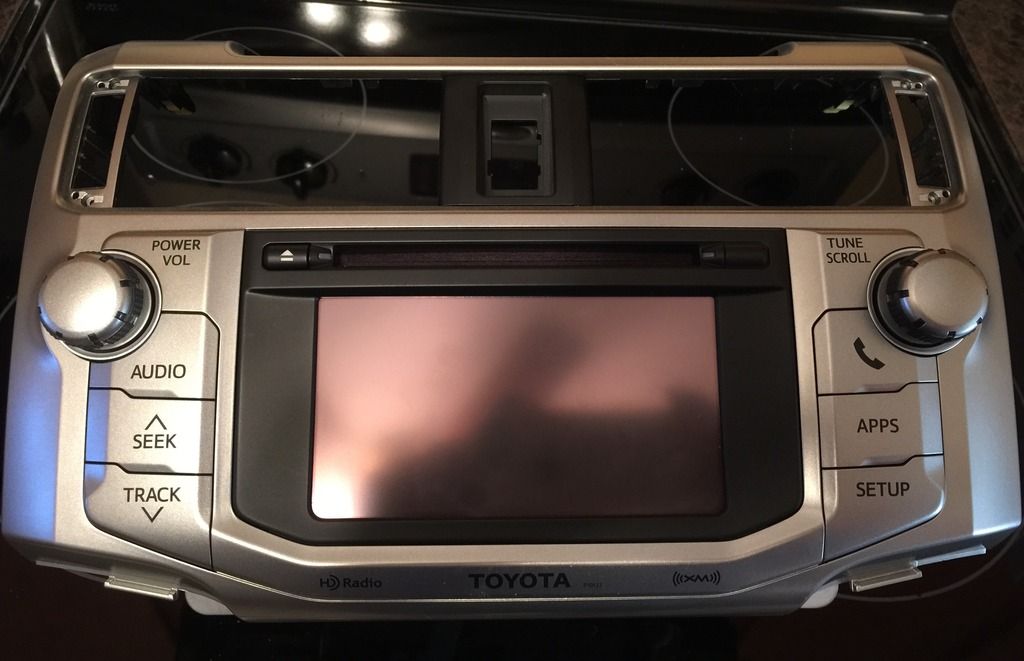
Maybe you don't have the buttons that I'm talking about; see the 'Set-up' button on the right-hand side:

E0099956-FDEB-47E3-AC05-9571682D5D6D_zpsazl5tvrm.jpg~original
 
Sounds f----ed to me. Dealership.

Might want to get somebody else's phone just to make 100% sure, or someone else to look at it, to make sure you aren't doing the 'dumb thing'.

Not sure Im making it clear. There are absolutely no functions at all related to anything bluetooth at all.
Not pairing, not unpairing, not anything.
There have been a dozen phones in and out of the vehicle.
Bluetooth is completely dead in the Entune.
 
Maybe you don't have the buttons that I'm talking about; see the 'Set-up' button on the right-hand side:

E0099956-FDEB-47E3-AC05-9571682D5D6D_zpsazl5tvrm.jpg~original

On the newer Entine, the Setup is in the APPS screen. And no, Bluetooth and Phone buttons cannot be accessed from the SETUP screen.
 
Two things I'd try:

1. Check the manual to see if there's a separate fuse for the BT system. If there is, check it to make sure it's good.

2. Disconnect battery, wait a few minutes, then reconnect it.
 

Members online

Forum statistics

Threads
278,309
Messages
3,554,066
Members
248,016
Latest member
Advally Service

Trending content

Back
Top