kmiller8821
New member
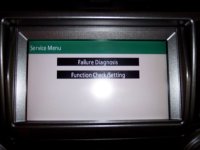
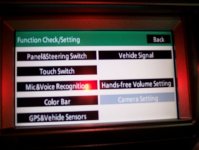
So, I was digging around on the net today looking for a backdoor into the NAV. I know there really isn't an override in it as in previous models, but I did find reference to a "function" that worked on some lexus navs. Gave it a shot on mine and viola, I had service menu access. now granted, you STILL can't override the stupid GPS lockout but it does provide some interesting menus to dig thru. You can diagnose your steering wheel buttons, check GPS signal, touch screen and adjust volume levels. Interesting.
To access this menu:
Turn vehicle on
On NAV, press and HOLD the info button while turning the headlights ON and OFF 3 times. (Turn them OFF, not to AUTO) The NAV menu should change as shown in these pics.
I didn't see this posted anywhere else here, so I figured I'd post it for owners interested. I'm not sure why the camera setting is grayed out, I would have liked to know what I could change in there. lol. I'm a nosey owner.
To access this menu:
Turn vehicle on
On NAV, press and HOLD the info button while turning the headlights ON and OFF 3 times. (Turn them OFF, not to AUTO) The NAV menu should change as shown in these pics.
I didn't see this posted anywhere else here, so I figured I'd post it for owners interested. I'm not sure why the camera setting is grayed out, I would have liked to know what I could change in there. lol. I'm a nosey owner.