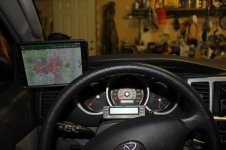
Is it possible to use tablet as trail GPS?

On the last trip, i could swear that my iPad PRO (wifi-only) was showing me where i am on Apple Maps when connected to my iPhone.
I think it's just updating your position periodically through your apple account, not real GPS data. But you can easily check by running a 3rd party GPS app while tethered

Sent from my SM-G930V using Tapatalk
 
check this out, you do not need a gps receiver, there are hundred of articles like this and apps that share location info between the devices
https://www.wired.com/2011/03/does-tethered-iphone-send-gps-to-wi-fi-ipad/

This is old information and doesn't work with modern iOS.
As I said a GPS receiver is more precise and has a better reception than tablet/phone build in GPS units.
I use my tablet for flying and would never rely on a built in GPS.
Plus buying a GPS receiver with a WiFi only iPad is cheaper than buying an iPad with build in GPS.
 
This is old information and doesn't work with modern iOS.
As I said a GPS receiver is more precise and has a better reception than tablet/phone build in GPS units.
I use my tablet for flying and would never rely on a built in GPS.
Plus buying a GPS receiver with a WiFi only iPad is cheaper than buying an iPad with build in GPS.
you are comparing flying to off roading, two completely different subjects, you need faster and better accuracy, off road you need to be within 10 meters
 
it does not matter, the point is its possible, let alone it still works

this is what I do for a living, I better know what I am talking about

yes, you're absolutely right dear expert, it is in fact possible if you want to use a poorly rated buggy app on now-unsupported years-old version of iOS on legacy devices (so not something people actually would want to do)

jfc dude, stop, you're going to confuse someone into spending money on devices that won't work like you are telling them they will
 
Last edited:
yes, you're absolutely right dear expert, it is in fact possible if you want to use a poorly rated buggy app on now-unsupported years-old version of iOS on legacy devices (so in reality, not actually possible)

jfc dude, stop, you're going to confuse someone into spending money on devices that won't work like you are telling them they will

you are the one who called me a liar, you are the one who tells me its possible by adding things on to a tablet, now you are saying I am confusing people and telling them to spend money, wtf?

i never recommended a device, i only said wifi wont triangulate when there are no known hotspots, do not put words in my mouth
 
you are the one who called me a liar, you are the one who tells me its possible by adding things on to a tablet, now you are saying I am confusing people and telling them to spend money, wtf?

i never recommended a device, i only said wifi wont triangulate when there are no known hotspots, do not put words in my mouth

stop

this thread is asking if its possible to use an old tablet as a GPS device if they download maps. it is in fact possible to use a tablet as a trail GPS, you just have to make sure it has GPS or get a GPS receiver. lots of people do this. probably more people do this than get dedicated GPS devices at this point. full stop.

here is where you've been wrong
you will need a gps chip in the tablet, while it can use wifi to triangulate, since you are going to be in the woods, if you even have a wifi signal, the location may not be well known (your phone will use the wifi strength and the gps or agps chip in your phone to locate the wifi signal and upload that info without you knowing, this is how the location gets to be well known).

if you have a gps chip, then yes it will work but as others have pointed out you will need to download maps.
false. you don't need built-in gps, you can use GPS receiver like the Garmin GLO or Dual Electronics receiver

just to be clear, a stock tablet will work for GPS, it will triangulate off the wifi card. if you go off road, there is no wifi. without a local wifi to triangulate to (actually 3 or more), there will be no gps.

a gps chip should get you to within 10 meters, wifi triangulating in a remote area may as much as 65000 meters, but again that relies on a well known fixed wifi spot, the more its reported the better it gets

I would hate to see you going out with a wifi only tablet and get lost
false. it will use GPS in the woods either from the tablet's GPS receiver or your external receiver. Some even also have GLONASS and Galileo!

and what I was referring to is if you are using your wifi card to triangulate just as you can with the cell signal, most modern devices do not have a gps chip and rely on the wifi or cellular for gps. many phones do, but you could not use an iPhone with an android tablet and expose gps between the devices.
most new devices have GPS, and if you don't have GPS built-in you use an external receiver. you don't need wifi

thank you for proving my point, a stock tablet cannot generally use gps, it can use the wifi card in populated areas, but since there will be no wifi, he cannot rely on the triangulation
it can, by using a gps receiver

check this out, you do not need a gps receiver, there are hundred of articles like this and apps that share location info between the devices
https://www.wired.com/2011/03/does-t...to-wi-fi-ipad/
that specific blog post was later found to be wrong on, it came from a tabletmonsters post but was debunked later by a developer names JohnMarshall4 who couldn't reproduce what was shown. there were apps available to make this work but they don't work anymore (this was all 7 years ago so not relevant to current supported versions of iOS anyways). It may also be worth pointing out that the OP was asking about an android device.

it's not bad to be wrong, but your insistence on this is going to confuse OP or other people who find this thread.


this thread is asking if you can use an old tablet as a GPS.

the answer is yes, you absolutely can and a lot of people do. if it doesn't have GPS just get a GPS receiver for it.
 
Last edited:
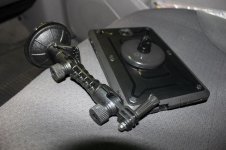
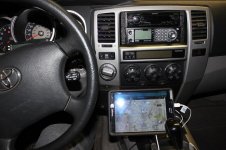
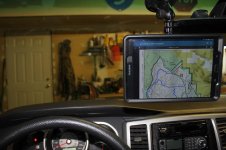
Just for fun.

For my Galaxy Tab s2 8"
I couldn't find a car mount I liked...on the cheap.
I bought a Supcase and Arkon suction cup mount.

Poured a 'puck' with a bolt embedded in it. (liquid 2 part plastic/standard camera sized mount bolt)
Also makes it easier to hold on to.
3M double sided tape to the Supcase.
Can stick it any where you like.
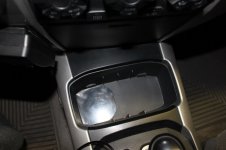
I stuck a flat plastic piece in the cup holder.
 

Attachments

  • Arkon with Supcase.jpg
    Arkon with Supcase.jpg
    64.2 KB · Views: 228
  • CupHolder.JPG
    CupHolder.JPG
    106 KB · Views: 228
  • cupMount.jpg
    cupMount.jpg
    73 KB · Views: 230
  • inTheWay.jpg
    inTheWay.jpg
    59.5 KB · Views: 230
  • LeftMount.jpg
    LeftMount.jpg
    58.3 KB · Views: 227
i live in canada and i downloaded offline maps of all the provinces i hit onto a cheap tablet. it works perfectly. i use it for trail maps when offroading and as a gps unit in the city
 
I am glad I came across this thread as it is something I am currently considering. I narrowed it down to 3 GPS units:
Dual
Bad Elf
Garming Glo
The reviews on amazon are hit or miss and I am not sure if anybody has one of these that can chime in. I plan on synching it with my 1st gen ipad (don't judge).

I tried the offline google maps route but when my wifi is off, I can click on the downloaded map and it only shows it in a small preview screen with no option to zoom in or anything. Hopefully someone can tell me what I am doing wrong.
 
I am glad I came across this thread as it is something I am currently considering. I narrowed it down to 3 GPS units:
Dual
Bad Elf
Garming Glo
The reviews on amazon are hit or miss and I am not sure if anybody has one of these that can chime in. I plan on synching it with my 1st gen ipad (don't judge).

I tried the offline google maps route but when my wifi is off, I can click on the downloaded map and it only shows it in a small preview screen with no option to zoom in or anything. Hopefully someone can tell me what I am doing wrong.
I have the dual and it works fine for me. My tablet has GPS but sometimes it has trouble getting a good position lock even though the dual still has accuracy within a few feet. (My tablet has an intermittent BT issue but it's the same with other devices so I don't think its related to the dual)

I've never messed with downloading Google maps, its not good enough off-road

Sent from my P00A using Tapatalk
 
I have the dual and it works fine for me. My tablet has GPS but sometimes it has trouble getting a good position lock even though the dual still has accuracy within a few feet. (My tablet has an intermittent BT issue but it's the same with other devices so I don't think its related to the dual)

I've never messed with downloading Google maps, its not good enough off-road

Sent from my P00A using Tapatalk


e60ral: I have just acquired Dual XGPS 160, I like this unit because it supports up to 5 connected bluetooth devices, tiny and powerful. I have an iPhone and a Galaxy Tab A small tablet. Setting up on the Galaxy was a pain because helper apps had to be installed. Apple products seem to be much easier to connect.

My question is: software for the mobile device that works well with the Dual XGPS? I may have missed it in this thread, but what software are you using with the Dual XGPS? Have you experimented with different mobile navigation apps? Pros & Cons?

Thanks.

I use GaiaGPS on a cheap tablet

Found it!
 
Last edited:
yep GaiaGPS offroad along with Google Maps or Waze onroad, and Sygic on-road if i don't have cell service
 
yeah, be aware that it costs $20/year to use (I'm a legacy account so I don't have to pay anything, but I would pay that if I needed to)

I saw the subscription fee on their website, guess I'm too late to the party to get free stuff . . .

. . . seems a lot of people are using Gaia . . .
 
If you don’t want to pay, check out ViewRanger. Allows you to do everything Gaia does, but free. If you want extra maps you gotta pay, but at least they give you 4 or 5 options. Plus you can save offline
 
If you don’t want to pay, check out ViewRanger. Allows you to do everything Gaia does, but free. If you want extra maps you gotta pay, but at least they give you 4 or 5 options. Plus you can save offline

Thanks, I'll check it out.
 

Members online

Forum statistics

Threads
278,316
Messages
3,554,111
Members
248,016
Latest member
Advally Service

Trending content

Back
Top