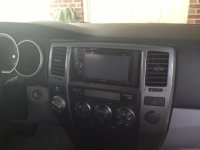
Kenwood DDX470 Head Unit Install

singleshot

New member
My son and I spent the last 3 nights doing a head unit and speaker upgrade in his 4runner. It's been about 25 years since I've done car audio installation and I'll tell you....it's a little more sophisticated these days!

Here's what we installed:

-Kenwood DDX470 Head Unit (DVD, Bluetooth, USB, no GPS)
-Infinity Reference 6500 front speakers
-Infinity Reference 6032 rear speakers
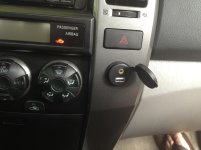
-USB & Aux extension

We attempted to install a Clarion CC510 backup camera, but as we were pulling the cable from the rear hatch to the upper rear quarter panel, it got snagged and I snapped it trying to get it loose. Some choice words followed that little incident. I tried to splice the wire back together, but no luck. A new one is on the way.

We used front tweeter adapters from car-speaker-adapters.com
Scosche front and rear speaker adapters
Metra Steering wheel control interface
Metra 95-8202 Head Unit Dash Kit
Metra 70-1761 Wiring Harness for head unit

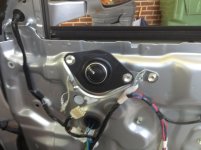
Overall, we're happy with everything. The Infinity speakers pump out decent bass, but he's already talking about adding a small sub. We ran new speaker wire to the front speakers and used the crossovers that came with the new speakers. We used the stock speaker wire for the rears and just used Metra 72-8104 adapters to connect them. The 4runner is pretty easy to disassemble and put back together. My wife freaked out when she walked out the 2nd night and saw everything in pieces. I wish I had taken more pictures.
 

Attachments

  • IMG_0822.jpg
    IMG_0822.jpg
    129.1 KB · Views: 3,295
  • IMG_0820.jpg
    IMG_0820.jpg
    136.7 KB · Views: 3,555
  • IMG_0818.jpg
    IMG_0818.jpg
    124.5 KB · Views: 3,075
Register to hide this ad
Where did you get the USB & Aux extension? I found one but it only has USB connection.

I installed the same head unit but I'm returning it for the Pioneer AVH-X4500BT. I'm not impress with the graphic on the Kenwood.

Both the Kenwood and the Pioneer have weak FM reception. I use an adaptor and a wye antenna cable to combine the the two antenna cables but it's still weak. I didn't have reception problem with the OEM unit.
 
Here is the USB extension I used.

3.5-usb_m.jpg


From 3.5-USB Extension Cables with Dash Mounting Bracket :: Accessories

So far, no issues with FM reception. I asked a local audio shop about the two antenna cables and he said to just use the larger of the 2. He claimed the 2nd cable was just a ground and we should just tape it up. Not sure I 100% believed him, but I thought we'd try it first.

My son really wanted a manual volume knob on the unit, so that's why we ended up with the Kenwood. All the Pioneers in his price range had volume buttons. His choice, so I didn't argue.
 
Thanks for the link.

I agree with you on missing the volume knob on the Pioneer. It's so difficult to control it especially while driving. I have to add the Steering wheel control to help ease that part.

The audio shop may be right about the second antenna be cause I don't notice any signal gain after I combine the 2.

BTW - Good job installing and thanks for sharing with us.
 
My son just informed me that he keeps getting a message that 'Parking is Off'. I'm thinking that I must have connected the light green 'parking sensor' wire to the wrong thing.

I've been looking on here and it seems that many just wire it to their common ground (black) wire coming from the head unit. Any advice?
 
Do all your controls work on your steering wheel using the Metra Steering wheel control interface?

What buttons on the steering wheel do you have?

I just have volume +/- and mode.
 
I ordered the Axxess Metra ASWC-1. My steering wheel control have Volume +/-, the channel/track up/down, and mode. The ASWC-1 works better with the Pioneer than the Kenwood as when you hold the Mode button, it will turn off. And press mode again will turn on. Just like with the OEM unit.
 
Did you continue running the stock crossovers?
Nice job on that install. Looks really clean.
WIsh my dad would help me with my truck :ybrick:
 
The 4th Gen's use a diversity antenna system...2 antennas and the OEM receiver chooses the one with the better signal at any given moment. You can see the antennas on each rear side window. There is also a signal amplifier for the antennas that you're wiring harnes may not be powering up. Search the forum...workarounds have been posted.

-Brent
 
I used the Metra ASWC-1 as well. I haven't tried all the functions, but I know that volume, channel and mode all work with the Kenwood unit.

I bypassed the front crossovers and used the ones that came with the new front speaker components. If the rear uses crossovers, then they're still being used. I used the stock rear door wiring.

So, does my new head unit have the 'smarts' to use inputs from 2 antennas?
 
I found the solution for my weak FM reception. Thanks to [MENTION=1653]riverwolf[/MENTION] (Brent) for pointing me to the right direction. I didn't think much about the "Power Antenna wire" since this model 4Runner doesn't have a power antenna as the previous model. But that wire is required to power the OEM antenna booster. Now I'm getting HD signal inside my garage as I only get Analog previously. Below is the post I found from a forum at Crutchfield. The only regret I have was even I have talked to the tech at Crutchfield (where I purchased my Pioneer) about the two antenna cables, he didn't mention to me about Power Antenna Wire. I had wasted time and money to purchased the antenna wye cable and the adaptor.

--Quote:

The reason there are two antenna cables is because the factory radio uses "Diversity Tuning".

You can think of it like there being two tuners in the factory radio and two antennas in the car. With diversity tuning, the radio is constantly looking at both antennas and it uses the one that is the strongest.

The Pioneer on the other hand only has a single tuner so you can only use one antenna. In the Toyota, the largest antenna cable is the one to use.

Realistically, the reception shouldn't be much different though. In the vehicle, the only thing I see is that there is an antenna booster in the car and this needs to be turned on or you will have pretty bad reception.

Turning the booster on is done by connecting the Power Antenna wire (Blue) from the adapter to the System Remote wire (Blue/White) on the Pioneer.

Shawn

--Unquote
 
So as I try to hook up the Power Antenna Wire in the dark, I have lost the ring that go around the lock. Doen anyone know how to lookup the part number so I can search online. The local dealer may charge me like crazy. Thanks!
 

Attachments

  • Screen shot 2013-06-14 at 9.49.00 PM.png
    Screen shot 2013-06-14 at 9.49.00 PM.png
    23.2 KB · Views: 2,720
I only soldered the radio harness to the Metra harness. For the others, I just did the twist and heat shrink.

I'm going to pull the head unit this afternoon and try grounding the parking wire to see if that works for me. Also plan to try connecting the blue and blue/white wires for the antenna connection.

The new rear camera will be here Thursday. Hope to have it installed this weekend.
 
Good news. I grounded the light green parking wire coming from the head unit and now everything is working properly. So glad I didn't have to order a bypass kit. I also connected the blue/white from the head unit to the blue on the Metra harness and I actually think the FM reception is better.
 
Yes. You can plug memory stick with music or video and it will play. Also can transfer pictures to head unit and use as your background. It will also connect up a phone/ipod/ and play music using some of the playback features.
 
First, let me say that I do not even own a single toyota vehicle and I just registered on here to say good friggin job on the install! Looks super legit and professional!!! However, I just purchased the same unit and have a question about the aux/usb panel. If I'll get the same one, will it be a plug and play type of thing on the back of the Kenwood unit? I know it has 2 USB outputs but I still don't know if it has a 3.5mm aux output (like a headphone jack) or will I have to mess with soldering and whatnot?
 
Good news. I grounded the light green parking wire coming from the head unit and now everything is working properly. So glad I didn't have to order a bypass kit. I also connected the blue/white from the head unit to the blue on the Metra harness and I actually think the FM reception is better.


Capture2.jpg~original


photo.jpg~original


Singleshot, I have them same HU about to go in and the same Metra harness. Looking at the manual from Kenwood. I think it should be blue to blue and blue/white is the remote turn on lead for an external amplifer. At least thats the way I'm interpreting it. I also have an unsed orange/black... it think its for dimmer. Let me know what you think or anybody else for that matter. My last HU was a single din and it had a metal spade on the back of the unit, slip on connection. It wasn't part of the harness. Any help would be appreciated, Thanks!
 

Members online

Forum statistics

Threads
278,311
Messages
3,554,082
Members
248,016
Latest member
Advally Service

Trending content

Back
Top