KENWOOD Head Unit Install Questions

It works with the factory backup camera? I'm hesitant to get an aftermarket head unit because I don't want to lose the backup camera and steering wheel controls. I'm not as concerned about the navigation.

My DNX995S has the factory camera without issue. I think that's true with most units. However with the iDatalink and a kenwood unit on at least the later model 5th gens (2018 ORP) I got dynamic backup lines on the backup camera (factory lines are still there, but ignorable) and have full customizability of the buttons on the steering wheel.
 
[MENTION=241676]MikeYQM[/MENTION] are you happy with your Kenwood? Would you recommend it?
Sorry for being off topic.

I'm in the process of upgrading my stock stereo and looking for a good one.

From my research Kenwood is a good option. But can't make up my mind. All the reviews I've read so far are hype garbage. Actually I've tracked down a site that tells it how it is. I was eyeing the Kenwood DDX9704S double din thanks to the review.

Can you tell me how bad the is the screen glare? What about the price is there enough value to justify it?

I'm open for suggestions
 
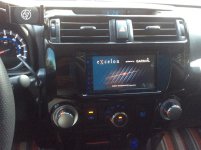
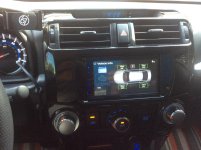
I installed a Kenwood Echelon with iData Link this summer and love it.

Crutchfield does have and adapter kit for the factory GPS and satellite antennas. They didn’t know until I told them they had it. Ug. So the only thing you need to deal with is the mic. I installed mine behind the rear view mirror, works great and out of sight

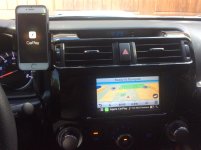
Bought USB plugs that snap into Toyota factory switch locations. Replaced the factory one in the center console and the blank right below the ignition for the Apple Car Play, phone mount right above it (very convenient)

MUCH better nav and maps
Easier updates to maps, no dealer required
Apple car play
Bigger better screen
Dynamic backup lines that are adjustable
TPMS pressure for each tire!
Passenger can enter a address while moving

Really so much better in every way
 

Attachments

  • 96E40205-1FEC-4944-9546-AFAD4FA34AA7.jpg
    96E40205-1FEC-4944-9546-AFAD4FA34AA7.jpg
    133.6 KB · Views: 1,991
  • 24EA6523-3226-4210-9397-9C2135F04A7C.jpg
    24EA6523-3226-4210-9397-9C2135F04A7C.jpg
    133.6 KB · Views: 2,106
  • 8BD755C6-0B54-4C2E-85E5-B29C1DC49253.jpg
    8BD755C6-0B54-4C2E-85E5-B29C1DC49253.jpg
    129 KB · Views: 2,088
Last edited:
[MENTION=242265]SnowYeti[/MENTION]
Did you get the plastic surround painted? Or did you manage to find one already painted?
 
Just installed my Kenwood DMX905S this past week and it's awesome! Made sure to install the latest firmware, and haven't noticed any hiccups. Also used the Maestro RR and am highly impressed by that as well. My build thread is here, but let me know if you have any questions!: My Basic Stereo Build - 2012 Limited
 
I just installed a dmx905s as well and love that thing. I had a alpine for only a few days before i decided to switch to the kenwood. But everything works that I had w oem (backup camera, gps, usb aux port) except the oem mic like one other said.
 
I installed one of the Wireless CarPlay Kenwood head units a week ago.

Crutchfield has a dash kit that matches the dark gray metallic factory dash without any need to paint.

The iDatalink Maestro was very easy to flash/program. All of my steering wheel buttons work perfectly.

I drilled a 1/2” hole in the dash kit plastic and snapped the mic in place so only the last 1/8” ring of it shows. I recommend a step drill bit like the kind you use for sheet metal. The mic now looks like a small button with holes surface mounted to the left of the screen. I did have to cut the little ball off the side of the mic in order to snap it in place.

I mounted the Kenwood GPS antenna right behind the little round cover that holds the wire for an automatic headlight sensor at the front edge of the dashboard. I drilled a small hole at the edge of the plastic cover to allow the antenna wire to pass through with the cover in place.

If you get an error message telling you that the speed sensor wire needs to be connected in order for Wireless CarPlay to work do the following (talked to a Crutchfield tech for an hour before we figured this out):
1. Find the pink wire on the Kenwood side of the wiring harness.
2. Locate the little, thin, white in-line “box” that says S Sensor on the pink wire.
3. Cut the pink wire on either side of the little white “box.”
4. Reconnect (crimp or solder) the ends of the pink wire. Cover any exposed wire with electrical tape or heat shrink tubing.
5. Turn the head unit on and the speed sensor error message continues. Drive around a little so the speed sensor communicates with the head unit and Wireless CarPlay will start functioning properly.

I already helped one T4R member with this issue. Trust me it works. Your Wireless CarPlay may work at first, but when it quits the next day follow the steps above.

Hi, any idea what's inside that S SENS white box at points 2,3? Is it a resistor? Got a kenwood without that box on the wire as it was cut by the previous owner and am worried I will do some damage.

(sorry for the old thread revival)
 

Members online

No members online now.

Forum statistics

Threads
278,316
Messages
3,554,111
Members
248,016
Latest member
Advally Service

Trending content

Back
Top