My $5 mod in 5 mins.

it may be easier to get in the habit of turning on the lights on before you start the 4runner at night.

That's got nothing to do with this mod. This does not turn your headlights on for you at night. This mod brightens the instruments and infotainment system if the headlights/parking lights are on and it's bright outside.
 
That's got nothing to do with this mod. This does not turn your headlights on for you at night. This mod brightens the instruments and infotainment system if the headlights/parking lights are on and it's bright outside.

Based on the video, I was really thinking of it the opposite way, it dims your infotainment system if it is dark out and your headlights are not yet on. Thanks for making that point that this mod works both ways. I guess that information makes this mod more valuable to me.
 
Last edited:
Based on the video, I was really thinking of it the opposite way, it dims your infotainment system if it is dark out and your headlights are not yet on. Thanks for making that point that this mod works both ways. I guess that information makes this mod more valuable to me.
I also did not realize that this mod works both ways (and also have not noticed this to be the case)... I'll have to check this to be sure tomorrow.

Sent from my Pixel 3 using Tapatalk
 
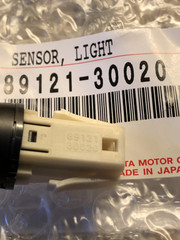
So after reading post #55 [MENTION=200736]ElectroBoy[/MENTION] wrote about how to check the sensor or non sensor and realizing mine was only a plug in my 2021 TRDORP, I decide to order a 89121-30020.
Will see if this will work or not!

Now
Taking out the dummy plug is very easy.
Now, if you need to remove the actual light sensor after installation, *that* will be a royal PIA.
The locking tabs are different and need to be depressed from under the dash to push out the sensor. Be sure to test your sensor before snapping it into place.
I am wondering if these tabs can be “modified” so as to ease the removal of the sensor if needed in the future?
Does someone have an extra one to try?
 
So after reading post #55 [MENTION=200736]ElectroBoy[/MENTION]I decide to order a 89121-30020.
Will see if this will work or not!
Out of curiosity, any luck in finding this sensor for cheap?

*regarding the tabs, I think earlier in this thread the recommendation was to use electrical tape so they don't lock. But if it works, not sure you would ever have to remove the thing ever again.
 
Out of curiosity, any luck in finding this sensor for cheap?

*regarding the tabs, I think earlier in this thread the recommendation was to use electrical tape so they don't lock. But if it works, not sure you would ever have to remove the thing ever again.

Got mine from fleabay and works great on my 2018 ORP
 
Out of curiosity, any luck in finding this sensor for cheap?

*regarding the tabs, I think earlier in this thread the recommendation was to use electrical tape so they don't lock. But if it works, not sure you would ever have to remove the thing ever again.

Yes, the sensors are very low tech, if they work from the start there’s not much that can go wrong.

The tape method seems like a good idea to pull back those tabs a little. Or maybe twist a wire around them, in case the tape softens up on the hot dash and the tabs break through and latch tight. Or trim the tabs in a way that they only grip a little. Or trim all of the tab contact area away and rely on a small dab of a low strength adhesive to hold the sensor in place.
[MENTION=103267]Saker[/MENTION], please let us know what you discover. I wish I’d done something to the tabs to make future removal possible. I just tested it then snapped it into place.
 
Yes, the sensors are very low tech, if they work from the start there’s not much that can go wrong.

The tape method seems like a good idea to pull back those tabs a little. Or maybe twist a wire around them, in case the tape softens up on the hot dash and the tabs break through and latch tight. Or trim the tabs in a way that they only grip a little. Or trim all of the tab contact area away and rely on a small dab of a low strength adhesive to hold the sensor in place.

[MENTION=103267]Saker[/MENTION], please let us know what you discover. I wish I’d done something to the tabs to make future removal possible. I just tested it then snapped it into place.

[MENTION=200736]ElectroBoy[/MENTION]

I took photos of the connection yesterday and it was the white 8 pin connector. When I get the sensor in, test it, I’ll report my findings.
 
dont work on mine??

i put the sensor in a 18 sr5p and it works no different than without it. When i turn on the nav and then the lights, it dims with or without the sensor. i was hoping it would dim the rear camera, i put led backup lights in and now the dash is to bright at night backing up. it made no difference in the radio panel also. i dont usually drive with the nav screen.
 
Last edited:
i put the sensor in a 18 sr5p and it works no different than without it. When i turn on the nav and then the lights, it dims with or without the sensor. i was hoping it would dim the rear camera, i put led backup lights in and now the dash is to bright at night backing up. it made no difference in the radio panel also. i dont usually drive with the nav screen.

You should have a brightness adjustment for both of those screens aside from the sensor.
 
[MENTION=200736]ElectroBoy[/MENTION]

So here are my findings:
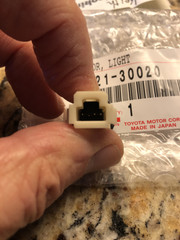
The sensor only has 3 pins.
I tested it and it works as you describe in post #55!

Confirm my part # with photos.

a6OJia.jpg


3y3AZB.jpg
 
Last edited:
BTW, I cut the upper part of the retaining clips that locks the sensor in.
So, it is held in by the clip pressure only.
If I wanted to remove it, I’m sure I could just pry it up and out!
 
BTW, I cut the upper part of the retaining clips that locks the sensor in.
So, it is held in by the clip pressure only.
If I wanted to remove it, I’m sure I could just pry it up and out!

Good job, mon. So it looks like it’s a 4-pin connector but only 3 pins are populated.
 
i put the sensor in a 18 sr5p and it works no different than without it. When i turn on the nav and then the lights, it dims with or without the sensor. i was hoping it would dim the rear camera, i put led backup lights in and now the dash is to bright at night backing up. it made no difference in the radio panel also. i dont usually drive with the nav screen.

In a previous post by [MENTION=323406]xyzzy[/MENTION] he posted a summary chart of which models will work with the light detectors. It doesn’t work in your 18SRP. Most likely because the harness wires are not connected.

https://www.toyota-4runner.org/3566171-post383.html

In an early post of this thread it was discovered that some models have the wires in the connector plug but they actually don’t terminate anywhere on the other end. For these models there was a solution described and designed by [MENTION=150567]Old Red[/MENTION] where wires were added to connect to the MPX Body ECU and enable the light sensing/dash dimming function. Unfortunately a lot of his posts got deleted from this forum and I can’t find them. Maybe someone who has done this repair can chime in if they still have the instructions.
 
Quick update,
I ordered a used 89121-30020 on eBay for $52 and installed it on my 2021 SR5 and it is working just like I understand that it should. I will test it more over the next few days as I try different driving scenarios such as driving at night and driving into dim parking structures but so far I can get the nav screen to dim by simply putting my hand over the light sensor.

I have not made any Entune menu settings like described in post #55 by [MENTION=200736]ElectroBoy[/MENTION] yet, it seems that my menu is a bit different.

Thanks to all that have contributed to this thread, no more blinding nav screen when I start the vehicle at night.
 
Apparently, I failed and didn't read enough of the tread to learn that I needed a different part for my '21 ORP.

So - I have the pre-2020 fitment purchased from eBay if someone wants one. HMU if you want the 89121-50020 for $15 shipped.
 

Members online

Forum statistics

Threads
278,310
Messages
3,554,080
Members
248,016
Latest member
Advally Service

Trending content

Back
Top