My Pioneer AVH-X3500BHS Head Unit Installation

Okay another rear view camera question
I would like to add a switch to have camera on at anytime
Thoughts
do i need a spst on/off/on switch?
or just a spst on/off switch

Does this look okay
upyvy9u8.jpg
 
Last edited:
Okay another rear view camera question
I would like to add a switch to have camera on at anytime
Thoughts
do i need a spst on/off/on switch?
or just a spst on/off switch

Does this look okay

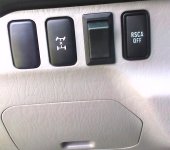
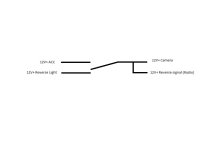
The following SPDT switch was used for my installation. Other people that have used this switch stated that the hole had to be enlarged for the switch to fit in their 4Runner dash/interior panel. The hole was not enlarged for the switch to fit in my 4Runner (a snug fit though). The image of the switch in the dash is re-posted below from one of my earlier posts in this thread. The circuit is below also.

DelCity supplied SPDT On-On Full Size Rocker Switch Item # 7700018 (Del City - Electrical Supplies & Professional Grade Wiring Products)

Possible helpful hint: I created a free DelCity account before deciding to order the switch. A few days later, DelCity sent me a coupon code for free shipping; so I got free shipping on the switch. :)

BackUpCameraSwitch.jpg

BackupCameraSwitchDiagram.jpg
 

Attachments

  • BackupCameraSwitchDiagram.jpg
    BackupCameraSwitchDiagram.jpg
    19.2 KB · Views: 2,234
  • BackUpCameraSwitch.jpg
    BackUpCameraSwitch.jpg
    91.4 KB · Views: 1,905
Thanks for the update! The image is not mirrored, at least, it is no different than any other rear view camera I have used in the past on stock vehicles. Got mostly everything sorted out, the only thing I haven't done yet is wire in the ground, I don't want to rip apart everything again to lead the ground wire all the way up to the drivers side...Will get to it soon, just havne't yet.

Shouldnt have had to run more then one wire to from a bnc with power wire is all you needed then get 1 power pig tail and you set

like this

>>>>>>>>>>power/bnc cable =====to front <<<<<power pig tail then connect at the front extend the hot and neg with some wire and you set
 
Last edited:
@ jeffreyb...so u tapped the reverse wire from the rear aall the waya 2 the fr4ont,...where did u tap the aacc power from?..color of the wire etc
 
@ jeffreyb...so u tapped the reverse wire from the rear aall the waya 2 the fr4ont,...where did u tap the aacc power from?..color of the wire etc

Correct. The 12V+ Reverse Light wire was tapped near the driver's side reverse light. The 12V+ Reverse Light wire was installed with the video cable of the backup camera and the 12V+ Camera wire from the rear to the front of the 4Runner along the driver's side under the interior panels. I have noticed that other folks on this forum have tapped the 12V+ Reverse Light wire at the front of the 4Runner, but I decided to tap it at the rear of the vehicle. Based on my memory, the 12V- (ground) Camera wire was installed to the front of the 4Runner also (connected at the head unit wiring harness to the Metra 70-1761 splice; Black - Chassis Ground), but my memory is fading on some details since the installation was several months ago. The 12V- Camera wire could be connected to the vehicle chassis or tapped to any other ground wire, but I was trying to minimize the number of taps into the stock vehicle wiring. The cables were taped together every 2-3 feet to keep the cables together behind the interior panels. I also recall that a couple of places behind the interior panels had small openings which made it difficult (or impossible) to pull the cables taped together; so you may want to wait to tape the cables after pulling them all from the back to the front of the 4Runner. Or you may decide to skip taping them. My goal here was to securely keep the wires under the interior panels for the life of the vehicle.

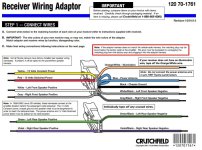
The 12V+ ACC wire to the backup camera switch was tapped at the connection of the head unit wiring harness to the Metra 70-1761 wiring harness since a splice was needed there anyways. I could not find a manual for the Metra 70-1761 wiring harness on Metra's website, but the web link for the Crutchfield manual on this wiring harness is below (and a screenshot of the wiring harness from the manual). The manual states that the "12 Volts Switched Power" (aka 12V+ ACC) is the red wire on the Metra 70-1761 wiring harness.

Crutchfield manual for the Metra 70-1761 wiring harness

RadioWiringHarness.jpg
 

Attachments

  • RadioWiringHarness.jpg
    RadioWiringHarness.jpg
    132.2 KB · Views: 17,375
Last edited:
Okay another rear view camera question
I would like to add a switch to have camera on at anytime
Thoughts
do i need a spst on/off/on switch?
or just a spst on/off switch

Does this look okay
upyvy9u8.jpg

Us this better
muhy2e2a.jpg


The following SPDT switch was used for my installation. Other people that have used this switch stated that the hole had to be enlarged for the switch to fit in their 4Runner dash/interior panel. The hole was not enlarged for the switch to fit in my 4Runner (a snug fit though). The image of the switch in the dash is re-posted below from one of my earlier posts in this thread. The circuit is below also.


DelCity supplied SPDT On-On Full Size Rocker Switch Item # 7700018 (Del City - Electrical Supplies & Professional Grade Wiring Products)


Possible helpful hint: I created a free DelCity account before deciding to order the switch. A few days later, DelCity sent me a coupon code for free shipping; so I got free shipping on the switch. :)


View attachment 111081


View attachment 111080


Something like this look okay
9ugyvysa.jpg
 
Thanks for all the info! I just ordered the AVH3500 today and hopefully get it installed in the next week or so. If any of you guys have this same deck and an iPhone 5 are you able to get app control over thunderbolt via usb? or do you have to buy the 30pin Pioneer cable along with thunder bolt vga converter?

I was also considering hooking up a Uniden BCT15X to the aux input or maybe just keeping it on its own external speaker, any thoughts? Thanks!
 
So today i finally put the dash back together
uha3ava8.jpg

and now this
6ytyjeda.jpg

Errr
All was well until i went to put a movie in
Then she opened and will not close

Also found this wire not connected
9yzyqega.jpg


Ok update
I went out and ripped the dash out again and took the metra face plate off and dremeled it as much as possible
6u2u4uvy.jpg

Still n/g
Wtf
Well thats it no dvd's for me
This radio has turned into a waste of time
 
http://www.offroaders.com/info/tech...er-crossing.htm

Watercrossing Summary

Vehicle Preparation

Walk the crossing to check its depth.
Don't cross fast flowing water.
Place markers at hidden obstacles.
Place a tarp across the front of the vehicle.
Disconnect the fan belt if a viscous coupling fan is not fitted.
Spray water repellent on distributor and ignition wires.
Pack recovery gear on top, ready for use.

Driving Technique

Take off seat belt and wind down window.
Use low range 2nd gear (in most situations).
Drive at a steady speed to create a bow wave.
Avoid using the clutch.
Do not over-rev engine if you lose traction.
If engine stalls, place in neutral without using clutch to restart. Takeoff in 1st low.

Post Watercrossing maintenance

Check diffs etc for water if depth above axles.
Check winches if fitted.

The extra wire not connected is the second antenna connection. Some people say their reception is fine without it. I purchased the Y for my deck so both connectors go into the deck.

Also, I would think your deck isn't closing because of the trim above and below the deck. I have the same style deck (mine is the 8500bhs) and I have the metra kit that is just on the left and right of the deck and mine opens and closes just fine. I would try to trim the top and bottom some more until it closes without obstruction.
 
So today i finally put the dash back together
uha3ava8.jpg

and now this
6ytyjeda.jpg

Errr
All was well until i went to put a movie in
Then she opened and will not close

Also found this wire not connected
9yzyqega.jpg


Ok update
I went out and ripped the dash out again and took the metra face plate off and dremeled it as much as possible
6u2u4uvy.jpg

Still n/g
Wtf
Well thats it no dvd's for me
This radio has turned into a waste of time

hate to be the bearer of bad news but who uses dvd anymore LOL usb usb usb
 
hate to be the bearer of bad news but who uses dvd anymore LOL usb usb usb
i will have to try that.
im old and technicaly chalanged

The extra wire not connected is the second antenna connection. Some people say their reception is fine without it. I purchased the Y for my deck so both connectors go into the deck.

Also, I would think your deck isn't closing because of the trim above and below the deck. I have the same style deck (mine is the 8500bhs) and I have the metra kit that is just on the left and right of the deck and mine opens and closes just fine. I would try to trim the top and bottom some more until it closes without obstruction.
where can i find this y connection? crutchfield?
do you know what kit # from metra you have?
i cant trim the top anymore...."good news is you cant tell where i trimmed it at all.....
so thats good
i will try and see what if any can be removed from the bottom.....
 
where can i find this y connection? crutchfield?
do you know what kit # from metra you have?
i cant trim the top anymore...."good news is you cant tell where i trimmed it at all.....
so thats good
i will try and see what if any can be removed from the bottom.....
I got all my parts on amazon.
The y splitter is Metra 40-UV43 Male to Female Motorola Antenna Cable.

Since the remaining antenna connection is smaller than the y splitter, this adapter is needed: Scosche Mda-B Micro/Delco Antenna Adapter Tip

Dash kit I got can also be found on amazon and is the same one used in the OP:
Metra 95-8202 Toyota DDIN Multi Dash Kit
 
I got all my parts on amazon.
The y splitter is Metra 40-UV43 Male to Female Motorola Antenna Cable.

Since the remaining antenna connection is smaller than the y splitter, this adapter is needed: Scosche Mda-B Micro/Delco Antenna Adapter Tip

Dash kit I got can also be found on amazon and is the same one used in the OP:
Metra 95-8202 Toyota DDIN Multi Dash Kit

thank you
that will be a huge help......
 
i will have to try that.
im old and technicaly chalanged

Im pretty sure you have movies on your computer or stored correct? if so just drop the movies on the usb plug it in and select to movie.

Believe it or not I found watching movies on the screen just to tiny i ended up playing the movie on my ipad from home server and BT the sound thru the stereo much better experience seeing it in HD rather then the standard crap on dvd players
 
Blame stupid people cause without enough of them it wouldnt have been proven needed
truth ^^^^^
but to make us all suffer, just not right....
i hate having the wording on the screen when i am backing up.
errr
my old pos unit had none of this crap on it, and no bypass or switches were needed to watch a movie
but it had no bluetooth....so i shot it..
i am just ahppy to have the radio and backup camera done and completed...
no i need to learn how to work the radio better......
then i need to start changing out speakers.
i am unsure how to piece together this jbl unit...:doh:
 

Members online

Forum statistics

Threads
278,316
Messages
3,554,124
Members
248,016
Latest member
Advally Service

Trending content

Back
Top