Navigation Screen Night Mode?

There is also a DAY Mode. On the home screen hit the gear/settings in top right corner, then display (top right of the 8 buttons), then the day mode button at the bottom center of the screen. This will prevent the unit from dimming even with headlights on. You can also adjust both day and night brightness settings from this menu.

And that also means that if you dash dims just fine and your nav screen doesn't, you need to deselect the DAY Mode button or dim your night mode settings.
LoL...I can't believe I kept missing the day mode button while trying to figure this out! Thx!

Sent from my SM-T350 using Tapatalk
 
I know you're thinking to yourself, "this guy's an idiot" but I confirmed again early this morning that the brightness wheel has no effect on the nav screen. Just to make sure it wasn't the light sensor picking up a porch light or something, a laid a towel over the center of the dash to cover up the sensor. Turned the vehicle on, turned on the headlights, and rolled the wheel all the way down - turns off the dash lights. Still nothing. I played with different spots on the brightness wheel and still nothing.

Someone above mentioned the day mode that can be accessed through settings...I only have two options under Display settings; General and Camera. Tried in park, while moving, headlights on/off, and still only two options.

This can't be this hard...what am I missing?

Is the background of your nav screen light or dark now? - I just reread this and figured it was light in day mode..
 
Is the background of your nav screen light or dark now? - I just reread this and figured it was light in day mode..

It's light...can't get it to go dark. Tried the headlights off with passenger belt buckled thing numerous times and still nothing. Tried with engine running and driver buckled in, off without driver, every combination I could think of and I still can't get the background to go dark. The only thing I can think of that I've done to mess with this setting was that I used a WiFi OBD2 connector and Carista to change a couple of settings (windows down with unlock, passenger belt ding off, etc).
 
you're already on the right track. Under settings, go to general and you'll see a box on the bottom labeled something like "day mode". With the headlights on, unclick the box. Then try it out. Headlights off, the screen changes to day mode, headlights on, it goes to night mode.

Everyone else is incorrect, the dimming wheel does not dim the navi screen, I've tried this too. Go back under general, and the top row has the screen brightness. I think you can set the day and night mode brightness differently (put it in each mode, then set the brightness).
 
It's light...can't get it to go dark. Tried the headlights off with passenger belt buckled thing numerous times and still nothing. Tried with engine running and driver buckled in, off without driver, every combination I could think of and I still can't get the background to go dark. The only thing I can think of that I've done to mess with this setting was that I used a WiFi OBD2 connector and Carista to change a couple of settings (windows down with unlock, passenger belt ding off, etc).

that's wild it isn't working and I should have used green text with the seat belt comment, I was just messing around so don't pull your hair out over the seat belts:wof:
 
You must have a 2017 like me, the owners manual doesn't address it at all that I can find although the Radio/Navi Manual says it's supposed to be there in the screen settings. I'm not doubting you at all, but the brightness wheel worked for me. I hope you can get it sorted out.
 
Have you verified Day Mode is off? (See my above post)

I don't have that option...as I mentioned previously, the only options I have are General (brings up brightness and contrast) and Camera (brings up options for tweaking the backup camera).

I don't drive a lot at night so this hasn't been that pressing. Well, I usually don't drive much at night until last night where 4 hours of it were on vacant, dark highways. Only without the illumination of street lights did I notice that my map light (that little LED in between the main front cabin lights) wasn't on either. My center console, where the A/C controls are seemed pretty dark too. The only lights on were the Recirc one and the A/C on one.

More to the story...I had the dealer install the factory remote start 2 days after buying the vehicle. When I left, a had an error on the screen saying something like "satellite antenna not connected" or something like that. Took it back, they plugged it in-all is good. Think there's a chance they unplugged part of the wiring harness that controls the ambient light sensor/center console lights? I checked the fuse real quick this morning (#35 in the engine compartment) and it looked good. Will get an ohm meter on it tonight. Think that could be the culprit?
 
Honestly if it's still new and you're having this trouble, I'd go back to the dealer with it. It sounds like you've done your due diligence to ensure it wasn't something you could fix simple with a toggle or setting. Let them worry about removing dash panels to verify connections.
 
Here's what I discovered in my '17 off road premium with much trial and error.

I do not have a day/night button in the control panel. Instead, the dash light dimmer wheel acts as that button.

So, here's what to do to set night time brightness/contrast levels:

Click that dash dimmer wheel down out of the always bright position (in to "night mode"), and turn on the headlights.with the headlights on. Then find your way to the brightness/contrast levls of your nav screen, then your camera and adjust them to taste. Then back out of thesettings. Now, when you turn on the headlights, the screen dims - as long as the dimmer wheel is not clicked all the way up.

To set day time levels do the samething with the headlights off, and the dimmer wheel clicked all the way up ("day mode")

Hopefully this will help others without a "day/night" button in settings.
 
I don't have that option...as I mentioned previously, the only options I have are General (brings up brightness and contrast) and Camera (brings up options for tweaking the backup camera).

I don't drive a lot at night so this hasn't been that pressing. Well, I usually don't drive much at night until last night where 4 hours of it were on vacant, dark highways. Only without the illumination of street lights did I notice that my map light (that little LED in between the main front cabin lights) wasn't on either. My center console, where the A/C controls are seemed pretty dark too. The only lights on were the Recirc one and the A/C on one.

More to the story...I had the dealer install the factory remote start 2 days after buying the vehicle. When I left, a had an error on the screen saying something like "satellite antenna not connected" or something like that. Took it back, they plugged it in-all is good. Think there's a chance they unplugged part of the wiring harness that controls the ambient light sensor/center console lights? I checked the fuse real quick this morning (#35 in the engine compartment) and it looked good. Will get an ohm meter on it tonight. Think that could be the culprit?

here's the scoop,

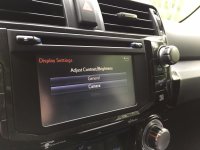
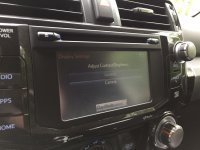
if you go to general > display, and the option to turn day mode is not present,
reduce your dimmer switch from the maximum setting and the option will appear on the screen.

then uncheck the day mode box, and it will work as everyone has described:

dimmer at maximum (click) - day mode; light background on navigation screen.

dimmer less than maximum; - night mode on GPS ; dark background on GPS screen.


here's the display screen with the dimmer at maximum, top photo,

the same screen with the dimmer reduced, bottom photo.
 

Attachments

  • IMG_3644.jpg
    IMG_3644.jpg
    123 KB · Views: 1,320
  • IMG_3645.jpg
    IMG_3645.jpg
    124.6 KB · Views: 1,150
other items,

seatbelt doesn't matter
engine does not have to be on, acc is fine
there is no correlation between day/night mode and any ambient light sensor.

Nobody screwed anything up on your nav, it's just a hard setting to find.
 
here's the scoop,

if you go to general > display, and the option to turn day mode is not present,
reduce your dimmer switch from the maximum setting and the option will appear on the screen.

then uncheck the day mode box, and it will work as everyone has described:

dimmer at maximum (click) - day mode; light background on navigation screen.

dimmer less than maximum; - night mode on GPS ; dark background on GPS screen.


here's the display screen with the dimmer at maximum, top photo,

the same screen with the dimmer reduced, bottom photo.


I get it, I really do the problem is there is no "Day mode" box even with the dimmer less than maximum. I know everybody is banging their head against the wall thinking I have the dimmer switch maxed out but I PROMISE you, that's not the case.

Thanks for the help. I need to swing by the dealer to pick up plates anyway, will schedule a service appt and report back.
 
Confirmed otw to work today, DAY MODE is not available as option unless headlights are on. No matter what the dimmer switch is set at. However, if selected setting will be saved as ON until disabled, which cannot be done with headlights off. So if it is on, unless you turn on the headlights, you can't turn it off.

Sent from my SM-G930V using Tapatalk
 
Last edited:
Did some more troubleshooting....

Pulled the radio/Nav screen out and confirmed all plug ins were at least physically connected. Nothing looked out of the ordinary but I know electrical issues can't always be discovered with eyesight alone.

Rechecked the fuses in the engine compartment and next to the drivers left leg. Sure enough, the 7.5amp "Panel" circuit fuse was blown. Quick trip to AutoZone for a replacement and I thought I would be good to go. Nope. After sacrificing a couple of fuses, I deducted that it is the turning on of the headlights that makes the fuse pop. My guess is that when the stealership installed the remote start, they messed something up behind the dash.

Sitting at the dealership now waiting for them to diagnose and repair.
 
Dealership witnessed the issue, took the dash apart, and (according to the service department manager) "jiggled" the wiring harness. With the dash apart and after jiggling the harness, they couldn't replicate the issue. They decided to drive around the parking lot and the gremlin came back.

They've since pulled the dash back apart and reassembled. This time, after driving around, the fuse doesn't pop. I can't be without a vehicle for the time being so I'm going to take her home as is. If I blow another fuse, I'll schedule another appointment.

This thing is still not solved for me...
 
here's the scoop,

if you go to general > display, and the option to turn day mode is not present,
reduce your dimmer switch from the maximum setting and the option will appear on the screen.

then uncheck the day mode box, and it will work as everyone has described:

dimmer at maximum (click) - day mode; light background on navigation screen.

dimmer less than maximum; - night mode on GPS ; dark background on GPS screen.


here's the display screen with the dimmer at maximum, top photo,

the same screen with the dimmer reduced, bottom photo.
Thank you! This was a huge help. Can't believe how much easier night driving is now!
 

Members online

No members online now.

Forum statistics

Threads
278,311
Messages
3,554,082
Members
248,016
Latest member
Advally Service

Trending content

Back
Top