OEM Looking 5th Gen NAV Info Thread

TOY2G

New member
I recently posted a thread about the Rosen NAV that looks OEM for the 5th gens.

I contacted 3 sources for the unit and all were unavail, and Rosen said they no longer make it.

I continued searching for options and decided to try the unit from Canada that is available on eBay... Seller here

This is the unit.


It shipped Wed, and I got it Friday from Canada. Remarkably fast shipping.
Here is a couple un-boxing pics.


First thoughts: looks well made, even the plastic feels and looks quality, no mold seepage, no bubbles, and as thick as the OEM. You can see in one picture the SD card slot on the right for the NAV and the SD slot on the left for media (supports up to 32gb)

So I had to run to the office at 2:00 AM so I thought why not just install the NAV. So I did and here are a couple "worth mentions" notes.

Side by side of the two units.
OEM


iGo


It is pretty well plug and play, with the exception of some of the extra features like additional inputs, and cameras.

There are three plugs that were not used with the basic install, I suspect 1 of them is for the In Console USB...(will confirm later) Here is the three plugs not used.


I am far from a stereo install master, and I can say with confidence, this was a very easy install. You have to remove your Flasher plug, OEM brackets, vents, black top filler, and a couple clips for your OEM setup to reuse, but that install of the NAV is 4 plugs + 2 antennas.

Here is what you reuse. Circled parts (arrows are just parts you remove)


There are other threads about how to remove your head unit so I won't mess with that part, or putting it back in. Install took less than an hour and so far so good. You do have to teach the nut your steering wheel controls (simple process where it learns the buttons you push) and you have to switch the KPH to MPH if you desire, but it comes ready to go.

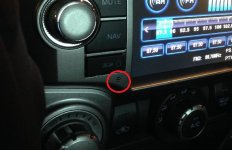
Here are some installed pics..the fit was perfect...looks OEM and the button color is even a nearly exact match orange (a little cooler).


I guess I did not take a picture of it with the lights on, but I will add more later as well as some thoughts on the unit operation.
 
Last edited:
Register to hide this ad
Looks really nice! Thanks for the rear pics! It is noticeably a larger display and looks good. Does it allow nav input while moving unlike the stock unit?
 
Looks really nice! Thanks for the rear pics! It is noticeably a larger display and looks good. Does it allow nav input while moving unlike the stock unit?


Yes, I was messing with the NAV locations, setting, backgrounds all while driving it home. There seems to be no lockout, just a stupid warning screen every time you switch to NAV or DVD

How is the sound quality compared to stock?

I'm not an audio guy, however my wife just used it for the first time to go get lunch and she says she cannot tell the difference. BUT, I put the presets back in and inside of my garage, one if the channels was a little fuzzy. I forgot to ask her if the old radio did the same, but I forgot and she is out and about again.

Yeah that always irked me.

What's that?


Note:

I spent some more time with it this morning, so far I have only one big gripe. The USB plugs (OEM) no longer work. I assume it's one of the three discount tend wires. The unit did come with a plug in USB adapter, and it has 5 matching color wires to the small whit plug that I left unused. I suspect I will be able to simply wire that USB cable back into my stock plugs (when I install the backup camera ( on order)


I have not figured out how to change the startup picture yet, and the Camry knobs bother me a little, but not as bad as I thought it would.


I will ad more information as I learn new things, but feel free to ask question before you go and drop $900 on one for yourself, I will try to be accommodating.

If I end up liking this thing enough to recommend it, they seller said he would be willing to work a deal on a group buy of 5 or more. But that's putting the cart before the horse, time will tell.
 
I've actually been eying this unit for a few years. Thanks for your posts -- I think you're the first person to get one!

How are bluetooth calls on this thing? My stock radio / bluetooth calls are great. I don't care about phonebook storage, etc. Just the call quality itself... mainly if the other end of the call can hear you well. Does it use the factory microphone or are those 3 openeings on the lower left side a built in mic?


Thanks!
 

Attachments

  • Capture.JPG
    Capture.JPG
    48.6 KB · Views: 4,068
I've actually been eying this unit for a few years. Thanks for your posts -- I think you're the first person to get one!

How are bluetooth calls on this thing? My stock radio / bluetooth calls are great. I don't care about phonebook storage, etc. Just the call quality itself... mainly if the other end of the call can hear you well. Does it use the factory microphone or are those 3 openeings on the lower left side a built in mic?


Thanks!

That is the mic in the pic. I don't think the quality is as good as the factory hands free. My wife called me from the truck and I could hear her fine but she said I sounded quite. I will make a couple more calls to see how well it works.
 
Fist problem to report, two actually.

#1. Every time you do something like use NAV, use phone, or switch to backup camera, the system defaults back to the radio even if you were listening to your iPhone, it jumps back to radio. There may be a setting for this, I just have not found it yet

#2. The hands free volume and the music volume are not the same.. They are the same dial, but when you take a call it is much quieter, so you crank the volume to hear the call (witch seems to be working just fine BTW) but when you end the call, the music is ear shattering.

As mentioned above, I am not a car stereo guy, and there may be a solution to these issues, but so far I have not found one.

FWIW, everything else seems to be great, nave is good, hands free is good, steering wheel control is good, sound quality is good, and the reception is the same as before (confirmed with wife).
 
Sorry if I'm being dense here but what does this give you that the OEM JBL system does not?

Touch screen, navigation, video output (for monitors in my headrest), backup camera, on screen Caller ID with redial (last 5 calls), AUX input, and an extra 13.4 MPG.....:becky:

Its not all fun and games...

-You loose the USB in the center console... I'm working on a fix
-You loose Party Mode
-Phone and NAV volume does not go through the amp, so you have to change the volume every time you take a call or use the NAV.
-Knobs look like they belong in a Camry not a T4R
-No way to change start-up screen to "TOYOTY" logo
 
Where did you mount the GPS antenna? Would you swap it out if you had to do it all over again?

The GPS antenna was the easy part. There is a tiny dash plug in the very center if your dash near the windshield. The antenna cord fishes down to the head unit and the antenna sits in the center of the dash against the windshield, it's not even really noticeable, inside or out.

All things said and done.... Yea I would do it again. Here is why:
Pros.
-it's affordable
-it is truly plug and play (about an hour install)
-the Quality and fit is high
-user interface is pretty simple
-the software used has been used for many years
-it looks nicer (IMO)
-you keep steering wheel control
-it sounds great
-you gain two inputs (AUX & Micro SD)

Cons.
-you loose party mode
-you loose your USB outlet (the unit comes with one)
-you loose voice command
-you cannot play DVDs on the main screen
-the knobs do not match the HVAC
-the phone and NAV volume is not as loud as the music
 
The GPS antenna was the easy part. There is a tiny dash plug in the very center if your dash near the windshield. The antenna cord fishes down to the head unit and the antenna sits in the center of the dash against the windshield, it's not even really noticeable, inside or out.

All things said and done.... Yea I would do it again. Here is why:
Pros.
-it's affordable
-it is truly plug and play (about an hour install)
-the Quality and fit is high
-user interface is pretty simple
-the software used has been used for many years
-it looks nicer (IMO)
-you keep steering wheel control
-it sounds great
-you gain two inputs (AUX & Micro SD)

Cons.
-you loose party mode
-you loose your USB outlet (the unit comes with one)
-you loose voice command
-you cannot play DVDs on the main screen
-the knobs do not match the HVAC
-the phone and NAV volume is not as loud as the music
i'd add another...

Con
-UI is even more dated than OEM unit.

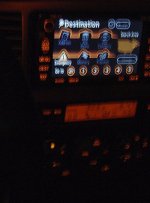
in fact, this UI basically apes the Nav in the 4th Gen 4Runner (Toyota Gen 5 Navigation). hat tip to [MENTION=15785]J.A.[/MENTION] for the fuzzy photo á la [MENTION=65614]Antman[/MENTION]
 

Attachments

  • image.jpg
    image.jpg
    44 KB · Views: 3,387
i'd add another...

Con
-UI is even more dated than OEM unit.

in fact, this UI basically apes the Nav in the 4th Gen 4Runner (Toyota Gen 5 Navigation). hat tip to [MENTION=15785]J.A.[/MENTION] for the fuzzy photo á la [MENTION=65614]Antman[/MENTION]


I'm not sure i can agree with you on this one, the software and majority of the hardware is the OE for several manufactures including Chrystler. That said all i have to base it against in my Pioneer AVIC-N3 from my sequoia and the AVIC-D3 from my tacoma. this Canadian unit is far better than the Pioneer (I do know that the pioneer models I mentioned are a couple years old).. i can tell you it looks nothing like the pic above, with the silly clip art logos and numeric touch pad.

i will take some video and post it up ASAP, because I am not a good judge of the all things car audio. and I want everyone to have as much information as i can possibly provide.
 
Tanks for posting info on this one. I have been looking at this unit for a while, but had not seen anyone with it yet. Looks pretty good to me and keeping the steering wheel controls is a major plus. I just wish it was not $800!
 
Tanks for posting info on this one. I have been looking at this unit for a while, but had not seen anyone with it yet. Looks pretty good to me and keeping the steering wheel controls is a major plus. I just wish it was not $800!

It's not $800.... It's $840..... :whistle:

I think I have figured out how to get my USB back..

The DVD and SD now play video and images on the main unit (got a little help from the manufacture)

HOWEVER..
The radio does seem a little more fuzzy than normal on one or two of my presets.

And... The NAV has quit working ( it works, it just will not find a satellite).

Waiting to hear back from the manufacture on this little snafu
 
I had a oem style with my lexus before. The brand was fly audio. Worked really good for many years till one cold night I turned on the car to move it and the touch screen just froze and never worked again. Granted I did buy it used but it's still a good solution to oem and it's plug and play. Good find! I was looking at these before I did my app radio 3 but couldn't find the seller info.
 
Just an update.

One of my rather small complaints with this unit was the Camry knobs on the nave...well..

I was messing around with my TE head unit, and I realized that the TE NAV knobs fit my aftermarket NAV. So a quick search gave me part number 90010-26010 for a whopping $1.96 each. Shipped for the pair was < $6.

Anyway, there was no modification to be made, just pull off the Camry knobs and slide on the T4R knobs.

Here is a before
71565ac2ba28951629c9bb2558bfa802_zps9de9403d.jpg~original


And here is an after.

5ff2f1bcd6000635d5b53acea8642892_zpsdacceb52.jpg~original


I could have gotten the pair for less than $4 had I went to the dealer, but the couple bucks was worth my time.


In the end, all the knobs match now, and most people would be hard pressed to figure out the NAV was not stock.
 

Members online

Forum statistics

Threads
278,309
Messages
3,554,069
Members
248,016
Latest member
Advally Service

Trending content

Back
Top