Picking up my babay today

Bay33saw

New member
Picking up my baby tomorrow

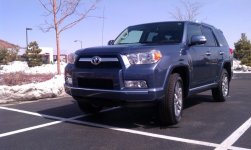
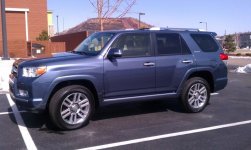
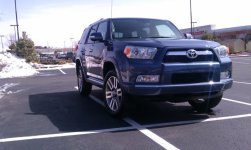
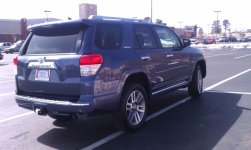
OK I have been on this blog for about two months now, have been in touch with some cool people, learned some cool stuff and now the day has arrived. Yes tomorrow (Wednesday 29th 2012) I will be driving from Las Vegas NV to Flagstaff AZ to pick up my new 2012 LE in Shoreline blue, best part about it is I will be all by myself on the drive home so I can play with all the buttons and gadgets.
I'll stop on the way home to take pictures and hopefully post them on here tomorrow.
Yipee I am no longer a 4runner Virgin.
 
Register to hide this ad
OK I have been on this blog for about two months now, have been in touch with some cool people, learned some cool stuff and now the day has arrived. Yes tomorrow (Wednesday 29th 2012) I will be driving from Las Vegas NV to Flagstaff AZ to pick up my new 2012 LE in Shoreline blue, best part about it is I will be all by myself on the drive home so I can play with all the buttons and gadgets.
I'll stop on the way home to take pictures and hopefully post them on here tomorrow.
Yipee I am no longer a 4runner Virgin.

Congrats!
 
Congrats! Its about time. Got your mod list started. And I'm sure the dog(s) will like it. If you let them in it.
Extra bonus you're going to Flagstaff
 
Congrats! Shoreline Blue was my first choice, but I settled for Black. I've had mine since Friday and absolutely love it so far.

The MPG is a little less than I expected, but it's only got 400 miles on it AND I installed 275/55/20 size tires.
 
Welcome and congrats. Keep in mind, since you are purchasing on leap year day, your warranty will last 4 times longer in time, (not miles)...:hatsoff:
 
Welcome and congrats. Keep in mind, since you are purchasing on leap year day, your warranty will last 4 times longer in time, (not miles)...:hatsoff:

I am also picking mine up today. Black/black limited. I also have the XD Addicts waiting with the 275/55/20 terra grapplers.
 
Congrats! Enjoy the new car smell!! Don't forget to bluetooth pair your phones so you can start enjoying from streaming music (iPhone/Android users) and hands-free chatting before you start moving.....stupid Toyota safety measures won't let you do it while moving.
 
http://i14.photobucket.com/albums/a324/moistmaster/IMAG0415.jpg

Damn I'll have to figure out how to post them here instead of linking them here, Nice ride back from Flagstaff though, averaged 19MPG and that's with the tires at 42psi. I forgot to check them at the dealership.

Here are some instructions for posting your photos that you already have stored on your computer instead of linking....

You already know how to post a written message, so start from there.

From the screen where you type a message, scroll lower and you will see a button, "manage attachments".

Left click on that button and a pop up will appear. At the top there will be two choices, "Upload a file from your computer" and "Upload a file from a URL". If the photo you are trying to post is already on your computer, hit "Browse" . Another pop-up will appear, "normal window's browse ", find the file you want to up load, highlight it, then hit open. Then go back to the manage attachments screen and click on "upload". The file address will then appear below the URL input window. The photo or whatever, is now uploaded to your pending post.

Note, if the photo you are tying to upload too large, or corrupted, or in a format not recognized by this program, it will not post. A message will appear just above the file address in the manage attachment pop up. If too large, remove the original attempt, resize your photo on your computer, then re upload small photo again. A list of acceptable file formats appears on the manage your attachment pop up, attachment "key".

If your photo is coming from an internet photo program, just type in the URL of the photo in the second box and go from there.

I would then suggest you hit the "Preview Post" button, found just next to the submit reply button just below where you type your written message. That way you can determine if your upload is there, make corrections etc. Then hit the Submit Reply button.

Good luck and be safe.
 
Here are some instructions for posting your photos that you already have stored on your computer instead of linking....

You already know how to post a written message, so start from there.

From the screen where you type a message, scroll lower and you will see a button, "manage attachments".

Left click on that button and a pop up will appear. At the top there will be two choices, "Upload a file from your computer" and "Upload a file from a URL". If the photo you are trying to post is already on your computer, hit "Browse" . Another pop-up will appear, "normal window's browse ", find the file you want to up load, highlight it, then hit open. Then go back to the manage attachments screen and click on "upload". The file address will then appear below the URL input window. The photo or whatever, is now uploaded to your pending post.

Note, if the photo you are tying to upload too large, or corrupted, or in a format not recognized by this program, it will not post. A message will appear just above the file address in the manage attachment pop up. If too large, remove the original attempt, resize your photo on your computer, then re upload small photo again. A list of acceptable file formats appears on the manage your attachment pop up, attachment "key".

If your photo is coming from an internet photo program, just type in the URL of the photo in the second box and go from there.

I would then suggest you hit the "Preview Post" button, found just next to the submit reply button just below where you type your written message. That way you can determine if your upload is there, make corrections etc. Then hit the Submit Reply button.

Good luck and be safe.

Gracias?:hatsoff:
 
Here we go I hope, I like the last one as it came with a cool sticker
 

Attachments

  • Toyo.jpg
    Toyo.jpg
    55.2 KB · Views: 377
  • Toyo 2.jpg
    Toyo 2.jpg
    55.4 KB · Views: 380
  • Toya 3.jpg
    Toya 3.jpg
    51.8 KB · Views: 376
  • Toyo4.jpg
    Toyo4.jpg
    132.2 KB · Views: 381
  • Toyo5.jpg
    Toyo5.jpg
    108.8 KB · Views: 378
LOL. You got your Zombie sticker on there already!!! I'm mulling over the round one that says Zombie Response Team.
 

Members online

Forum statistics

Threads
278,309
Messages
3,554,075
Members
248,016
Latest member
Advally Service

Trending content

Back
Top