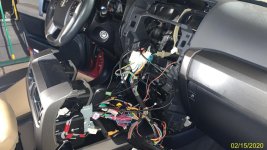
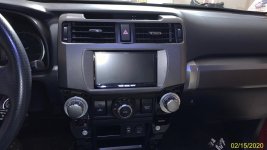
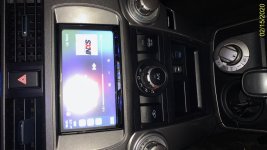
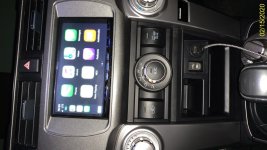
Pioneer NEX install in ‘12 Limited

[MENTION=43936]zcruiser[/MENTION], thanks for the reply. I also wonder about the vehicle speed sensor wire. When I read the Crutchfield info it says thinks like "with vehicle stopped and parking brake engaged....".

Has anyone experience with how to bypass these safety features so I can screen mirror while driving?
 
[MENTION=43936]zcruiser[/MENTION], thanks for the reply. I also wonder about the vehicle speed sensor wire. When I read the Crutchfield info it says thinks like "with vehicle stopped and parking brake engaged....".

Has anyone experience with how to bypass these safety features so I can screen mirror while driving?
If you don't hook up the speed sensing wire, it would think you are stopped. Not sure what other functions that would mess up, however.

You could put a switch inline with the speed sensor wire. Flip it on (closed) when you want the signal to reach the HU, flip it off (open) when you want to fool the HU into thinking you're stopped.
 
This post may be too old for the OP to see, but does anyhow have experience with these Pioneer head units and the required parking break wire for entering certain address searches of other features such as screen mirroring? I am wondering if it is an easy thing to bypass. I think it would be cool to be able to screen mirror when using Gaia navigation on 4WD trails and then you wouldnt really need an iPad to see where you are going. The little telephone screen is too small really, and an iPad works great but screen mirror would be nice.

Well if I understand your question correctly, the bypass is easy. Just ground the parking brake wire out of the HU and you are GTG. Another trick is to override via the HU functions, see : YouTube

I did both just to be sure all functions are unlocked. Also, screen mirroring while driving works like a champ on the 8500. :)


.

.
 
Well if I understand your question correctly, the bypass is easy. Just ground the parking brake wire out of the HU and you are GTG. Another trick is to override via the HU functions, see : YouTube

I did both just to be sure all functions are unlocked. Also, screen mirroring while driving works like a champ on the 8500. :)
.

Wow, that's a pretty sweet trick! Will have to try it on my 6500...

ETA: It works! I did have to press all the way in the lower-left corner vs 1/2" up and 1/2" over. I was disappointed at first until I moved my press all the way into the corner.
 
Last edited:
Well if I understand your question correctly, the bypass is easy. Just ground the parking brake wire out of the HU and you are GTG. Another trick is to override via the HU functions, see : YouTube

I did both just to be sure all functions are unlocked. Also, screen mirroring while driving works like a champ on the 8500. :)

Wow, that's a pretty sweet trick! Will have to try it on my 6500...

ETA: It works! I did have to press all the way in the lower-left corner vs 1/2" up and 1/2" over. I was disappointed at first until I moved my press all the way into the corner.

Great info in this thread. Getting ready to install the 8500nex myself with the help of the info here. To confirm/clarify the brake bypass - will the override trick via the HU functions reference above still work if you still had the green parking brake wire from the t02 harness connected to the HU harness from above wiring diagram (green to green), OR do you still need to ground the green wire from the HU and not connect the green wire from the t02 harness? If you still need to ground the green from the HU, can ground it by attaching that to the black ground lead from the HU, and then to the to2 black ground or do you need to physically ground it to some metal? thanks in advance.

 
Great info in this thread. Getting ready to install the 8500nex myself with the help of the info here. To confirm/clarify the brake bypass - will the override trick via the HU functions reference above still work if you still had the green parking brake wire from the t02 harness connected to the HU harness from above wiring diagram (green to green), OR do you still need to ground the green wire from the HU and not connect the green wire from the t02 harness? If you still need to ground the green from the HU, can ground it by attaching that to the black ground lead from the HU, and then to the to2 black ground or do you need to physically ground it to some metal? thanks in advance.

I wired green to green for parking brake and the override works as described.

Otherwise, if you so choose, ground is ground whether you hook to black or some piece of metal that is sufficiently connected to the vehicle chassis.
 
Here's the metallic silver that I used, may be a touch sparkly but it's not bad....
049568e79d4353324d70f00bda1ffda0.jpg
 
great info in this thread. was able to do my first ever install with the help here, other threads and youtube. Had to look at the 1000 wires in the harness, wiring diagram about 50 times, but got it. I got the newer maestro rr2, although not sure what future benefits it would provide me - couldn't find much info on how to use/program the three new options, and I didn't use bluetooth to flash. If anyone has further info on the RR2 other than the one youtube video, feel free to share.

I also took out the 12v lighter and replaced it with a USB / HDMI input on the center stack. Might reroute the 12 v socket to the glove box later. I added the siriusxm, although not activated now. Had to change a few things and re-flashed it. I also ran a usb like zcruiser to the glove box to flash. Learned the hard way and figured out you have to take out the radio fuse in order to flash it once installed since there can't be power to the rr in order for the laptop to recognize it. Zcruiser - thanks for the recommendation on the paint. Looks more sparkly in the photos than it really is - i like the color. again, awesome info and thread - when I first saw all the wires when initially researched the install and didn't know too much about maestro and idatalink either - i thought no way....... Had a heck of a time to get the rr2, sirius tuner, and the bundle of wires shoved back in there.
 

Attachments

  • IMG_6838.jpg
    IMG_6838.jpg
    137.5 KB · Views: 1
  • IMG_6839.jpg
    IMG_6839.jpg
    131.7 KB · Views: 1
  • IMG_6840.jpg
    IMG_6840.jpg
    136 KB · Views: 1
  • IMG_6842.jpg
    IMG_6842.jpg
    137.6 KB · Views: 1
Last edited:
[MENTION=43936]zcruiser[/MENTION] and others,

I installed the 8500NEX but cannot get my Android S9 to properly do the bluetooth pairing thing. It says "paired" but then quickly disconnects. I tried everything including firmware update on the new HU and doing unpair and repair and app permissions and everything else I can think of.

I am wondering if the stupid e-brake green wire thing is wrong and the pairing wont work because I'm not safely parked. What exactly did you guys do with the long green e-brake wire that is supposed to go to the "power" side of the e-brake (as per 8500NEX installation schematic). Its kind of confusing with TO2 harness saying for light/green to connect to HU harness, yet the HU harness has a long wire and says to connect to parking brake.

What is the long green wire supposed to go to when you also have a TO2 harness?

Anyone have any clarity on this ebrake wire?
 
[MENTION=43936]zcruiser[/MENTION] and others,

I installed the 8500NEX but cannot get my Android S9 to properly do the bluetooth pairing thing. It says "paired" but then quickly disconnects. I tried everything including firmware update on the new HU and doing unpair and repair and app permissions and everything else I can think of.

I am wondering if the stupid e-brake green wire thing is wrong and the pairing wont work because I'm not safely parked. What exactly did you guys do with the long green e-brake wire that is supposed to go to the "power" side of the e-brake (as per 8500NEX installation schematic). Its kind of confusing with TO2 harness saying for light/green to connect to HU harness, yet the HU harness has a long wire and says to connect to parking brake.

What is the long green wire supposed to go to when you also have a TO2 harness?

Anyone have any clarity on this ebrake wire?

Are you using or have setup Android Auto? Dont't have that head unit, but I believe if you have setup Android Auto, you may need to forget and set the connections again to use standalone bluetooth. Please see this: https://www.youtube.com/watch?v=h6lYGMGAev4&feature=youtu.be&t=159
 
I have not been able to fully complete the pairing process. I cant figure out if there is some special procedure, i.e. must do bluetooth then do xy before zz.

Only thing I can try is to unground the light green ebrake wire since that is the only questionable wire connection and maybe that is screwing with the safety must be pulled over before you can perform a phone setup process.

Crutchfield is totally supportive and have offered to exchange the head unit in case of defective or to simply return it. Great customer service.
 
I have not been able to fully complete the pairing process. I cant figure out if there is some special procedure, i.e. must do bluetooth then do xy before zz.

Only thing I can try is to unground the light green ebrake wire since that is the only questionable wire connection and maybe that is screwing with the safety must be pulled over before you can perform a phone setup process.

Crutchfield is totally supportive and have offered to exchange the head unit in case of defective or to simply return it. Great customer service.

If you connect the light green from the Pioneer to the ebrake wire in the T02 harness, I believe it passes the e-brake signal that the OEM head unit used to lock itself when moving. No harm in connecting it and properly putting the ebrake to test it. You can also connect it to vehicle (frame) ground or the harness ground, but I would not leave the light green open wire.
 
Last edited:

Members online

Forum statistics

Threads
278,316
Messages
3,554,120
Members
248,016
Latest member
Advally Service

Trending content

Back
Top